 56
56Work Out
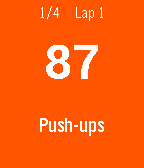
Health & FitnessA work out timer. Work out for 90 seconds, rest for 30 seconds. Repeat. Vibrations every 30 seconds. Customize your own workout routines and times.
 56
56Expense Tracker
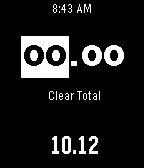
Tools & UtilitiesKeep tack of money you've spent. Don't overspend on your budget. Great for adding quick amounts to see how much you're spending out and about or in any budgeting category. Hold the middle button to Save an amount. Hold the middle button on "Clear Total" to reset the overall total. Undo the last amount you've added or the total you cleared. You should know where your money is going
 56
56Heart Rate Checker
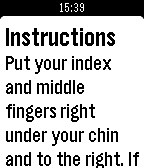
Tools & UtilitiesYour battery will be very sad if you leave this app on for a long time. If you like this app, give it a heart! A simple heart-rate checker for your pebble! Are you ever sad because the pebble can't track your heart rate? Well, problem solved! Put your index and middle fingers right under your chin and to the right. If you are not moving, you'll feel beating. That's your heart rate. While you're doing this, hit select on the app, then start counting the beats. Once you count 10 beats, immediately hit select again. You'll then get your heart rate!
 56
56Blackjack
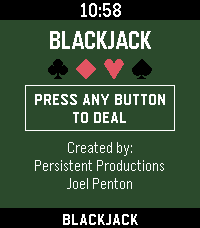
GamesBlackjack for Pebble Classic player vs. dealer, single 52 card deck, no betting Designed for Pebble 2 Duo Open source code — github.com/Joel256/Pebble-Blackjack Made by: Persistent Productions - Joel Penton
 56
56simple altmeter
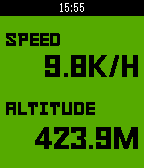
Health & Fitnesssimple app that display altitude and speed by web access.
 56
56TYLT Vu Pulse
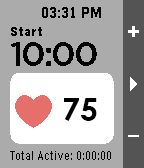
Health & FitnessThis is the companion app to the TYLT Vu Pulse for Pebble Time and Time Steel. Seamlessly integrating Heart Rate and Wireless charging for your Pebble! ** TYLT Vu Pulse “Smartstrap” is required for this app to perform Heart Rate functionality.
 56
56Pebblsky
DailyBrowse your pinned feeds and stay up to date with what people are talking about with the latest trending topics from Bluesky. Support my work https://ko-fi.com/lamasters Thanks to denden1088 in the rebble discord for the banner!
 56
56KOERS
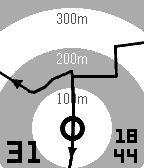
Health & FitnessExplore new roads with your Pebble: select a GPS route on your phone and start riding. Quickly select existing routes nearby, routes and segments from you and your friends on Strava. Or import a route in GPX or TCX from your favourite route builder. Features: - Course navigation on Pebble: show current location on your route. - Show distance and direction to route when not on screen. - Map rotation based on heading (default) or device orientation. - Offline import of GPX and TCX files. iOS only - Search for existing routes nearby you. - Connect with Strava to select routes, activities and segments. - Show current speed and time. - Turn backlight always on. You can try KOERS for free while in beta. KOERS has proven its practice for me on the bike, let me know if you find it useful during your activities.
 56
56Helios
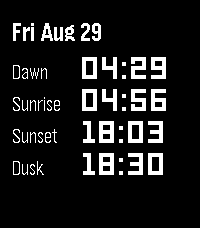
DailyHelios puts the sun’s daily milestones on your wrist: Dawn, Sunrise, Sunset, and Dusk. Navigate forward and backwards in time with the up and down buttons, then return to present day with the select button. Helios processes everything on the phone using the SunCalc Javascript library. No external servers required!
 56
56PebbleRail
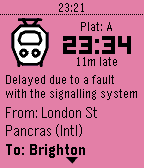
DailyView live UK train times from your Pebble! Features: * View departures from nearby stations * See upcoming and previous stops * Pin departure/arrival to the timeline Timeline icons by LCP Powered by National Rail Enquiries
 56
56POD - Pebble Of Doom
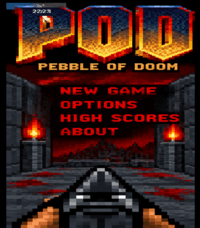
GamesA re-imagine of Doom for (Emery) Pebble Time 2 and (Gabbro) Round 2..... 5 levels with a boss at the end, make sure to conserve ammo 😉 Seeing this run on a pebble is a delight to me personally. Active ongoing tweaking is being made, but in the meantime, Enjoy! Acknowledgements: Brick wall texture courtesy of: https://opengameart.org/users/alpharats Everything else was free textures / sprites or modified by me that did not require or ask for a source of approval or credit.
 56
56HTTP Request
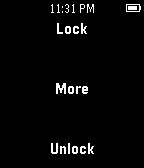
RemotesThe first HTTP Request that is cross platform and doesn't require a companion app. Has eight possible different addresses, two of which are quickly accessible with six in the "More" menu. All eight can have any label. Also includes a timeout option in seconds to auto close the app. Leave blank in settings to never auto close.
 55
55mario speed run
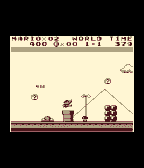
GamesMario speed run (Proof of concept) give it a ❤ if you like
 55
55Liquid
GamesMove Liquid on your Pebble!
 55
55Running Coach
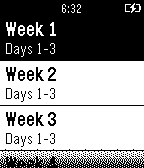
Health & FitnessA running app that provides users with timers for each workout of the C25K and B210K running programs. A buzz will alert you about the end of a running or walking interval and you will also be able to pause or switch the current interval. The app also allows you to tell the watch to vibrate at an interval of your choice (e.g. 5 minutes) - useful for running, meditating, and cooking steaks.