 43
43Chord Chart
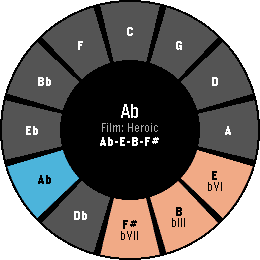
Tools & UtilitiesI'm trying to teach myself how to improvise on the piano. I often find myself needing to pull up the circle of fifths or search for progressions. Having all of this on my wrist helps me iterate through things quickly. With the upcoming shipment of the Pebble Round 2, the circle of fifths naturally fits that display. The interface is designed for the Round 2 but works on other hardware as well. The main interface is built around quick progressions and their geometry on the circle of fifths. Users can cycle through a library of common progressions and try them out in any standard key signature. The app also includes a "key finder" to help novices like myself interpret what notes fit into which key signatures. Eventually, I'd love to make this more interactive and let musicians build and store their own progressions. Controls - UP/DOWN: Transpose Key - SELECT: Flip through the current genre of pre-built progressions - Hold SELECT: Browse all genres - Hold DOWN: Open Key Finder
 43
43Patch
DailyHarness the power of iOS Automations to send text messages (including iMessages) from your Pebble! No server required. Patch uses Outlook (yes, Outlook!) to send an email to yourself, which triggers an Apple Shortcuts automation to intercept the notification and send the text message. The whole process takes less than ten seconds and requires no intervention after you hit send on the Pebble. You can also assign emojis to contacts, and program up to 10 canned messages. This app only works if you properly configure the automation on your phone. Be sure to carefully follow the setup guide in the app settings. Official text response functionality on iOS should be coming soon to the EU as a result of Article 6(7) of the Digital Markets Act.
 43
43Thinking of You
NotificationsSmall little app for making your long distance partner feel not so far away. Send a little ping to let them know you're thinking of them. REQUIRES THE WATCHFACE FOR FULL FUNCTIONALITY! (I can integrate it on others later if wanted) Watchfaces available: Kickstart + Thinking of You https://apps.repebble.com/56a8c37365b34e9f90165a97 Pokétch+ Thinking of You https://apps.repebble.com/09a2026106124b0fa22a2cb2
 43
43Hacker News Reader
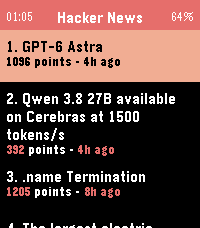
DailyBrowse Hacker News and read full articles directly on your wrist. The app fetches the top stories from Hacker News, with more available at the tap of a button, and lets you read the full article content by scrolling with the Up/Down buttons or your finger on the touchscreen. Press Select to switch between light and dark themes, and Back to return to the story list. Requires a phone connection to fetch content.
 43
43Color View Sample
Tools & UtilitiesThis app is intended for development purposes. It allows you to view and check the 64 colors available on color-capable Pebble devices (currently only “Pebble Time” and “Pebble Time Round” are supported). This App is free. There are no additional charges. If you'd like to make a donation, please use the link below: https://square.link/u/R4JNLUWs (Explanation in Japanese follows) 開発のためのアプリとなります。 カラー対応のPebble(現在のところ、"Pebble Time"、"Pebble Time Round"のみ対応)で利用可能な64色を一覧表示したり、確認できます。 本アプリは無料です。特に追加料金も不要です。もし寄付したくなったら下記リンクからお願いします https://square.link/u/R4JNLUWs
 43
43Game Dice
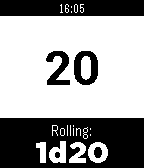
GamesGame Dice is a polyhedral dice roller for those who play table top role playing games, board games, or even people who have trouble making decisions. It will roll dice in all the common polyhedral flavors (d3, d4, d6, d8, d10, d12, d20, and d100), and of any quantity (as long as "any quantity" means 99 or less). Buttons: Up - "Quick Die" roll Select - Choose dice Down - Normal roll
 43
43iUnlockYourMind Pro
Tools & UtilitiesThis is a companion app for the mentalism App iUnlockYourMind Pro. The pebble app allow the user to use the pebble watch as a secret peek device and also as a secret input device. Please Check www.appstore.com/iUnlockYourMind for more details.
 43
43food baby
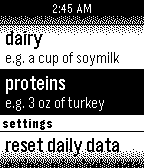
Health & FitnessPart-nutritionist, part-digital pet, Food Baby's goal is to motivate healthy dietary choices through the raising of a virtual pet. As such, your healthy habits translate to both your well-being and your pet's happiness. Logging your food intake into major food categories "feeds" the pet. The pet provides recommendations for what to eat next to maintain a balanced diet. XDA Challenge entry.
 43
43Mirror v1.0
Tools & UtilitiesSimply a black screen.
 43
43PoolCounter
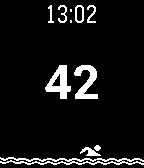
Health & FitnessApplication for those who swim in the pool and wants to know how far managed to swim for exercise. Swim one lap, press any button once to the right(Up, Down, Select) to increase the lap counter by 1. Hold the "Select" button to reset the counter. + Vibration when you + The counter is saved when you exit the application + The man floats! Приложение для тех, кто плавает в бассейне и хочет знать, какое расстояние удалось проплыть за тренировку. Проплыв один круг, нажмите однократно любую кнопку справа, чтобы увеличить счетчик кругов на 1. Удерживайте центральную кнопку для сброса счетчика. +Вибрация при нажатии +Счетчик сохраняется при выходе из приложения +Человечек плавает!
 43
43Azimuth
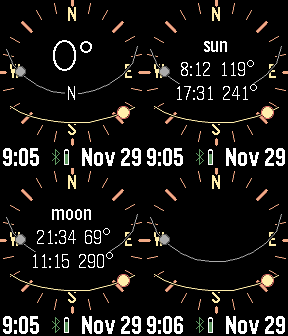
Tools & UtilitiesPlan for the perfect camera shot. This app calculates and displays the sun and moon path against a compass. Tap or press buttons for rise and set times. Many custom options, including backlight, moon positions, screen inversion, battery, connection, and vibration alerts.
 42
42Just Weather
DailyJust Weather displays a weather icon (created by dakirby309) and the temperature in Fahrenheit only from openweathermap.org, updated every 15 mins using your GPS coordinates. When I had a OG Pebble, I had two watch faces I used one had the weather and the other had battery status. With Pebble Time it is more involved to change watch faces... I created the watch app so I could make it a quick launch app by holding down the past or future buttons.
 42
42Tokyo Metro
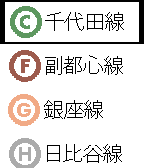
Tools & UtilitiesBrowse station names listed in each subway lines. This app needs Japanese Language pack ( http://wh.to/pebble/index_jp.html ) 上記の日本語言語パックがインストールしてあることを前提です。そうしてないと駅名が文字化けします。Ver1.4でPebble timeに対応して、路線がカラー表示になりました。
 42
42Task Flow
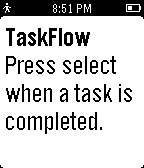
Tools & UtilitiesTask Flow is a minimalist task manager that helps you focus on what to do next. Add tasks on the configuration page in the order you want to complete them. When you finish a task, press select to mark it done.
 42
42Grosh for Pebble
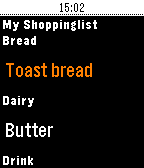
Tools & UtilitiesTry grocery shopping with your Pebble, it's perfect for keeping your hands free when you're shopping and speeds up the proces - and minimises the risk of dropping your phone! Grosh is the first commercial grocery app that adds Pebble support. Grosh is like no other grocery shopping app you have seen, it comes with intelligent suggestions and orders your list according the the store layout. How to get started: 1) Download the normal Grosh app on your phone (iOS, Android or web version) to get a FREE account that your watch app can connect to. Use the normal Grosh app to update and share your list before shopping. 2) Download Grosh for Pebble 3) Enter your Grosh account credentials by hitting the settings icon next to Grosh in your list of Pebble apps 4) Launch Grosh for Pebble. The list will be sorted, if your're in a store according to the layout. 5) Click the select button to mark items as purchased. 6) Shake the watch to check for updates to list, eg if partner added something to the list after you left home. 7) Long press select button to change list or modify quantity (set to 0 to delete item) 8) Use ""+ Add item"" to dictate a new item (requires microphone), including quantity eg. 5 milk Grosh supports stores in 31 countries and 18 languages. Grosh is built by a small team dedicated to bring you the best shopping app ever. We publish frequent free updates and would love your feedback. Get in touch via our homepage groshapp.com, our Facebook and Google+ pages called Groshapp or tweet us @groshapp.