 66
Find My Phone
Tools & UtilitiesLost your phone? Pick Find My Phone in your watch's launcher and hit select to start ringing your phone
 1
Talk 2 Agent
Tools & UtilitiesTalk to your AI agent, right from your wrist. Open the app and speak. Your words are transcribed on the watch and sent straight to your agent. No phone in your hand, no typing — just talk. Features: • Works with the Muse, ChatGPT, Claude, and Grok Bot plugins — or a custom plugin UUID and action • Built-in transcription: no server needed, the text goes directly to your agent • External mode: send audio to your own transcription endpoint and forward the result • Starts automatically on launch and closes after a successful send • Optional chat ID to target a specific conversation Designed for Pebble Time 2. The Plugins preview must be enabled in the Pebble phone app (Settings → Plugins), and the destination plugin must be installed and signed in on your phone. Replies arrive through the agent service's own notifications, not inside this app. Privacy: Talk 2 Agent has no server of its own and collects nothing. In built-in mode, your speech is transcribed by the platform dictation service and the text is passed only to the plugin you selected. In external mode, audio is sent only to the URL you configure.
 56
Timeline WX
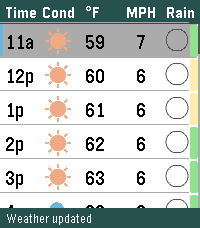
DailyYour next 48 hours, visualized. Built specifically to push the limits of the Pebble Time 2's high-resolution display. Whether you're coordinating a Scout campout, dialing in your morning commute, or tracking incoming storms, Timeline WX delivers precision meteorological data at a glance, with no squinting required. Instead of static daily summaries, smoothly scroll through a continuous 48-hour timeline. We have stripped away cluttered text and replaced it with clean, data-driven visual indicators so you can assess your environment instantly. THE ARCHITECTURE Instant Offline Resume: Your timeline is cached directly to the watch's flash memory. Launch the app and see your forecast instantly, even if your phone is disconnected. Auto-Pruning Timeline: The watch continuously syncs with the hardware clock to automatically hide past hours, ensuring your scroll always starts exactly at "Now." Ultra-Battery Optimized: Completely rewritten to run natively on the Pebble OS background clock, reducing battery drain by up to 98 percent. FREEDOM OF WEATHER DATA (NO API KEY REQUIRED) You are no longer locked into a single weather provider. Timeline WX now features an internal translation engine, allowing you to seamlessly swap between four world-class meteorological APIs directly from the settings menu. Choose the provider that works best for your specific geographic location: Open-Meteo is the default option. It is great for global use and requires no API key, though it relies on broader aggregated models. The National Weather Service (NWS) is highly accurate for US locations using regional grid data, but it is restricted to the US and lacks UV Index data. Yr.no / Met.no provides world-class precision MEPS modeling for European and Nordic locations, but also lacks UV Index data. OpenWeather OneCall 3.0 provides complete global data including the UV Index, but requires registering for a personal API key. (Note: If a selected provider does not support UV data, the UV safety bar will gracefully hide itself rather than displaying false information). SMART ENVIRONMENTAL WARNINGS Stop reading numbers and start seeing conditions. Timeline WX actively processes combinations of temperature, wind speed, UV, and humidity to color-code threats. Dynamic Hazard Badges: A colored badge sits directly behind the weather icon based on a custom algorithm. Yellow means uncomfortable (muggy, hot, or cold). Orange means a warning (high winds, severe UV, or approaching storms). Red means dangerous (extreme temperatures or severe weather). Temperature Alerts: Values turn Red when blistering hot (90F or higher) and Blue when freezing (32F and below). High Wind Warnings: Wind speeds turn Orange when gusts exceed 20 MPH, which is perfect for knowing when to tie down the tent fly. Midnight Dividers: High-contrast double lines and red timestamps explicitly mark when the forecast crosses into a new day. INTUITIVE RAIN AND UV TRACKING Rain Pie Charts: Ditch the confusing percentage text. Custom blue pie charts show you exactly how likely it is to rain, hour-by-hour. UV Safety Bar: A dynamic, color-coded safety bar runs down the right edge of the screen, letting you know exactly when you need sunscreen on a Green to Purple scale. CORE FEATURES AND CUSTOMIZATION On-Wrist Settings Menu: Long-press the Select button to toggle Dark Mode or swap units directly from your watch, and changes instantly sync back to your phone. Decoupled Measurements: Mix and match your preferred units. Supports Fahrenheit, Celsius, Kelvin, and Rankine for temperature, alongside MPH, KPH, m/s, and Knots for wind. Dark Mode: Invert the UI for a high-contrast, low-light optimized viewing experience. Live Telemetry Banner: The bottom banner dynamically displays live countdowns to the next refresh, active server connections, and current location. Precision Location: Choose between automatic Phone GPS or a manual Zip Code, with background refresh intervals adjustable from 15 minutes to 2 hours. SETUP INSTRUCTIONS Install the app, and you are immediately ready to go using Open-Meteo as the default provider! If you prefer to use OpenWeather, you will need to supply your own key to keep the app free. Sign up for a free account at OpenWeatherMap.org. Subscribe to the "One Call 3.0" API and generate a free API Key. Set your daily call limit to 1000 to ensure it remains completely free. Paste the key into the Timeline WX settings page, switch the provider dropdown to OpenWeather, and save. If you enjoy what I am making, don't forget to heart the app! If you want to support continued development, consider a donation at https://ko-fi.com/ericmccormick
 6
Next Up Agenda
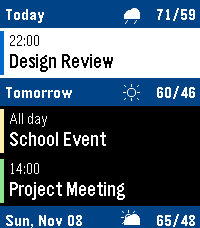
DailyYour upcoming calendar events and daily weather, all in one place. Next Up Agenda brings your schedule and weather forecast together in a clean, easy-to-read interface designed for Pebble watches. Quickly see what's coming up, check the weather, and stay organized without reaching for your phone. Using Pebble's native Calendar and Weather plugins, Next Up Agenda works with information already available through the Pebble mobile app. No API keys, calendar URLs, or additional accounts required. ### Features - Native Calendar Integration: Automatically displays upcoming appointments from calendars enabled in the Pebble mobile app. - Integrated Weather: Daily weather icons and high/low temperatures appear alongside calendar date headers. - Calendar Colors: Customize colors for individual calendars to distinguish appointments at a glance. - Automatic Day/Night Mode: Switches between light and dark themes using local sunrise and sunset, with manual overrides. - All-Day Events: Displays all-day appointments correctly, including across daylight-saving time changes. - Event Details: Select an event to view its start and end times and location when available. - Customizable Display: Adjustable font sizes, compact event rows, 12/24-hour time formats, and optional filtering of completed events. - AppGlance Support: View your next upcoming appointment directly from the Pebble launcher. - Offline Access: Previously synchronized appointments and weather remain available when your phone is disconnected. - Reliable Synchronization: Automatic updates, manual Force Sync, and Bluetooth transfer verification. - Recurring Event Support: Repeated appointments are displayed individually, even when they share the same title. ### Easy Setup Enable the Calendar plugin in your Pebble mobile app and grant access to your calendars. Optionally enable the Weather plugin to add daily forecasts and sunrise/sunset-based theme switching. No additional configuration is required to start viewing your agenda. ### Compatibility Supports Pebble, Pebble Steel, Pebble Time, Pebble Time Steel, Pebble Time Round, Pebble 2, and Pebble Time 2. Note: The native Calendar plugin currently provides up to 10 upcoming events within a seven-day window. Next Up Agenda displays the available events without imposing its own fixed time limit. ### Support Development If you enjoy the app and would like to support continued development, consider buying me a coffee: https://ko-fi.com/ericmccormick
 3
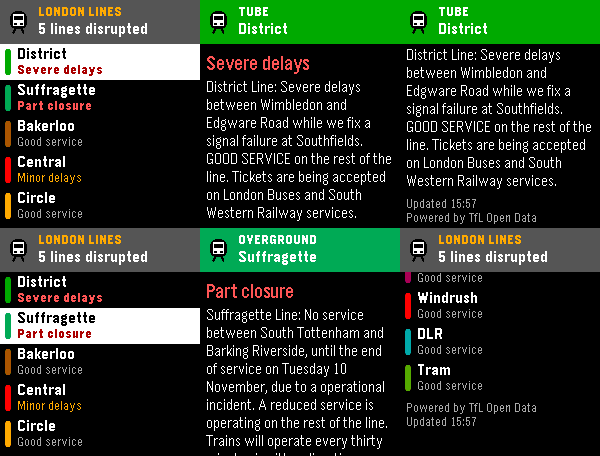
London Tube Lines
Tools & UtilitiesLive status of the Tube, Elizabeth line, Overground, DLR and trams on your watch, and for any watchface. Powered by TfL Open Data.
 5
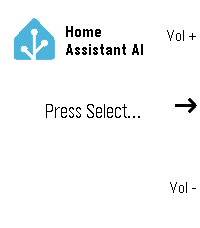
Home Assistant AI
Tools & Utilities**Your smart home. Your voice. Your wrist.** Bring the power of Home Assistant directly to your Pebble smartwatch. Home Assistant AI lets you ask questions, check your smart home, and control connected devices using natural language, without pulling out your phone. Powered by your own Home Assistant server and its configured conversation agent, the app makes interacting with your smart home simple and convenient. ### Features - **Natural voice interaction:** Ask questions and communicate with your Home Assistant conversation agent directly from your watch. - **Smart home control:** Check device states, control connected devices, and trigger supported Home Assistant actions. - **Spoken responses:** Hear responses directly through the built-in speaker on compatible Pebble watches. - **Progressive audio streaming:** Optimized audio delivery minimizes delays and supports longer, multi-sentence responses. - **Conversation mode:** Long-press Select for repeated voice interactions using PebbleOS dictation. - **Customizable experience:** Adjust font size, vibration feedback, speech settings, and playback volume where supported. - **Reliable communication:** Automatic recovery from temporary connection and speech-generation errors. ### Supported Watches Compatible with Pebble Time, Pebble Time Round, Pebble 2, and Pebble Time 2. Spoken audio playback requires a watch with a supported speaker. ### Requirements **Home Assistant Bridge plugin is required.** Install and configure the Home Assistant Bridge plugin before using this app. The plugin securely manages your Home Assistant connection, authentication, conversation agent, and text-to-speech settings. You'll also need a working Home Assistant installation with a configured conversation agent and an accessible connection from your phone. ### Support Development Home Assistant AI is an independent project developed to make Pebble smartwatches more useful. If you enjoy the app and would like to support continued development, improvements, and new features, consider buying me a coffee! **Support me on Ko-fi:** https://ko-fi.com/ericmccormick
 7
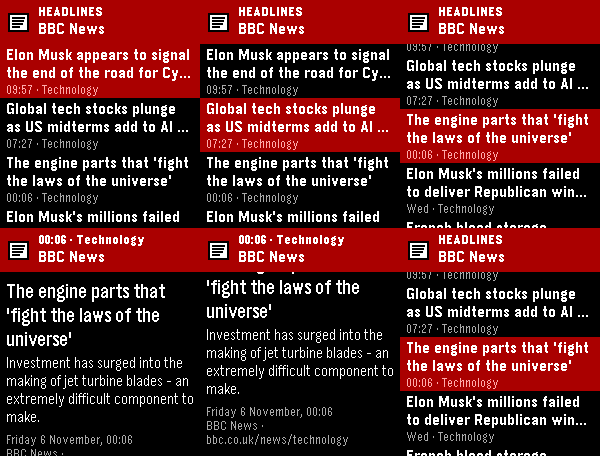
BBC Headlines
Tools & UtilitiesHeadlines from BBC News or any RSS feed: a reader on your wrist, and a plugin for any watchface.
 11
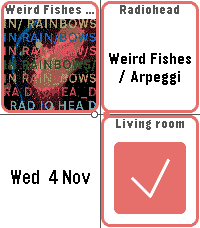
Dashboard (Plugin Demo)
Tools & UtilitiesDashboard demo app: show data from any plugin in 2 pages of 4 slots each. Configure which sources to use in the app's settings page. Tapping also allows taking actions (e.g. turning on lights, play/pause/skip music). Fun as a quicklaunch app.
 60
Shapeshifter - Watchface switcher
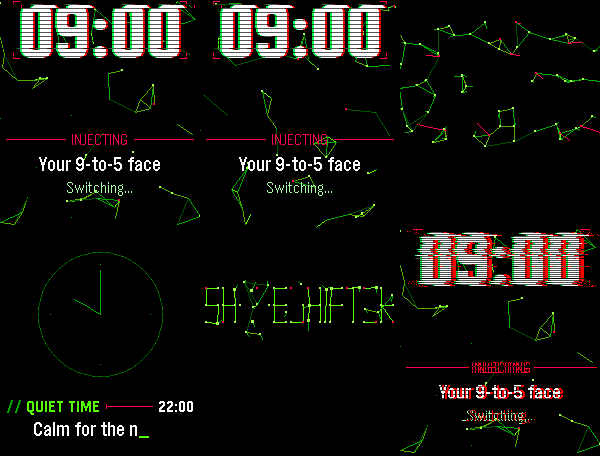
FacesShapeshifter Every watchface you love, in rotation. IMPORTANT NOTES - Still evolving - Needs the Pebble app's plugins preview: Pebble app 1.16 or later, Settings > Plugins > Plugins / permissions preview - Only "Launch apps" is required. Location, calendar and the account sites are used only by the features that need them Shapeshifter is a watchface that switches to your other watchfaces by your rules, and opens your apps the same way. Set it up once and it works by itself: one face for the working day, another for the evening, a calm one during Quiet Time or meetings, Weather at 7:00. Or let it shuffle: a random face every 15 minutes, to finally see all your favorites. RULES - Schedule: a face or an app for certain days and times - Events come before the schedule: Quiet Time, or a calendar event (optionally only events with a certain word in the title) - Beta events: walking or running, after waking up, at a place you set (Home, Work, ...), or on the go - A default face for when no rule applies - Each rule shows a face, a random one from the faces you pick (every 5 minutes up to once a day, or at sunrise and sunset), or opens an app YOUR LOCKER - Connect your Pebble or Rebble account (or both): Shapeshifter syncs the faces and apps in your locker into its lists. When you connect, once a day as you open the settings, or with one tap - It also removes what you uninstalled, and asks first when a rule uses it - Your sign-in stays on your phone and goes only to Pebble or Rebble FACES AND APPS - Up to 200 faces and 100 apps. They need to be in your locker to open - Add one by hand: search the Pebble store by name, paste a store link, store ID or UUID (sideloaded ones work too), or pick a built-in one (TicToc, Music, Weather, ...) - An app opens over your face; leave it and the face is back - A fallback face when a face can't be opened - Catches up on a missed switch when the phone is back in reach If you like this watchface and want to support the development, press the ❤️ button and consider buying me a coffee at https://www.buymeacoffee.com/toaster2.
 13
Weather Face (Plugin Demo)
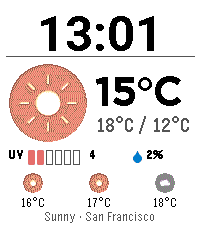
FacesA demo watchface built on the Pebble plugin API: time, current temperature with the day's high and low, a condition picture, UV index, chance of rain and your location, all read from the phone's weather plugin.
 7
Aika
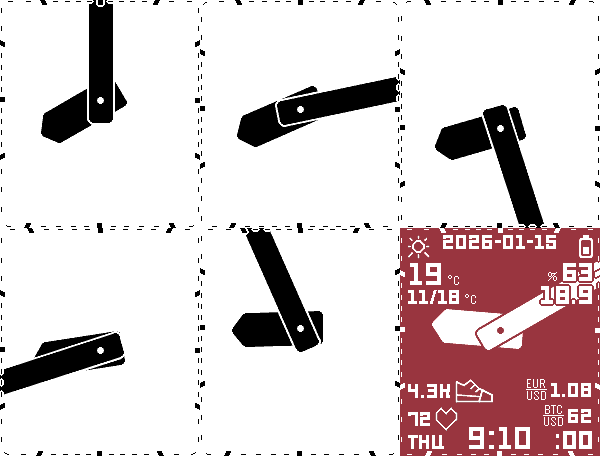
FacesA more readable watchface, with extremely bold analog hands for better low-light visibility. Supports plugins! The analog hands are the biggest component at the center, with the minute hand extending past the edges of the screen, for the highest visibility. Widget values are drawn on top of the clock hands. Values are what counts. Widgets can show their measurement units (°C, %, ...), instead of ambiguous/duplicated icons. Widget units & icons are drawn under the clock hands. It's alright to see them most of the time. The hands are the more important component. The clock center (optionally) "breathes" up & down following the minute hand's direction. This reduces the distortion from the minute hand's changing length, and makes the face feel closer to a square than the rectangular screen really is. Widget fonts, sizes, positions, icons, & units are fully customizable. In addition to "legacy" built-in widgets, any available data plugin can be used as a numeric or icon widget. Built-in widget categories include: - Time - Date - Weather - Rain - Health - Sleep - Battery - Crypto - Currency - Electricity spot price - Tuya sensors & switch states - Bluetooth Other configurable features: - Colors - Night mode - Battery & Bluetooth warning signals (border & widget) - Weather units & data sources (Open-Meteo or FMI) - Rotating widget groups - Language options - Periodic vibrations The comprehensive widget system is adopted from another open source watchface, Sykerö TimeStyle, github.com/Sykero-Software/TimeStylePebble, which is based on TimeStyle by freakified. The analog hands are adopted from an earlier watchface of mine, Nyquist, github.com/truhanen/pebble-nyquist-watchface.
 37
Plugin Tiles (25+ plugins)
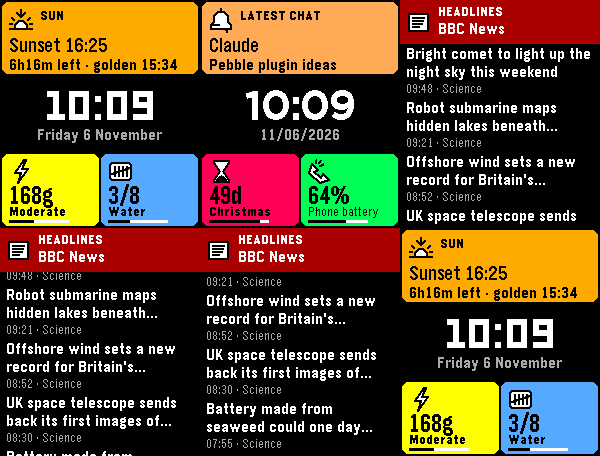
FacesYour Pebble plugins as colour tiles around the time. Choose up to 4 blocks or 2 big blocks. Pulls from your installed plugins. Basically functionality per plugin til I can provide further updates. Flick your wrist for each one's full page display. Add up to 4. Make sure you install 1.0.1 as v1 has a broken settings page! ** This is in beta and some plugins wont work**
 10
Calendar Face
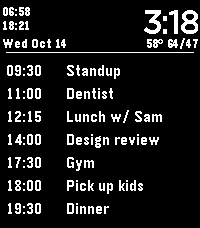
FacesYour calendar, on your watch face. Calendar lists your next appointments, with their start times, right under the clock, as many as fit your screen (up to 11). Events come from the calendars already synced in the Pebble mobile app, so there is no account to link, no ICS URL and no separate app to set up. Nice extras: a big 12-hour clock, the date, the current temperature with today's high and low, and sunrise and sunset. The last events and weather are kept, so the face is never blank after a reboot. Square screens use a compact header; round screens stack the clock above the info lines. Permissions: Calendar (your events), Location (local weather and sun times) and Internet for api.open-meteo.com only (the weather service). The Pebble app asks you to approve them when you install the face. Nothing else leaves your phone.
 10
Eclipz
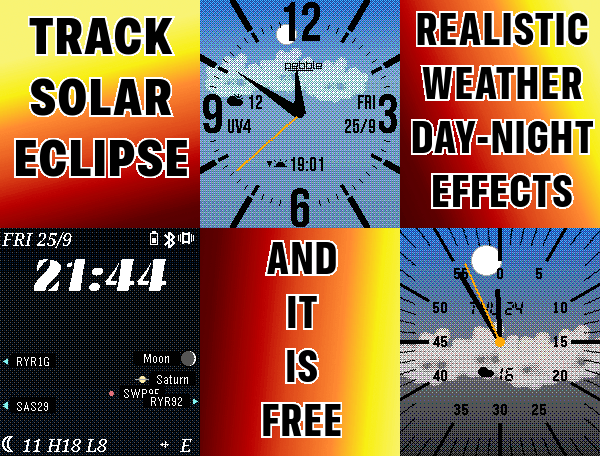
FacesWhat is a a watch? We've used them for decades without asking this basic question, what exactly does it do? You would think it just tells the time, but in reality it tracks the movement of celestial bodies and quantifies it down to two digits. Maybe three. How can we make this better? How do we extract more from this process? How do we make it *smart*? I went on a trip chasing solar eclipse that enlightened me and result of this epiphany is this watchface. Instead of just telling you time, you will be able to tell what is going on with time. Why is the sun suddenly going dark in the middle of the day? What is that bright point blinking in the sky? Are those aliens? Chill, its just RayanAir flight FR110. Whats that bright spot above horizon, let me check, oh its Venus. Took me 5 seconds. And I also see instantly what is the UV Index, how many steps have I done or even if Quiet Mode is enabled. Oh look, ISS is flying above us! All of it in your own style - possibilities are endless but remember! With great power comes great responsibility - more things mean more battery drain, more features will make things harder to see at glance, too many fancy elements might strain pebble CPU and visuals will stutter. Design isn't easy, but its fun, express yourself, or pick one of the presets that I quickly cooked up. You will be able to explore cosmos straight from your wrist. See if there's a chance for aurora or falling stars. You can also save your favorite style presets into one of 6 save slots and adjust them quickly as you need and even schedule for automatic application to have different workday and weekend look. During Solar Eclipse event the watch will count down to each phase and can even warn you with vibrations. Or just vibrate every hour during your day to remind you how quickly time flies. Live preview of changes on the watch available in 1.4 along with plugin support (text data only for complications) Can your expensive Rolex do this? Right. I thought so.
 21
Vector
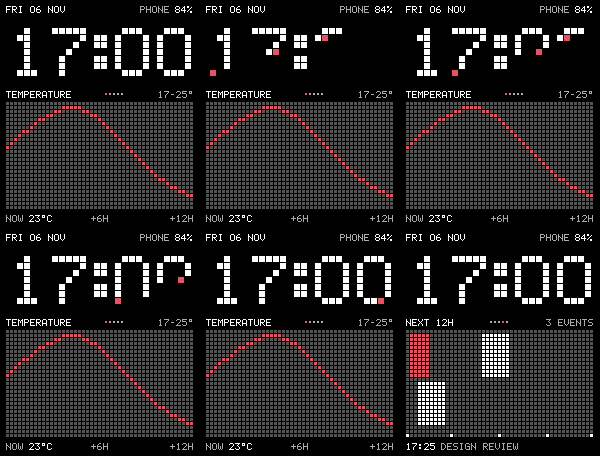
FacesAn oscilloscope on your wrist. Chunky dot-matrix digits up top, and under them a dot panel that plots what's coming: the temperature for the next twelve hours, the week ahead, the sun, your calendar and your steps. - Five pages in one face: TEMPERATURE (the next 12 hours as a red line, with the range and now), FORECAST (seven days as low–high bars, today in red), DAYLIGHT (the sun's arc over the horizon, sunrise and sunset), NEXT 12H (your calendar events as blocks on a timeline, with the next one by name) and STEPS TODAY (hour by hour, the current hour in red) - The page turns every minute, or straight away with a flick of the wrist; pages with nothing to show are skipped - Your favourite reading from the Pebble app's complications sits in the top corner, labelled ("PHONE 84%"), or the watch battery when you haven't picked any - When a digit changes it is rescanned dot by dot, a red beam running ahead of the new number - Every reading is labelled, every gap is even, and the dots are Retro Face's: grey when off, white when lit, red only where it matters - Light or dark Uses Pebble's phone plugins (preview): weather, calendar and your complications come from the Pebble app, so turn on Settings → Plugins in the app (1.16 or later). Steps come from the watch itself. Works on Pebble Classic, Steel, Time, Time Steel, Pebble 2, 2 Duo, Time 2 and Round 2.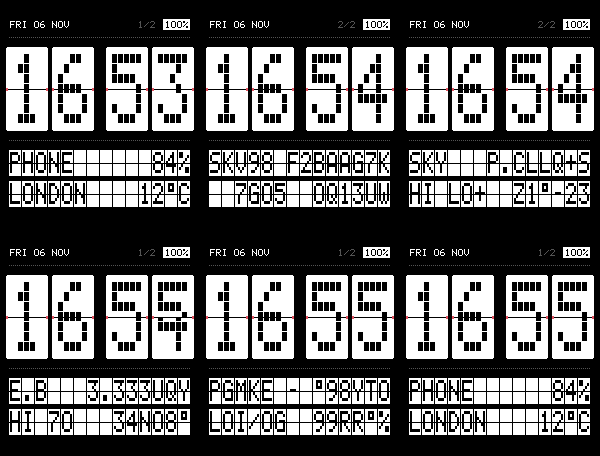 4
Split Flap
FacesA departures board on your wrist. The time sits on four big flaps that fold over at the hinge when they change, and two board rows below run through their letters to show your readings, a pair at a time. - Big white flaps with dot-matrix digits, a hinge gap and little red pins; each change folds the top half down and drops the new bottom half open - Two board rows of small flaps whose letters run through the drum to their new value, rippling left to right - The rows turn to the next pair every minute, or straight away with a flick of the wrist - Shows the readings you picked as complications in the Pebble app (phone battery, a calendar entry, anything a plugin offers), then the weather for your location: temperature, sky, high and low, next sunrise or sunset, rain chance, humidity and UV - Header with the date, the page you're on and the watch battery (red when it's low or your phone disconnects) - Uses Pebble phone plugins (preview): needs the Pebble app with plugins switched on Works on Pebble Classic, Steel, Time, Time Steel, Pebble 2, 2 Duo, Time 2 and Round 2.
 14.7K
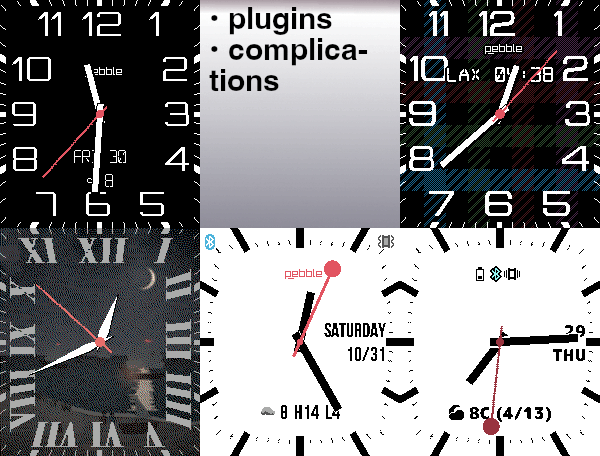
Modern
Faces!!! ROUND USERS: This is an alpha build preview, not a finalized round port of modern - even the design is experimental. I'll be working through the bugs, UI and UX over next couple weeks. Thank you for your patience. Modern is back, built for another decade of pebbles. Now with latest bells and whistles: - weather info - astronomy info (moon phase, planets, meteor showers, ISS, Aurora KP index) - health data - world clock - styling - colors - custom backgrounds - weather backgrounds - plugin backgrounds - custom hands - custom indices - custom fonts - complications - custom coplications - build your own complications with plugin data sources - live preview in both settings page and on watch - animations - style scheduling - battery preserver - hourly vibrations - bluetooth connection vibrations and more!
 139
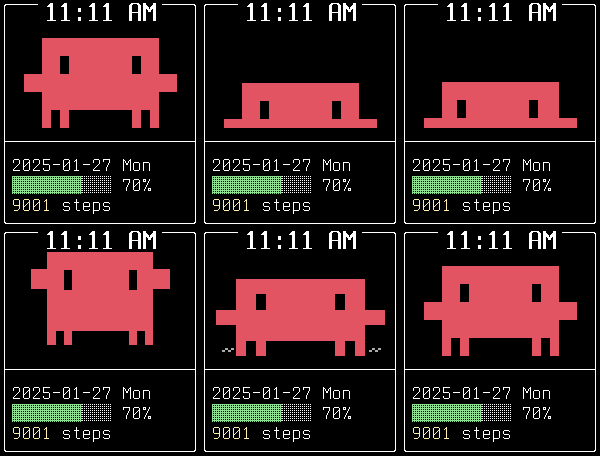
codewatch
Facescodewatch puts your coding buddy on your wrist. A terminal-aesthetic watchface inspired by Claude Code, featuring a code creature that lives on your screen and comes alive with a flick of your wrist. Features: - Flick your wrist and the creature jumps, skips, sneezes or peeks in from off-screen in 14 animations - Or it runs one of over 40 slash commands: live stats like steps, sleep, heart rate and your next alarm, plus a few fun ones - Big, clear time, with three status lines you choose: date, battery, steps, weather, heart rate, sleep, next alarm and more - Weather with no API key to set up: current conditions, today's high and low, tomorrow, and when the rain arrives - A step goal bar that fills as you walk - A settings page styled like the Claude Code terminal - Startup screen - Terminus monospace font throughout - Nothing moves until you flick, so it's easy on the battery - Supports Emery (Pebble Time 2) and Gabbro (Pebble Round 2) - NEW Status lines can also show readings from your Pebble plugins, or your favourites from the Pebble app Weather data by Open-Meteo.com (CC BY 4.0). Inspired by Claude Code. Keywords: terminal, claude, claude code, code, creature, pixel art, animated, terminus, monospace, stats, steps, weather, forecast, slash commands, cli, hacker, plugins
 10
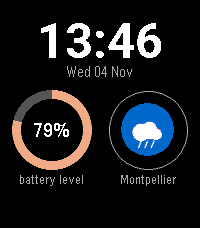
Complication Face (Plugin Demo)
FacesA demo watchface built on the Pebble plugin API: the time and date with two slots, a number and a picture, filled from the readings you prefer in the Pebble app (for example phone battery, weather or your next event). Configure your preferred readings in Settings / Plugins / Complications.