Plugins are a dev preview. Enable them first in the Pebble mobile app: Settings → Plugins → Plugins/permissions preview. Learn more
 22
Google Tasks & Keep
Notes, Reminders & TasksSaves notes to Google Keep and creates reminders in Google Tasks through one shared Google account.
 19
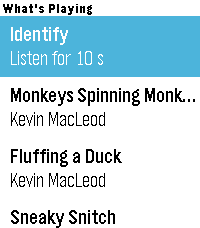
What's Playing
Tools & UtilitiesIdentify the music playing around you. Press Identify and your watch listens for up to ten seconds, then shows the song's title, artist and album. Your last ten matches stay on the main screen. Needs a watch with a microphone (Pebble Time 2, Pebble 2 Duo or Pebble Round 2) and a phone app that streams the watch microphone to the phone. The recording is sent to Core Devices' recognition service, which uses AudD to find the song. No account or setup needed.
 18
Obsidian/Markdown Notes
Notes, Reminders & TasksCreates separate Markdown notes or safely appends to a selected existing note in a user-selected folder, with Obsidian-compatible tasks and links.
 17
Claude
AI AgentsSend messages to your Claude conversations and Claude Code sessions. With no chat named, starts a new Claude chat, or sends to the default Claude chat or Claude Code session chosen in settings. Supports chat nicknames. Sign in in settings.
 15
Google Home
Smart HomeReads and controls existing Google Home devices and household automations. It cannot add or delete homes, devices, or automations.
 14
Home Assistant Bridge
AI AgentsOne connection. Endless possibilities for your Pebble. Home Assistant Bridge connects Pebble applications to your Home Assistant smart home through a centralized, secure plugin. It provides access to device states, smart home controls, AI conversations, and text-to-speech, allowing developers to build Home Assistant-enabled Pebble apps without managing separate connections and credentials. ## Features - Secure connectivity: Configure your Home Assistant server and authentication once, with credentials securely managed by the plugin. - Smart home integration: Access entities, sensor readings, device states, and supported Home Assistant services. - AI conversations: Communicate with Home Assistant's configured conversation agents. - Shared voice settings: Configure TTS engines, STT engines, conversation agents, and Assist pipelines in one place. - Audio streaming: Generate spoken responses through Home Assistant and stream them to compatible Pebble applications. - Reliable playback: WAV validation, checksums, automatic retries, and progressive delivery help prevent corrupted or interrupted speech. - Developer-friendly: Includes a reusable JavaScript and C audio SDK for integrating native Pebble speaker playback. ## For Developers — Adding Audio to Your App Home Assistant Bridge includes an open-source audio SDK that allows other Pebble applications to use Home Assistant's text-to-speech capabilities. Rather than implementing WAV processing, ADPCM encoding, Bluetooth audio transfer, and speaker buffering independently, developers can integrate the existing, tested audio system. Audio SDK and integration guide: https://github.com/ericlmccormick/Pebble-HA-plug-in/tree/main/sdk ### Required Files Copy these three files into your Pebble application: 1. ha_audio.js — Phone-side audio processing https://github.com/ericlmccormick/Pebble-HA-plug-in/blob/main/sdk/ha_audio.js Place in `src/pkjs/ha_audio.js`. Handles TTS requests, verified WAV retrieval, ADPCM encoding, sentence preparation, and Bluetooth audio transfer. 2. ha_audio.c — Watch-side audio playback https://github.com/ericlmccormick/Pebble-HA-plug-in/blob/main/sdk/ha_audio.c Place in `src/c/ha_audio.c`. Provides native speaker playback, audio decoding, buffering, volume control, and playback diagnostics. 3. ha_audio.h — Watch-side interface https://github.com/ericlmccormick/Pebble-HA-plug-in/blob/main/sdk/ha_audio.h Place in `src/c/ha_audio.h`. Defines the C functions used to initialize, control, and manage the audio system. ### Integration Requirements Your application must declare the appropriate Home Assistant Bridge plugin permissions and include the required AppMessage keys. Initialize the audio library on the watch, route incoming audio messages through its handler, and use the JavaScript library to request speech playback. Complete setup instructions and example code: https://github.com/ericlmccormick/Pebble-HA-plug-in/blob/main/sdk/README.md The Bridge manages Home Assistant authentication and speech generation. The consuming application includes the audio SDK to handle Bluetooth transport and native watch playback. Important: Native spoken playback requires a Pebble watch with a supported speaker. Other watches can still use Home Assistant's non-audio capabilities. For a working implementation, see Home Assistant AI: https://github.com/ericlmccormick/Pebble-Home-Assistant-AI ## Requirements - A running Home Assistant installation accessible from your phone. - Home Assistant authentication credentials. - The appropriate plugin permissions granted to consuming applications. - A configured Home Assistant TTS engine for spoken responses. ## Open Source Home Assistant Bridge is an independently developed, reusable integration intended to expand what's possible with Pebble smartwatches. Developers are welcome to explore the source code, integrate the audio SDK, contribute improvements, and build new applications using the Bridge. ## Support Development If you find Home Assistant Bridge useful, or you're a developer building on top of it, please consider supporting continued development. Support me on Ko-fi: https://ko-fi.com/ericmccormick
 11
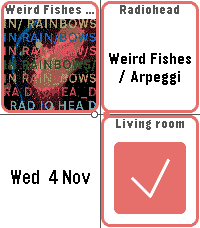
Dashboard (Plugin Demo)
Tools & UtilitiesDashboard demo app: show data from any plugin in 2 pages of 4 slots each. Configure which sources to use in the app's settings page. Tapping also allows taking actions (e.g. turning on lights, play/pause/skip music). Fun as a quicklaunch app.
 10
Location Sharing
People & LocationReads the latest locations of people who already share their location with you through Google Maps.
 9
Todoist
Reminders & TasksInternal App Store identity for the bundled Todoist Index plugin.
 7
Muse
AI AgentsSend a message to your chosen Muse chat. Sign in and choose the destination in settings.
 7
MET Norway Weather
WeatherWeather where the phone is, from the Norwegian Meteorological Institute (api.met.no). One location instance (the phone's current position) and the hours ahead of it.
 7
BBC Headlines
Tools & UtilitiesHeadlines from BBC News or any RSS feed: a reader on your wrist, and a plugin for any watchface.
 7
ChatGPT
AI AgentsSend a message to your ChatGPT Dot. Sign in with ChatGPT in settings.
 5
Grok Bot
AI AgentsSend messages to your Grok Bot and read its replies. Sign in and choose the bot in settings.
 5
Air & Pollen
WeatherAir quality for any watchface, anywhere: the US and European AQI, PM2.5 and ozone, plus today's pollen in Europe.