Custom Color Japanese
Sir_Awesomness
Watchface
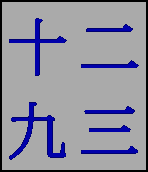
Description
A colour version of my popular face for classic pebble: Traditional Japanese.

You get to set the colour, here's how:
Install the watch-face
In the settings for the face on the phone select a text colour and a background colour then press enter.

It's that simple!

Description from B&W version:

Want to practice your kanji? This is the watch-face for you.
Features 11 characters.

Why it's interesting:
The Japanese number system is similar to the Latin in that it is in base 10, the symbols themselves are different and 10 is represented by 1 character.

For example:
10 = 十
40 = 四十
15 = 十五
45 = 四五

This watch-face is based off big time so it is read left -> right, top -> bottom.
If you want to change this to be the traditional orientation, you can do so on the configuration webpage.
- DeveloperSir_Awesomness · Is this you? Claim your app ›
- CategoryFaces
- PlatformsTime/Time Steel, Time 2 (scaled)
- Updated2015-08-29
- Version1.96