FlipBoard APOLLO
ldnpub
Watchface
Description
# FlipBoard APOLLO — Pebble Store listing

## Tagline
Your day as a mission-control telemetry readout.

## Description (English — store default)
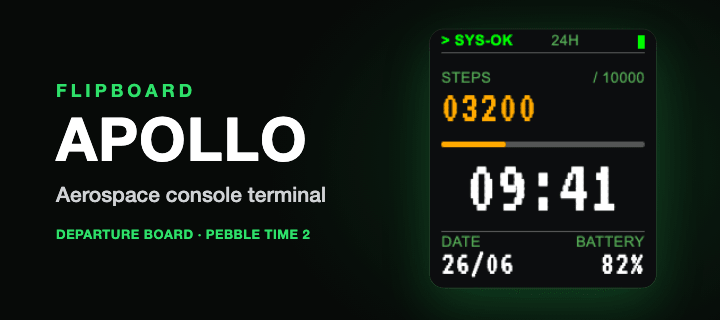
FlipBoard APOLLO turns your Pebble Time 2 into a flight-console terminal. Rendered
in the VT323 monospace terminal font, it reads like a green-screen readout straight
out of mission control — telemetry for the one flight that matters, your day. On
every minute the digits still fold over with the same satisfying split-flap snap,
like a status board updating on the wall.

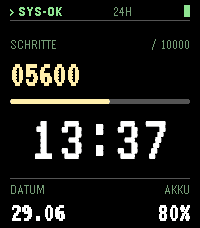
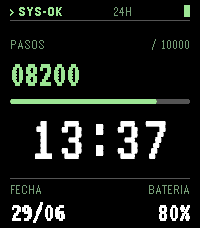
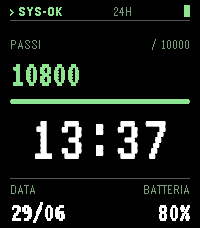
Underneath the clock, your day reports its flight status:

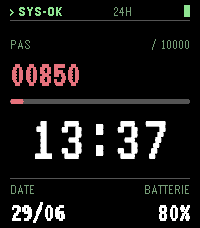
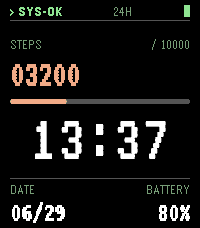
• A STATUS LINE up top — "> SYS-OK   24H" with a battery pip, the console
  reassuring you everything is nominal.
• A "PAS / 10000" goal readout, with the big step count on the left like a live
  telemetry channel.
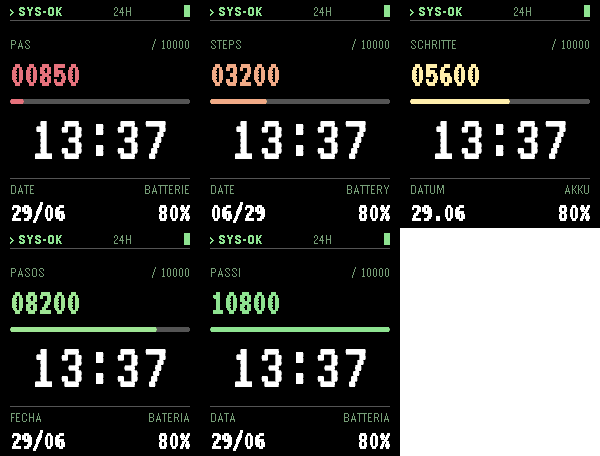
• A PROGRESS BAR that fills horizontally toward your goal, colour-ramped from warm
  red when you're near zero, through amber and yellow across the day, to green as
  you close in on your target — so a single glance reads the mission like a console
  operator.
• The big HH:MM clock under the bar, then DATE and BATTERY in the footer.

Make it yours from the Pebble phone app:

• Daily step goal — the colour ramp follows whatever target you set.
• Language — APOLLO speaks Français, English, Deutsch, Español, Italiano,
  Nederlands, Português, Polski and Svenska. Labels and weekdays follow along.
• Date format — Auto (it matches your language: DD/MM, MM/DD, DD.MM or ISO), or
  pick one by hand.
• Year — hide it, or show it as "26" or "2026" when there's room.
• Wrist shake — off by default, or assign one action: replay the flip animation,
  trigger the backlight, flash your steps-to-goal, surface a random destination
  code (a little easter egg), or toggle 12h/24h.
• 12h / 24h — follows your watch by default; the shake toggle can flip it on the fly.

Designed for the Pebble Time 2 (Emery, 200×228) colour display, with anti-aliased
custom digits and an e-paper-calibrated palette so it looks crisp on the real
panel — not just in the emulator.

## Description (Français)
FlipBoard APOLLO transforme votre Pebble Time 2 en console de contrôle de vol.
Dans la police monospace VT323, elle se lit comme un terminal à écran vert tout
droit sorti du centre de commande — la télémétrie du seul vol qui compte, votre
journée. À chaque minute, les chiffres se replient toujours d'un coup net, comme un
tableau de statut qui se met à jour au mur.

Sous l'horloge, votre journée affiche son statut de vol :

• Une LIGNE DE STATUT en haut — « > SYS-OK   24H » avec une pastille de batterie,
  la console qui confirme que tout est nominal.
• Un affichage d'objectif « PAS / 10000 », avec le grand compteur de pas à gauche
  comme un canal de télémétrie en direct.
• Une BARRE DE PROGRESSION qui se remplit horizontalement vers votre objectif, dont
  la couleur suit votre but : rouge près de zéro, puis ambre et jaune dans la
  journée, et vert à l'approche du but. Un regard suffit pour lire la mission comme
  un opérateur en salle de contrôle.
• Le grand HH:MM sous la barre, puis la DATE et la BATTERIE en bas.

Personnalisable depuis l'application téléphone :

• Objectif de pas quotidien — le dégradé de couleur s'y adapte.
• Langue — Français, English, Deutsch, Español, Italiano, Nederlands, Português,
  Polski, Svenska. Libellés et jours de la semaine suivent.
• Format de date — Auto (selon la langue : JJ/MM, MM/JJ, JJ.MM ou ISO), ou choisi
  à la main.
• Année — masquée, ou affichée en « 26 » ou « 2026 » quand il y a la place.
• Secousse du poignet — désactivée par défaut, ou une action au choix : rejouer
  l'animation à volets, allumer le rétroéclairage, afficher les pas restants
  jusqu'à l'objectif, faire surgir un code destination aléatoire (petit easter
  egg), ou basculer 12h/24h.
• 12h / 24h — suit la montre par défaut ; la secousse peut basculer à la volée.

Conçue pour l'écran couleur du Pebble Time 2 (Emery, 200×228), chiffres
anti-aliasés et palette calibrée pour le vrai panneau e-paper.

## Source
Open source — github.com/ldnpub/FlipBoard

## Category
daily

## Release notes (this version)
BETA — new phone settings: date format (Auto-by-language or manual DD/MM · MM/DD ·
DD.MM · ISO), year display (off · 26 · 2026), and a configurable wrist-shake action
(off by default; replay flip · backlight · steps-to-goal · random destination ·
toggle 12/24h). Language now has its own menu (no longer tied to shake). Plus the
configurable daily step goal and 9-language labels (FR/EN/DE/ES/IT/NL/PT/PL/SV).
- Developerldnpub
- CategoryFaces
- PlatformsTime 2
- Updated2026-07-06
- Version0.4.1