Goals
Rythm.Run
Watchface
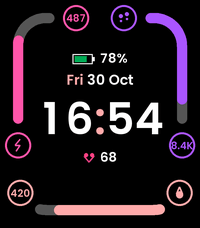
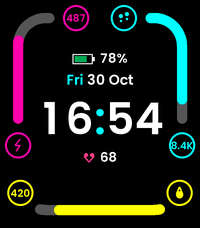
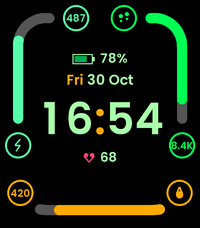
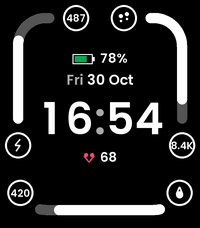
Description
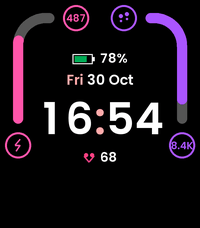
Goals is a modern, clean, and highly readable activity watchface engineered specifically for new-generation Pebble smartwatches: Pebble Time 2 (200x228 rounded rectangle) and Pebble Round 2 (260x260 circular).

Goals maximizes your watch display area by strictly following the screen contour: progress arcs follow a rounded rectangle on the Time 2 and a true circular track on the Round 2.

CONTOUR-FOLLOWING GOAL SECTORS

The display perimeter is divided into 1, 2, or 3 independent goal sectors:
- In 3-sector mode, arcs are evenly distributed at 120-degree intervals (Top Left, Top Right, Bottom).
- In 2-sector mode, the layout automatically shifts upward (10h-2h and 2h-6h), leaving the bottom area open and clean.
- Each sector features a proportional progress gauge, an icon, and a compact numeric badge (e.g. 8.4K, 487).

8 SELECTABLE METRICS

Each sector slot can be configured independently with any of the following:
1. Daily Steps (footprints icon, dynamic daily target from Pebble Health)
2. Active Minutes (lightning bolt icon)
3. Active Calories in kcal (flame icon)
4. Walked Distance in m / km (location pin icon)
5. Battery Percentage (battery icon with proportional fill bar)
6. Current Heart Rate in BPM (heart icon)
7. Resting Heart Rate in BPM (heart icon)
8. None (hides the sector)

4 NATIVE 64-COLOR THEMES

Every palette has been tailored for Pebble's 64-color displays (2 bits per RGB channel) for optimal outdoor sunlight readability:
- Original Dark: deep black background with vibrant coral, cyan, and mint green arcs.
- Cyber Neon: neon violet, electric blue, and hot magenta.
- Emerald Forest: luminous emerald and spring green tones.
- Monochrome: crisp white and multi-shade gray.

CLOCK AND STATUS DISPLAY

At the center of your screen, Goals displays:
- 12h or 24h digital clock following your system preferences.
- Optional 1 Hz blinking colon (can be toggled to solid).
- Full capitalized date header (e.g. FRI 30 OCT).
- Subtle horizontal battery gauge bar with percentage beneath the time.

EFFORTLESS PHONE CONFIGURATION (PEBBLE CLAY)

Customize your watchface directly from the Pebble / Rebble companion app:
- Color theme selection
- Blinking colon toggle
- Sector 1 metric (Top Left)
- Sector 2 metric (Top Right)
- Sector 3 metric (Bottom)
- DeveloperRythm.Run
- CategoryFaces
- PlatformsTime 2, Round 2
- Updated2026-10-30
- Version0.1.1
- Battery ImpactNot enough data yet