GWeather + Steps
geochrist
Watchface
Description
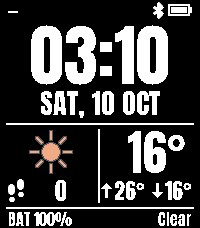
A bold, easy-to-read watchface for the Pebble Time 2, with live weather, steps and a built-in compass.

MAIN SCREEN
• Big time in the Anton font, with optional seconds and AM/PM
• Date in 6 formats, with short or full day name, regular or bold
• Current temperature with today’s high ↑ and low ↓
• Barometer trend arrow in front of the temperature, showing how the air pressure changed over the last 3 hours
• Colour weather icon and condition (e.g. “Partly cloudy”), updated every 10 minutes
• Your city, step count, battery level and Bluetooth status
• Vibrates if your phone disconnects

BAROMETER TREND
The arrow before the temperature works like the barometer on a classic Suunto:
• ↑ Rising: pressure up 1 hPa or more. Weather improving.
• → Steady: little change. Weather stays as it is.
• ↓ Falling: pressure down 1 hPa or more. Weather getting worse.
• ↓ with a double head: pressure down 4 hPa or more. Storm warning.
It uses sea-level pressure from the weather service, so walking uphill or downhill won’t give false readings. It updates with the weather every 10 minutes. You can turn it off in the settings.

COMPASS SCREEN (ABC)
Shake your watch firmly a few times to open it. Shake again to return to the time.
• Live compass: the dial turns as you turn, and the direction you face is always at the top
• Altitude (from your phone’s GPS)
• Air pressure (from the weather service)
• Altitude: ground elevation at your position (from your phone’s location)
• Air pressure at sea level (MSL, as in weather reports)

First use of the compass:
• “MOVE WRIST”: the compass needs calibrating. Slowly move and rotate your wrist in different directions, like drawing a figure 8 in the air.
• “CALIBRATING”: calibration is in progress. Keep moving your wrist until the heading appears.
Calibration is saved, but must be repeated after charging the watch. For the most accurate reading, hold the watch flat.

SETTINGS
Open the settings in the Pebble app to choose:
• °C or °F (metres/hPa or feet/inHg on the compass screen)
• 12h or 24h, leading zero, AM/PM, seconds
• Date format, full day name, bold date
• Colour or single-colour weather icons
• Your own colour for every part of the screen, with a one-tap reset
• Shake to open the compass on or off, and whether it closes by itself
• Barometer trend arrow on or off

Note: showing seconds or keeping the compass open uses extra battery.

Weather: Open-Meteo. Fonts: Anton by Vernon Adams and Weather Icons by Erik Flowers (SIL Open Font License). Colour weather icons: Meteocons by Bas Milius (MIT License).
- Developergeochrist
- CategoryFaces
- PlatformsTime 2
- Updated2026-10-10
- Version1.9