HA Trigger
Kieselleger
Watchapp
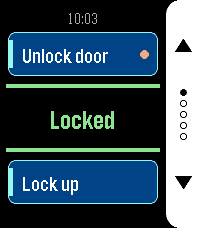
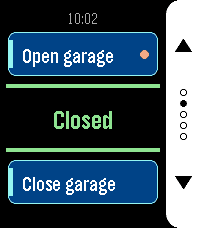
Description
HA Trigger puts Home Assistant actions on your wrist and keeps the answer
in front of you.

Each screen carries two actions: the top button runs one, the bottom button
the other. Between them sits the state of an entity of your choice, in large
type and coloured by what it says: green when things are as they should be,
amber while a lock is still turning, red when the entity is unavailable or
Home Assistant did not answer. It refreshes by itself every 15 seconds while
the app is open, so you can read it without pressing anything.

Set up as many as five screens — front door, garage, lights — and flip
through them with the middle button. Only screens with at least one action
are shown, and dots on the button rail tell you where you are. The app
reopens on the screen you left it on.

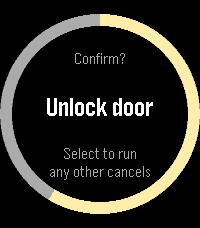
Each action can ask before it fires. Turn the prompt on for anything you do
not want to trigger from a pocket, and the watch shows a countdown ring:
the middle button runs the action, any other button cancels, and doing
nothing cancels it too. Actions with a prompt are marked with a dot on
their card, so you can see which one is the careful one.

Any service works — `lock.open`, `script.turn_on`, `switch.toggle`,
`scene.turn_on`, `cover.open_cover`. Give it a target entity, or leave that
empty for scripts that take no arguments. For the status line, a template
sensor is worth setting up: whatever text it produces is what the watch
shows.

Your settings live on the watch as well as on the phone, and the two sync
in both directions. Reinstall the phone app and the watch hands its
configuration back; reinstall the watch app and the phone restores it. You
should not have to type a long-lived token twice.

Built for Pebble Time 2 and Pebble Round 2, with a layout drawn for each —
a full-height button rail on the rectangular display, a rounded rail set
inside the circle on the round one.

Settings

- HA URL — base URL of your Home Assistant, no path and no trailing
  slash. If you leave out `http://` or `https://` it is assumed to be
  `http://`.
- Long-Lived Token — from Profile > Security in Home Assistant. Best
  created under a dedicated, non-administrative user.
- Screens 1 to 5 — each with its own status entity and a top and bottom
  action. Leave both actions of a screen empty to hide it.
- Status Entity — shown in the centre of the screen. Leave empty to use
  the top action's entity, or the bottom one's if the top is empty. A
  template sensor works well here.
- Top / Bottom Action — a label, a service in `domain.service` form, an
  optional target entity, and whether to ask before running it. For a script,
  scene, automation or button you can name the entity alone and leave the
  action empty — the matching action is derived from it. Without a label the
  card shows the entity's name.
- Color Scheme — Dark uses a white button rail on black, Light a black
  rail on white.
- DeveloperKieselleger
- CategoryTools & Utilities
- PlatformsTime 2, Round 2
- Updated2026-09-21
- Version1.2.0