igi-Assistant
iginoc
Watchapp
Description
A comprehensive control interface for Home Assistant on your Pebble smartwatch. Monitor sensors, control lights, manage music, and chat with your home, all from your wrist with a high-contrast, readable interface.
Key Features

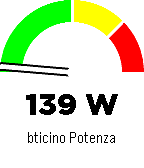
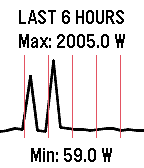
    Sensor Monitoring: Display a specific sensor (e.g., car battery, power usage) directly on the main screen with a visual gauge and large, readable fonts.
    Light Control: Quick menu to toggle selected lights on and off.
    Home Assistant Chat: Send and receive text messages to Home Assistant (requires input_text). Supports voice dictation (on microphone-enabled models) and customizable canned messages.
    Music Control: Control active media players (Play/Pause, Volume, Next/Prev Track).
    Accessible Design: High-contrast black-on-white interface with color support for modern Pebble models (Time, Time Round, P2).

Home Assistant Requirements

To use all features, add the following to your configuration.yaml or create the helpers via UI:

    Chat: Create an input_text entity named pebble_chat.

    input_text:
      pebble_chat:
        name: Pebble Chat
        initial: ""
        max: 255

    CORS (Important for Configuration): To allow the Pebble app configuration page to fetch your lights list, you must enable CORS:

    http:
      cors_allowed_origins:
        - "*"

App Configuration

    Open the app settings within the Pebble mobile app.
    Enter your Home Assistant URL (e.g., https://your-home.duckdns.org or local IP if on WiFi).
    Enter a Long-Lived Access Token (create one in your HA User Profile -> Long-Lived Access Tokens).
    Enter your Nickname for the chat.
    Select the Lights you want to control and the Sensor to display on the home screen.

Note: If the configuration page fails to load your entities, ensure CORS is correctly configured in Home Assistant (see requirements above).
Controls

Main Screen:

    UP: Open Music Control.
    SELECT: Open Lights Menu.
    DOWN: Open Chat.

Lights Menu:

    UP/DOWN: Scroll through lights.
    SELECT: Toggle On/Off.
    SHAKE (Wrist): Toggle the currently selected light.

Chat:

    UP/DOWN: Scroll through message history.
    SELECT: Open dictation or canned messages menu.

Music:

    UP/DOWN (Click): Previous / Next Track.
    UP/DOWN (Long Press): Volume Up / Down.
    SELECT: Play / Pause.
- Developeriginoc
- CategoryRemotes
- PlatformsOG Pebble, Steel, Time/Time Steel, Time Round, 2, 2 Duo, Time 2, Round 2
- Updated2026-04-22
- Version1.4.1