Likloa - Radial Calendar Timeline
Jonas E
Watchface
Description
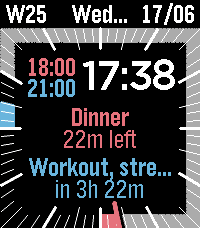
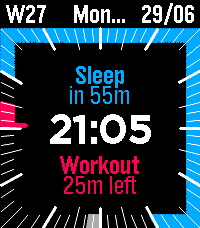
Bring your schedule directly to your wrist. Likloa is an elegant analog-digital hybrid watchface that transforms your Google Calendar events into visual time blocks around your watch dial. See your day, track your current meeting, and see your remaining free time at a glance.

Key Features

- Visual Timeline: Events are plotted as clean arcs around a 12-hour analog dial.
- Direct Google Sync: Connects directly to the Google Calendar API—no companion phone apps required.
- Fully Customizable: Personalize colors for the background, text, ticks, and event blocks using the Pebble 64-color palette.
- Modular Status Bar: Three slots to display your choice of Battery %, Date, Day of the Week, or Week Number.
- Flexible Layouts: Added a setting to choose the exact placement of inner dial elements to suit your style.
- High-Readability Dial: Crisp digital time paired with clear analog hour, half-hour, and minute ticks.
- Text Outlining: Added a setting to outline event text, ensuring maximum contrast and readability against any background.
- Toggleable Sidebar: Switch between active timeline timestamps or a clean, minimalist look.

Quick Setup Guide

Because Likloa connects directly to Google's infrastructure, it requires a quick, one-time configuration:
- Get an API Key: Go to the Google Cloud Console, enable the Google Calendar API, and generate a free API key.
- Get your Calendar ID: In your Google Calendar browser settings (under "Integrate Calendar"), copy your Calendar ID (usually your email address). Note: Your calendar access must be set to "Public" for the watchface to read the time blocks.
- Configure: Open the watchface settings in your Pebble/Rebble app, paste your API Key and Calendar ID, choose your colors, and hit Save!

Please contact me below if you find bugs or want to request a feature.
- DeveloperJonas E
- CategoryFaces
- PlatformsTime 2
- Updated2026-06-23
- Version1.0.2