Health and Weather
Eric McCormick
Watchface
Description
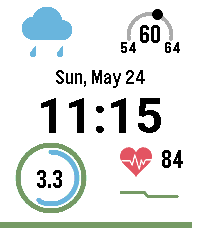
A high-density, data-rich dashboard watchface designed to give you a complete overview of your day at a single glance. Built specifically for high-resolution color Pebble displays, it perfectly balances live weather data, detailed health metrics, and system status without feeling cluttered.

Key Features
Advanced Weather (Top Left): Displays the current temperature, daily high/low, a weather condition icon, and a quick text description. The outer ring is a dynamic, color-coded UV Index indicator that plots the current sun intensity on a 200-degree arc.

Activity Rings (Bottom Left): Apple Watch-style concentric progress rings tracking your daily Active Minutes (Green) and Step Count (Blue) against your personal goals.

Granular Health Data (Bottom Left): Displays your exact step count and total distance walked (miles or kilometers) inside the activity rings.

Live Heart Rate & Sparkline (Bottom Right): Shows your live BPM alongside a dynamic, exaggerated 20-minute historical sparkline graph. The graph line automatically changes color based on your heart rate zones (Resting, Normal, Elevated, High).

System Status: Features a sleek battery percentage bar across the bottom of the screen (turns red below 20%) and alerts you with a double-pulse vibration if your Bluetooth connection drops.

Requirements & Setup
To make this watchface function properly, users will need to configure a few things in the watchface settings page:

OpenWeatherMap API Key: This watchface uses the OpenWeatherMap OneCall 3.0 API to fetch precise, localized weather and UV data in a single network request. Users must create a free account at OpenWeatherMap, subscribe to the OneCall 3.0 API, and paste their unique API key into the watchface settings.

Location Services: The Pebble app on the user's phone must have location permissions enabled to fetch accurate local weather data.

Pebble Health: Pebble Health must be enabled on the watch to track steps, distance, active minutes, and heart rate. A Pebble device with a built-in optical heart rate monitor is required for the sparkline graph to function.

Customization Options
Users can customize the watchface via the built-in settings menu:

Units: Toggle between Imperial (Fahrenheit/Miles) and Metric (Celsius/Kilometers).

Time Format: Switch between 12-hour and 24-hour clocks.

Update Frequency: Adjust how often the weather updates (default is every 30 minutes) to balance battery life and data freshness.

Health Goals: Set custom daily targets for Step Count and Active Minutes to ensure the progress rings accurately reflect personal fitness goals.
- DeveloperEric McCormick
- CategoryFaces
- PlatformsTime 2
- Updated2026-05-25
- Version1.6