Organik Time
Organik Apps
Watchface
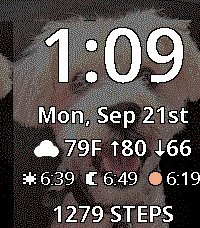

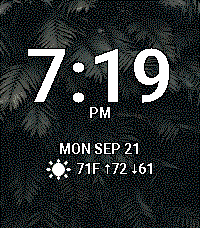
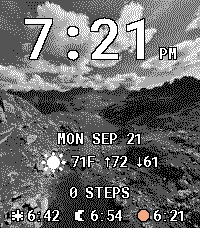
Description
Your photos. Your type. Your time.

Turn Pebble Time 2 into a personal photo watchface with a live phone preview and a library of complete presets.

• Choose photos on iPhone or Android. A Safari/Chrome import option is included when the Pebble app cannot open its photo picker.
• Fill the screen: crop and position, zoom 100–300%, dim, or switch to black and white. Fine-tune dithering, sharpness, contrast and shadows.
• Choose 20 freely licensed fonts and all 64 display colors. Large fitted clock sizes and automatically fitted data lines keep text readable.
• Arrange four data rows: date, weather, steps, heart rate, stocks, or sunrise/sunset/evening golden hour. Hide any row.
• Adjust clock/data placement, spacing, date format, AM/PM and battery/Bluetooth indicators.
• Save complete photo-and-layout presets. Tap a preview to load it; the green ✓ Loaded badge confirms your choice. Settings stay open until Save and apply.

For Pebble Time 2 (200 × 228). No Organik Connector required. Photos are processed locally. Weather/stocks require a connected phone and internet; health readings depend on Pebble Health. Presets use local phone storage. After a disconnected watch restart, the photo returns when the phone reconnects.

Guide: https://geezuschrotch.github.io/organik-time-photo-picker/guide/
- DeveloperOrganik Apps
- CategoryFaces
- PlatformsTime 2
- Updated2026-09-21
- Version1.0.20