Pandora Remote
gravity_rose
Watchapp
Description
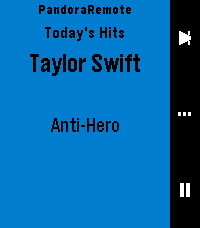
Control Pandora from your wrist. PandoraRemote lets you manage playback, rate songs, and adjust volume directly from your Pebble watch.

FEATURES

- Skip tracks, play/pause with a single button press
- Thumbs up or thumbs down the current song
- Adjust phone volume from your watch
- See the current song, artist, and station on your watch
- Auto-launches when Pandora starts playing
- Works on all Pebble hardware except the OG (Time, Time Steel, Time Round, Pebble 2, Time 2, Core 2 Duo, Core Time)

HOW IT WORKS

PandoraRemote has three screens you cycle through with the select button:

Playback: Skip to the next track or play/pause.
Rating: Thumbs up or thumbs down the current song.
Volume: Turn the volume up or down on your phone.

WARNING:
This is a personal passion project, and frankly, if I don't see a need for a feature, I probably won't add it on my own. So if you have a feature request, please submit an issue on the github repo, and I'll evaluate if I think it would be nice to have.  The best way it to develop it yourself:  if you're not a developer,  it might be time to try out Claude Code (or similar) and submit a PR with your proposed changes.  I will review and merge if it looks good.

This project is open source and licensed under CC BY-NC-SA 4.0. See https://creativecommons.org/licenses/by-nc-sa/4.0/ for details.

SETUP

1. Install the PandoraRemote companion app on your Android phone. Until the app is available on the Google Play Store, download the APK from:
   https://github.com/gravity-rose/PandoraRemote/releases
2. After sideloading, you must grant the app restricted permissions and notification access. The app will walk you through this on first launch.
3. Start Pandora — the watch app launches automatically.

DISCLAIMER

Pandora is a registered trademark of Pandora Media, LLC. PandoraRemote is an independent project and is not affiliated with, endorsed by, or sponsored by Pandora Media, LLC.
- Developergravity_rose
- CategoryRemotes
- PlatformsTime/Time Steel, Time Round, 2, 2 Duo, Time 2, Round 2
- Updated2026-05-04
- Version1.5.2