Pebble Points
ClickCalickClick (Touchy Weather)
Watchapp
Description
Pebble Points
Pebble Points is a fast, button-first scorekeeping app for Pebble smartwatches. It is designed for in-the-moment tabletop, card, party, and casual competitive games where you need quick score changes without leaving gameplay.

What Pebble Points Does
Pebble Points lets you:

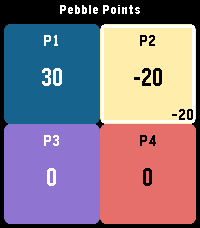
Track scores for 2 to 4 players with Customize player count and player names from phone settings
Switch the active player instantly
Increment or decrement scores with one click
Use negative scores when your game rules allow it
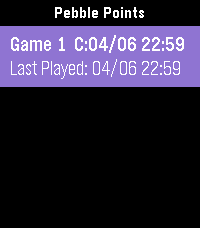
Keep up to 3 saved games and continue later
Replay a saved game using checkpoint playback
Toggle haptic feedback from phone settings
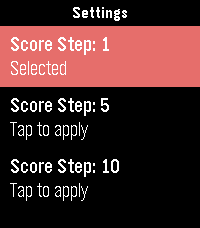
Set score step from watch settings (1, 5, or 10 points per click)
Reset only the active player to 0 with a long Select press

Core Features (Detailed)
1) Flexible Player Support
Supports 2, 3, or 4 players.

Layout adapts automatically:
2 players: vertical split
3 players: top full-width + two bottom panels
4 players: 2x2 grid
Active player is visually highlighted.

2) Fast, One-Handed Scoring
Up: add points to active player
Down: subtract points from active player
Select: rotate to next player
Long Select (~700ms): reset active player score to 0

3) Count-By Methods (Scoring Step)
Pebble Points supports multiple “count by” methods via score step:

Count by 1: +1 / -1
Count by 5: +5 / -5
Count by 10: +10 / -10
Set this from the app’s on-watch Settings menu.

4) Save and Continue Sessions
Keeps the 3 most recent games.
Stores creation and last-played timestamps.
Promotes a continued game to the newest slot automatically.
Preserves player names, scores, active player, and settings-backed behavior.

5) Phone Settings (Clay)
From companion settings you can configure:

Player count (2/3/4)
Player names (up to 15 chars each)
Haptic feedback on/off

6) Responsive Visual/Haptic Feedback
Haptic pulses for key scoring and selection actions (when enabled).
Score-delta indicator for recent change context.
Built-in animation scaffolding for pop/slash/confetti style effects.
How Pebble Points Differs from Typical Pebble Score Apps
Pebble Points focuses on speed + persistence + replay context rather than only raw counters:

Session-centric design instead of a single volatile scoreboard

You can keep multiple recent games and return later.
Replay-aware storage

Each saved game has a checkpoint track for playback.
Immediate replay-to-live handoff

You can watch a replay, then continue directly into live scoring.
Watch-first interaction model

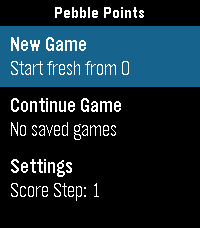
Most core flow (new game, continue, step changes, scoring) works directly on watch.
Practical count-by control

Native score-step selection (1/5/10) enables faster game-specific scoring patterns.
Replay Feature: Big Overview
Replay in Pebble Points is a checkpoint replay system, not a full event-by-event log.

Replay Flow
Open Continue Game.
Pick a saved game.
Choose Replay (when checkpoints exist).
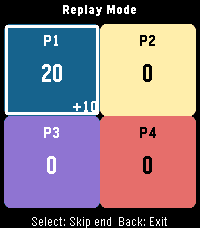
Watch checkpoint playback.
At end, press Select to continue directly into live game.

What Replay Can Do
Reconstruct score snapshots over time for a saved game.
Show progression of scores and active player across checkpoints.
Play checkpoints automatically on a timer (~300ms step).
Skip to replay end with Select while playback is running.
Restart replay after completion with Up.
Continue directly from replay end into active gameplay.

What Replay Cannot Do (Current Limits)
It is not a full tap-by-tap action history.
It does not store unlimited history (bounded checkpoint ring).
It does not allow editing while in replay mode (read-only replay view).
It does not branch/fork from arbitrary mid-replay checkpoints.
Replay availability depends on checkpoint data existing for that save.

Replay Data Model (Practical Constraints)
Up to 8 checkpoints per saved game.
Checkpoints are recorded from key moments (start, player switch, interval-based taps, larger deltas).
Data is bounded to stay lightweight on Pebble hardware.
- DeveloperClickCalickClick (Touchy Weather)
- CategoryGames
- PlatformsOG Pebble, Steel, Time/Time Steel, Time Round, 2, 2 Duo, Time 2, Round 2
- Updated2026-04-10
- Version1.6