Pixel8
nihplod
Watchface
Description
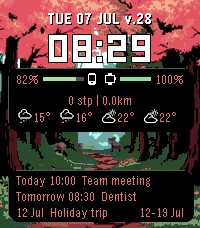
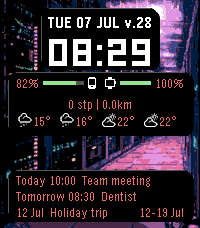
Pixel8 is a feature-rich watchface for every Pebble: Pebble Time 2, Pebble Time / Time Steel, Pebble Time Round, Pebble 2, the original Pebble / Pebble Steel, and the newer Rebble-made flint and gabbro. It shows the time and date, phone and watch battery levels, step count with heart rate, sleep duration, weather forecast, and upcoming calendar events — all on a customisable background.

Pixel8 is developed and daily-driven on a Pebble Time 2, which gets the most testing on real hardware. Support for the other platforms was added and verified in the Pebble SDK emulator rather than on physical devices, so if something looks or behaves oddly on your specific watch, please report it.

Three major panels — Clock, Info, and Calendar — can be freely reordered by dragging in the settings page, or hidden entirely. The bottom panel is always anchored to the screen edge. The clock panel can be hidden for a minimal data-only layout.

The Info panel has four sortable, individually toggleable rows:

Battery — phone and watch bars with colour-coded gradients and a lightning bolt icon when your phone is charging.
Steps — today's steps, distance walked, and heart rate with a pixel heart icon when a reading is available. Set a step goal in settings; the row turns green when you reach it.
Weather — up to 4 forecast columns (current, a few hours ahead, tomorrow, day+2) with weather icons. Provided by Open-Meteo, no API key needed.
Sleep — last night's sleep shown as hours and minutes.

The order of rows can be changed by dragging in the settings page.

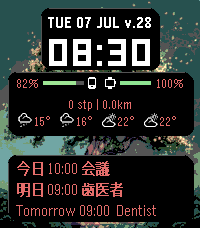
The Calendar panel shows your next 1 to 5 events from any iCal/ICS feed (Google Calendar, Nextcloud, Apple Calendar, etc.). Events also appear as Timeline pins with an Open Agenda action button. The "Today" and "Tomorrow" labels can be customised to anything you like (NOW, TMR, Idag, ...).

Style it your way: each panel's 3D card background can be toggled on or off (including a new card behind the clock), the text size of the Info and Calendar panels is selectable (14/18/24 px), the padding between panel borders and content is adjustable per panel, and the date can show the ISO week number (v.28).

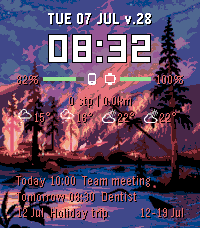
The background can be a custom PNG uploaded directly from the settings page (no hosting needed), a solid colour, or a custom PNG loaded from a URL. Add a second image or URL and it rotates with the first at set day/night times. A .list file URL rotates through a different image each day.

https://example.com/file.list with the following content
https://example.com/image1.png
https://example.com/image2.png

All panels and rows can be toggled on or off individually. Colours use the Pebble 64-colour palette.

How to convert an image for use as background — the settings page tells you the exact size for your connected watch and shows the right command. Sizes: Pebble Time 2 200x228, gabbro 260x260, Pebble Time Round 160x160, Pebble Time 144x168 (all colour); Pebble 2 / original Pebble / flint 144x168 (black & white). Always 32 KB or smaller.

Colour watches — indexed/palette PNG:
magick image.png -resize 200x228! -colors 64 -type Palette new_image.png

Black & white watches (Pebble 2, original Pebble, flint) — true grayscale, not a reduced colour palette:
magick image.png -resize 144x168! -colorspace Gray -type Grayscale -depth 1 -dither FloydSteinberg new_image.png

On Windows, install ImageMagick first (winget install ImageMagick.ImageMagick), then run the same commands in a new PowerShell or Command Prompt window.

No command line? Use free GIMP instead (Windows/macOS/Linux): Image > Scale Image, set width and height to your watch's size with the chain-link unlinked, then Image > Mode > Indexed with 64 colours (or Grayscale then a black & white Indexed palette for B&W watches), then File > Export As a PNG.

This watchface is vibe coded together with Claude for my own personal liking.
- Developernihplod
- CategoryFaces
- PlatformsOG Pebble, Steel, Time/Time Steel, Time Round, 2, 2 Duo, Time 2, Round 2
- Updated2026-09-08
- Version3.26.0