Plugins are a dev preview. Enable them first in the Pebble mobile app: Settings → Plugins → Plugins/permissions preview. Learn more
 45
Obsidian/Markdown Notes
Save notes as Markdown files in your Obsidian vault, or any folder, from your Pebble watch or Index ring.

Say what you want to save, for example "Idea: a reading list for winter". Each note can be its own file, or be added to the end of a note you pick. Reminders are written as Obsidian tasks.

Security and privacy:
- The plugin only reads and writes the folder you pick on your phone. It has no internet access and needs no account.
- Your notes are plain Markdown files, so they sync however you already sync your vault.
- The source code is on GitHub.

To set it up, install the plugin, open its settings and pick your vault folder.
 38
Google Tasks & Keep
Add reminders to Google Tasks and save notes to Google Keep from your Pebble watch or Index ring.

Say what you need to remember, for example "Remind me to renew my passport on Friday", and it goes to Google Tasks with the time you said. Notes go to Google Keep. Both use one Google account.

This plugin uses an unofficial Google API. Google Keep has no public API for personal accounts, so the plugin signs in and talks to Google Tasks and Keep the same way Google's Android apps do. Google could change this at any time, and the plugin would stop working until it's updated.

Security and privacy:
- You sign in on Google's own sign-in page. The sign-in is stored in your phone's secure storage and is only used to add reminders and notes.
- Reminders and notes go from your phone straight to Google over HTTPS. They don't pass through Pebble or Core Devices servers.
- The source code is on GitHub.

To set it up, install the plugin, open its settings and sign in with Google.
 16
Todoist
Add tasks to Todoist from your Pebble watch or Index ring.

Say what you need to do, for example "Remind me to call the dentist at 3pm". The task goes to your Inbox, or to the project you name, with the due time you said and a reminder. Your watch confirms when the task has been added.

Security and privacy:
- You connect Todoist on Todoist's own sign-in page. After that, tasks go from your phone straight to Todoist over HTTPS.
- Your connection is stored in your phone's secure storage and is only used to add tasks to Todoist. Disconnecting in settings removes it.
- The source code is on GitHub.

To set it up, install the plugin, open its settings and connect Todoist.
 9
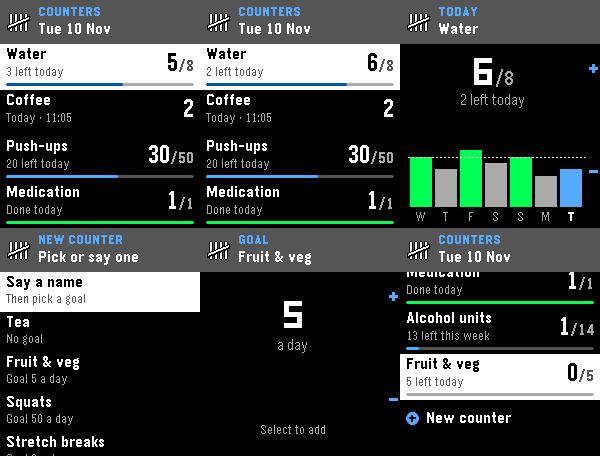
Counters (Plugin + App)
Tally counters on your watch and for any watchface: glasses of water, coffees, push-ups. Press to add one.
 8
TickTick
Add reminders to TickTick from your Pebble watch or Index ring.

Say what you need to remember, for example "Add dry cleaning for tomorrow". The reminder goes to your Inbox, or to the list you name, with the due time you said. Your watch confirms when it has been added.

Security and privacy:
- You connect TickTick on TickTick's own sign-in page. After that, reminders go from your phone straight to TickTick over HTTPS.
- Your connection is stored in your phone's secure storage and is only used to add reminders to TickTick. Disconnecting in settings removes it.
- The source code is on GitHub.

To set it up, install the plugin, open its settings and connect TickTick.
 7
Counters
Tally counters for any watchface: glasses of water, coffees, push-ups. Tap to add one.
 5
Remember The Milk
Add tasks to Remember The Milk from your Pebble watch or Index ring.

Say what you need to do, for example "Add oat milk to my groceries". The task goes to your Inbox, or to the list you name, with the due time you said. Remember The Milk reminds you using the reminder settings in your account.

Security and privacy:
- The plugin uses your own Remember The Milk API key, which you request from Remember The Milk. You then allow access on Remember The Milk's own page.
- Your key and sign-in are stored in your phone's secure storage and are only used to add tasks to Remember The Milk.
- Tasks go from your phone straight to Remember The Milk over HTTPS.
- The source code is on GitHub.

To set it up, request an API key on Remember The Milk's website, then open the plugin's settings, enter the key and shared secret, and allow access.