Plugins are a dev preview. Enable them first in the Pebble mobile app: Settings → Plugins → Plugins/permissions preview. Learn more
 31
LCD Rings
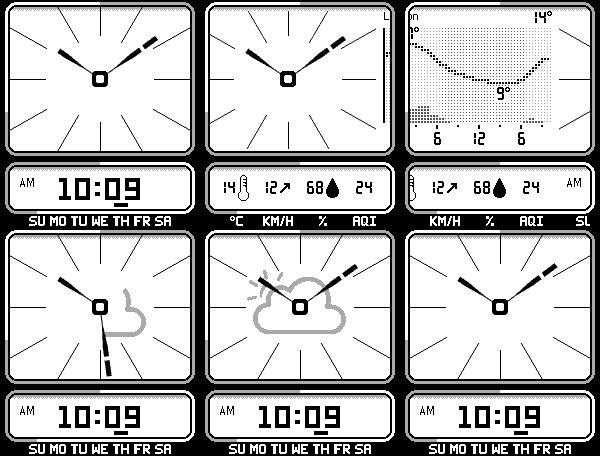
LCD Rings is my tribute to classic digital/LCD hand display watches. Made primarily for Pebble Time 2. As of 2.1.4 an experimental Pebble Round 2 mode has been added (I cannot test this myself sadly  - please contact me with any issues or feature requests).

To be very clear, this would not exist without Kieselleger's awesome LCD Hands, which heavily inspired this variation.

Current features:
- Rain at a glance: dashes round the dial show the rain due in the next hour, minute by minute from the minute hand.
- Configurable rings: the frame round each panel is a gauge for battery, steps, day and night, or the next hour's rain, in black and white or colour.
- Weather reveal: light/shake the screen and the minute hand sweeps round to uncover an animated weather icon, while the time slides away for the current conditions.
- Agenda and weather graph views: light/shake the screen to move between any of the new views, configured within the settings page.
- a brand spankin' new WebAssembly live preview of watch face within settings page.

Developed with AI assistance.

Credits:
- LCD Hands by Kieselleger: https://apps.repebble.com/lcd-hands_59411f6e0dfc32034b001049
- Casio AE-11W by Jack T: https://apps.repebble.com/casio-ae-11w_56a242b1956f0bdbf900003e
- Weather data by Open-Meteo.com (CC BY 4.0): https://open-meteo.com/
- Icons from Meteocons by Bas Milius (MIT): https://meteocons.com/
 13
Weather+
Weather+ — Global Weather Data for Pebble

Weather+ passes the forecast location’s time zone to compatible apps such as Timeline WX so they can display local forecast hours across daylight-saving changes.

Weather+ is a powerful, configurable weather data plugin for Pebble watches. It provides a shared source of detailed weather information for compatible Pebble apps and watchfaces, reducing the need for each app to manage its own weather services.

**Features**
- Worldwide weather forecasts with automatic provider fallback.
- Four forecast providers: Open-Meteo, MET Norway, NOAA National Weather Service (US), and OpenWeather.
- Hourly and daily forecasts, including temperature, feels-like temperature, precipitation, humidity, wind, gusts, cloud cover, UV index, and more.
- Weather alerts from NWS, MeteoAlarm, and OpenWeather, with automatic regional selection.
- Optional air quality information, including AQI and pollutant concentrations.
- Optional marine forecasts, including waves, swell, and sea temperature.
- Independent unit settings for temperature, wind, precipitation, pressure, and visibility.
- Configurable forecast provider priority and Open-Meteo forecast models.
- GPS or manually specified locations.
- Weather caching to reduce unnecessary requests.

**Reliable and configurable**
Weather+ includes data validation, source diagnostics, manual refresh, and worldwide provider testing. Advanced diagnostics are hidden by default and can be enabled when troubleshooting. Diagnostic reports can be saved to your phone.

**Requirements**
Weather+ supplies weather data to compatible Pebble apps and watchfaces; it is not a standalone weather display. Some features require internet permissions, and OpenWeather requires your own One Call 3.0 API key and subscription.

**Support development**
Weather+ is independently developed and maintained. If you find it useful, you can support continued development at: https://ko-fi.com/ericmccormick

**Pebble Weather Plugin Compatibility**

Weather+ can also use the official Pebble Weather plugin as a weather data source, providing a convenient option for users who already have it configured.
However, selecting the Pebble Weather plugin instead of Weather+'s direct weather providers may limit the weather information available, including the number of supported data fields and how far into the future forecasts extend.
For the most comprehensive weather data and longest available forecast range, we recommend using Weather+'s built-in providers, such as Open-Meteo, MET Norway, NWS, or OpenWeather.
 8
Air & Pollen
Air quality for any watchface, anywhere: the US and European AQI, PM2.5 and ozone, plus today's pollen in Europe.
 7
MET Norway Weather
Weather forecasts from the Norwegian Meteorological Institute (MET Norway) for your Pebble watch.

Get the weather now, hour by hour for today and tomorrow, the week ahead, and sunrise and sunset, for each of your weather locations and in your units. It can be your watch's weather source, so watchfaces and apps that show weather use it.

Security and privacy:
- No account or API key. Forecasts come from MET Norway's free public weather service.
- Your phone's location is only used for the current-location forecast.
- The source code is on GitHub.

To set it up, install the plugin and choose it as your weather source in the Pebble app's Weather settings.
 5
Moon & Sky
The moon's phase and the sun's day anywhere in the world, plus the UK aurora alert, for any watchface.
 5
ČHMÚ Weather
Czech station observations and local ALADIN forecasts for your Pebble.

ČHMÚ Weather is an unofficial weather plugin that runs inside the Pebble phone app. Choose it as your weather provider for Pebble Weather, the timeline and compatible readings in Dynamic, Halftone, Dashboard and other apps.

- Use your saved Pebble locations and units.
- Find a nearby station automatically or choose a fixed Czech station.
- See station temperature, with humidity and wind when available.
- Get hourly and daily ALADIN forecasts.
- Add missing forecast fields, rain probabilities, forecast UV and later days through Open-Meteo completion. It is enabled by default and can be turned off in settings.
- Configure the plugin in English or Czech.

Covers Czech locations. Nearby station observations may differ from conditions at your exact location. Cached readings keep their original age; Pebble controls native Weather update timing.

Requires internet access and plugin support enabled in the official Pebble phone app. This is a phone plugin with no watch app to open.

Free. Part of XOCE. No additional account, API key, ads, analytics or developer-operated server. Requests go to ČHMÚ and, when enabled, Open-Meteo. Independent of ČHMÚ, Open-Meteo and Core Devices.

Source and privacy: https://github.com/xefensor/pebble-chmu-weather
 4
Netatmo Weather
Connects Netatmo weather stations as a plugin source
 3
Weather Enhanced
Dependable weather on any watchface that reads weather, from your own provider, held inside its free plan so it never runs dry partway through the day.

Weather Enhanced counts every call it makes and keeps each provider inside its plan's limits, so a free key lasts the whole day, every day. When your provider has a bad moment, it keeps showing the last good reading, then switches to Open-Meteo until your provider is back. It serves weather the same way the Pebble app's own Weather plugin does, so a watchface written for it reads this with nothing to change, and picking it as your preferred source feeds the watch's own Weather app too.

- Never spends past a provider's free plan, with a Paid Plan switch for a key on a paid plan.
- Keeps the last good reading through a bad moment, then falls back to Open-Meteo.
- Works with Open-Meteo, with no account or key, or your own free OpenWeatherMap or WeatherAPI.com key.
- Adds pressure, dew point, and a fuller forecast for faces that show them.
- Also works with watchfaces that show your coordinates, such as LCARS Stardate.
- Fetches the first place in the Pebble app's weather list, or up to five.
- Follows the Pebble app's units, or your own.
- Refreshes every 15 minutes to 2 hours, your choice.

Weather data by Open-Meteo.com under CC BY 4.0. Weather data © OpenWeather. Powered by WeatherAPI.com.

To use it, turn on plugins in the Pebble app under Settings, Plugins, Plugins / permissions preview. Then pick Weather Enhanced as your Weather source.

-----
I mostly build things in my spare time, and your support helps keep that going. It usually finds its way into more green coffee beans, a few roasting experiments, and plenty of late-night coding sessions working on Pebble projects like this one.

If you've found something useful here, or simply enjoy following along with what I'm building, you can support my projects here:

https://ko-fi.com/nullsyntax