PrintWrist
Jordan Storme
Watchapp
Description
Your Bambu Lab printer, on your wrist, from anywhere.

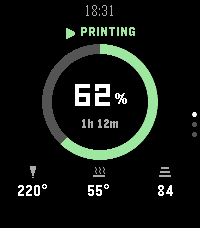
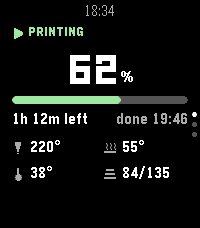
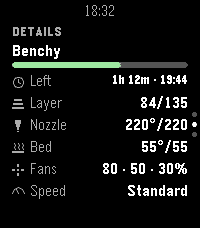
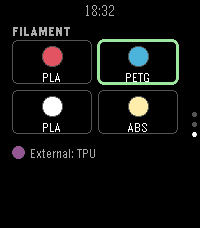
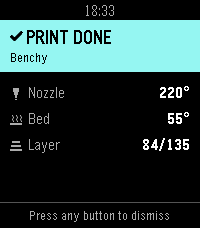
PrintWrist shows your print's progress, time left, temperatures, fans, speed and AMS filament on your Pebble Time 2, over Bambu Cloud, so it works away from home too. No server, no extra app, nothing to host.

- Three status layouts: Arc, Big Number, or Dense
- Up/Down for Details (temps, fans, speed, layers) and Filament (all 4 AMS slots plus the external spool)
- Buzzes when a print finishes, fails, or needs attention, with quiet hours
- Chamber light on/off and refresh from the watch

Setup: open PrintWrist's settings in the Pebble app and sign in with your Bambu Lab account. Bambu emails you a 6-digit code, which you enter on your phone or on the watch. Your password goes only to Bambu and is never stored; PrintWrist keeps the sign-in token on your phone.

Why no pause or stop? Bambu's firmware only accepts those commands from Bambu's own apps, so use Bambu Handy for them.

Tested on the P2S. Other cloud-connected Bambu printers should work but are untested.

PrintWrist is an independent project, not affiliated with or endorsed by Bambu Lab. It uses Bambu Cloud, which Bambu can change at any time.
- DeveloperJordan Storme
- CategoryTools & Utilities
- PlatformsTime 2
- Updated2026-09-26
- Version1.1.0