QuickAssist
tylxr
Watchapp
Description
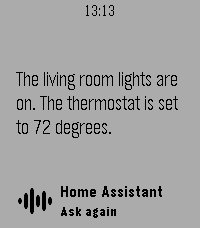
Open QuickAssist, speak your request, and read your assistant's reply on your wrist. Control devices and ask questions through your chosen Home Assistant voice assistant, then press the middle button to continue the conversation.

Features:
- Starts dictation on launch while connecting to the phone.
- Uses your selected Home Assistant voice assistant.
- Shows scrollable text replies with follow-up conversation support until you exit.
- Connects to Home Assistant and loads available voice assistants directly in the phone settings page.
- Shows connection, authentication, and assistant errors on the watch.

Requires Pebble Time 2, a compatible Pebble phone companion with working dictation, and a reachable Home Assistant instance with Assist configured. Setup requires your Home Assistant URL and a long-lived access token with permission to list and run Assist pipelines. Enter these in the app's phone settings, tap Connect, choose your voice assistant, and save.

Pebble handles speech transcription; Home Assistant handles the request. Replies are text only. Commands are submitted immediately after recognition without a confirmation step. Credentials are stored in the phone companion. Local Home Assistant URLs require phone access to your home network or VPN.
- Developertylxr
- CategoryRemotes
- PlatformsTime 2
- Updated2026-10-26
- Version1.4.0