Referee Timer (25/40 play clock)
Sheldon Smith
Watchapp
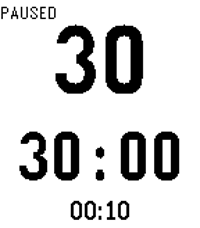
Description
A game clock and 25-second play clock that can be controlled independently.

New: Game clock defaults to 12 minutes but can be adjusted to any value and will be saved in memory.

Instructions
**************
UP BUTTON: Start 25s play clock/Reset play clock
LONG PRESS UP: Start 40s play clock

DOWN BUTTON: Start/Stop game clock

SELECT BUTTON (Long Press):
Enters setting mode.  If game clock is in the middle of a countdown, up and down buttons adjust the game clock.  Single click the select button again to exit the settings mode.  Long click to reset the game clock to the original value.

If game clock is already reset, long pressing the select button will enter a special mode to adjust the game clock's value.  For example, if you change the game clock from 12 minutes to 10 minutes, the clock will automatically reset to 10 minutes in the future.

The current mode of the clock is displayed in the top left corner of the screen.
- DeveloperSheldon Smith · Is this you? Claim your app ›
- CategoryTools & Utilities
- PlatformsOG Pebble, Steel, Time/Time Steel, Time Round, 2, 2 Duo, Time 2 (scaled), Round 2 (scaled)
- Updated2017-06-19
- Version4.2