Return to by flwkt
flwkt
Watchapp
Description
Return to by flwkt

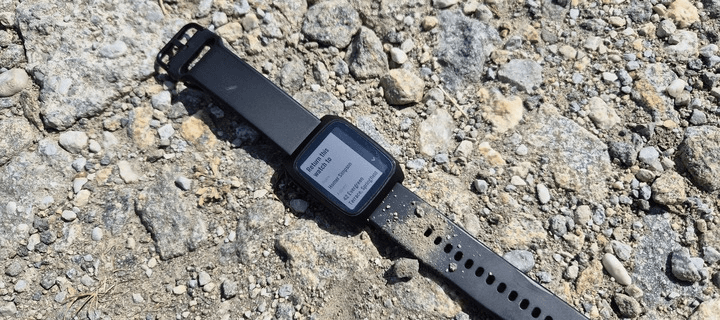
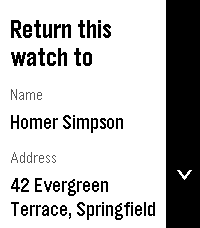
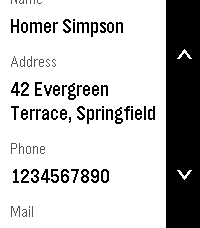
Lost your Pebble? Make it easy to get back. Return to shows a clear “Return this watch to” screen with your name, address, phone, and email — so whoever finds it knows how to reach you.

Set it once in settings and leave it on your app list. When it matters, the info is right there on the wrist.

Fill in any combination of:
- Name — Who the watch belongs to
- Address — Where to return it
- Phone — Number to call
- Mail — Email address

Empty fields are hidden so the screen stays clean.

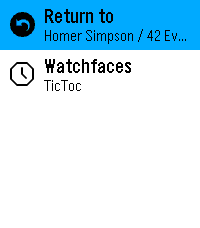
App list subtitle
Choose which fields appear under the app name in the launcher (name, address, phone, and/or mail). Selected values are joined with “ / ” so you can spot your contact at a glance without opening the app.

Recommendation
Pin the app to the top of your app menu so anyone who finds your watch and opens the menu sees it right away:

- Open the Pebble app on your phone
- Go to Apps
- Tap My Apps
- Long-press Return to and move it to the very top

Features
Readable on Time 2, Round 2, Pebble 2, and Pebble 2 Duo — Layout adapts to rectangular and round screens (including B/W), with scroll hints on the action bar when there’s more to see.
Configurable — Edit contact details and subtitle options from the phone settings page (Clay).
Built for finding your way home — A simple ICE-style contact card for your Pebble, nothing more, nothing less.
- Developerflwkt
- CategoryTools & Utilities
- Platforms2, 2 Duo, Time 2, Round 2
- Updated2026-08-06
- Version1.7