Tesla Control
Unknown
Watchapp
Description
Your Tesla, on your wrist.

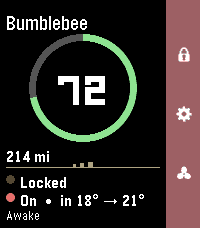
  Tesla Control turns your Pebble into a slim remote for your car. A clean status card shows your vehicle at a glance,
  and a right-side action bar maps the everyday controls to the buttons you already know.

  Status card
  - Your car's name and a bold battery ring with range
  - Doors (locked / unlocked) and climate (on, with inside → target temp)
  - Power state — Awake, Asleep, or Waiting for sleep — read live without waking the car
  - The accent color matches your car's paint (red, white, black, blue, silver, grey) on color watches

  Controls (action bar)
  - Up — Lock / Unlock (the padlock icon reflects the current state)
  - Down — Climate On / Off
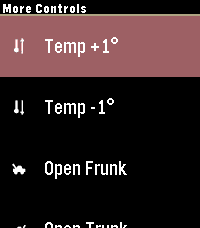
  - Select — More Controls: Temperature ±1°, Open Frunk, Open Trunk, Charge Port, Refresh — plus a Wake option when the
  car's asleep

  Smart about sleep
  Tesla commands only work when the car is awake, so Tesla Control checks first and wakes the car for you ("Waking…")
  before sending a command — no failed taps.

  Temperature your way
  See and set cabin temperature in °C or °F.

  Works on Pebble color watches (Time / Time 2 / Time Round) and black-and-white models.

  Requirements
  - A Tessie account (with your vehicle linked and an active subscription)
  - Your Tessie API token and vehicle VIN, entered once in the Pebble phone app's Settings

  Privacy
  Your Tessie token and VIN are stored only in the Pebble phone app's local storage and sent directly to Tessie over
  HTTPS. The token is masked after you save it and is never shown again.

Not affiliated with, endorsed by, or sponsored by Tesla, Inc. or Tessie. "Tesla" is a trademark of Tesla, Inc.; "Tessie" is a trademark of its respective owner. Requires a separate Tessie subscription.- DeveloperUnknown
- CategoryRemotes
- PlatformsTime/Time Steel, Time Round, 2, 2 Duo, Time 2, Round 2 (scaled)
- Updated2026-06-06
- Version0.0.1