Tesla Time
Tim Dorr

Watchapp
Description
Monitor and control your Tesla Model S from your wrist.

**IMPORTANT** Make sure you visit the settings from your Pebble or Pebble Time app first. The app won't work without it!

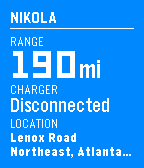
- Check your range and charge status
- Remember where you parked
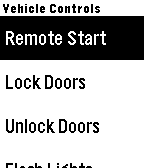
- Forgot your key? Unlock and remote start.
- Too cold? Too hot? Turn on the AC or heat to prep your car.

Log in to your Tesla account via the Settings.
- DeveloperTim Dorr · Is this you? Claim your app ›
- CategoryRemotes
- PlatformsOG Pebble, Steel, Time/Time Steel, 2, 2 Duo, Time 2 (scaled)
- Updated2017-05-26
- Version0.5