Thataway!
LeeTheGeek
Watchapp
Description
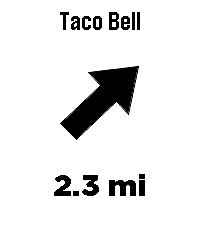
Thataway! points an arrow at the closest anything.

Type any business or place name - Taco Bell, Starbucks, a grocery store - and the arrow on your wrist always points at the nearest one, with live distance. Turn, and the arrow turns with you. Always points to the closest match.

No routes, no maps, just a direction and a distance, as the crow flies.

To enter a location or change settings go to Thataway! in the pebble app on your phone and click on the Settings button.

Mark where you're standing: hold the middle button to save your current spot - your campsite, the trailhead, where you parked. The app grabs a precise GPS fix, tells you how accurate it is, and the arrow leads you back. No cell coverage needed.

Save up to three favorite places with GPS coordinates in settings - these work without cell coverage too.

UP and DOWN cycle between your search, your marked spot, and your saved places right from the watch.

Fuzzy search - sloppy spelling still works
Vibrates on arrival (optional)
Imperial or metric units
Optional live GPS accuracy readout

The watch needs its Bluetooth connection to the Pebble app at all times - the phone provides the GPS. Internet is only needed for searching; marked and saved destinations work with no data signal at all, perfect for the backcountry. Distances are straight-line, not driving directions. If the watch asks, wave it in a figure-8 to calibrate the compass.

Note: Support for the OG pebble time is not confirmed yet, if you try it and it works please let me know, I have only done emulator testing of it.

Search data (c) OpenStreetMap contributors, via Photon and Overpass.
- DeveloperLeeTheGeek
- CategoryTools & Utilities
- PlatformsTime/Time Steel, Time 2
- Updated2026-08-11
- Version1.1.2