Timer / Chrono
ACW Bright
Watchapp
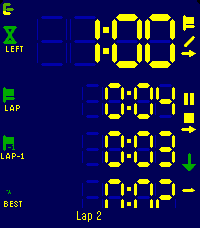
Description
Modes
-----
Count up, count down for a duration, or count down until a clock time.
The three are distinguishable modes, each with its own screen layout, colours and alarms.

Flexible layout
---------------
You decide what every line shows.
Up to four lines per mode, each one picked from: total time, remaining, current lap, prior lap, fastest, average, the gap between the current lap and any of those, the end time, or the lap count.
Pick a size per line: XL, L, M or S. The LCD digits fill whatever space is left.

Laps
----
Laps work in both directions and exclude paused time.
The lap list shows each lap against the one before, with the fastest marked.

Alarms
------
Alarms fire at the end, before the end, at intervals, or when a lap reaches a reference lap.
Each one can vibrate, sound, or both.
Alarms still fire with the app closed.

Buttons
-------
Every button shows what a short press and a long press will do, and how far a hold has got.

Touch
-----
Setup, changing start/end times etc. can be done with gestures too: Click a field and use clockwise to increment, counter clockwise to decrement.

Watch/Phone
-----------
Everything runs on the watch. Layouts and colours are edited on the phone, where there's room for it, which is a single-setup most of the times.


Ready for Pebble Time 2, Pebble Time and Pebble 2.- DeveloperACW Bright
- CategoryTools & Utilities
- PlatformsTime/Time Steel, 2, 2 Duo, Time 2
- Updated2026-09-24
- Version1.0.1