Tiny Agent
Justin Sunseri
Watchapp
Description
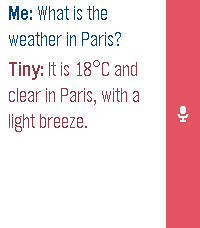
A voice-first AI assistant for Pebble, built with Alloy and Poco. You open the app, see your recent conversation, press select, talk, and get a short text answer. Tiny can also set timers, alarms, and reminders.

Features
- Conversation is the whole UI: no home screen, no menus, no cards.
- Right-hand accent bar with a microphone. Select starts dictation, up/down scrolls, back exits.
- Dictation auto-sends; an optional Clay toggle adds the system confirmation screen.
- Timers and alarms run on the watch with wakeups. Reminders are timeline pins inserted by the phone.
- Tool results are plain text: no timer widgets, weather cards, maps, or images.
- Theme colours and a font-size override in Clay, plus a full conversation history tab.

A faster agent loop: two System One models and one LLM

Most assistants send every request to a large language model and wait for it to generate tokens. Tiny Agent splits the turn into three jobs, and only the last one uses a traditional LLM:

- Clef-flash decides what the request is. The phone sends the conversation state and a schema with one choice question listing every tool. Clef returns a probability for each option in a single parallel pass. This is the router.
- Clairic extracts the arguments. For the chosen tool, the phone sends the state and a schema of typed fields. Clairic returns one typed value per field — a text span, a number, a date, a time, a duration — with confidence and p_null. This is the extractor.
- The LLM writes the answer, only when needed. Open-ended, ambiguous, multi-step, and web-synthesis requests go to a normal chat model (Gemma 4 26B on the free plan). Deterministic tool calls — timers, alarms, weather, reminders — run the tool and answer from a template without invoking the LLM at all.

Clef and Clairic are System One models: they read the input once and answer in a single parallel pass, instead of generating one token at a time like a System Two LLM. That is what makes "set a timer for ten minutes" or "what's the weather in Paris?" feel immediate. The core idea is that a tool call is a decision plus a typed extraction, not a generation — so the expensive model is reserved for the cases that actually need reasoning or prose.

What are Clef and Clairic?

- Clef is Cloudflare's open-weight decision model. You give it a state and a schema of typed questions (noul, choice, or score), and it returns a calibrated probability for every allowed answer. Tiny Agent uses @cf/cloudflare/clef-flash, the 9B latency-optimised version, for the hot path.
- Clairic is Cloudflare's System One extraction model. You give it a state and a schema of typed fields (text, number, date, time, datetime, duration, list, estimate, forecast), and it returns one typed value per field, plus confidence and p_null. It does not generate tokens: it reads the input in one pass and decodes each answer under the rules of its type. Tiny Agent uses @cf/cloudflare/clairic for tool arguments such as what, when, query, and in_seconds.

The chat model is a normal System Two model. The free plan uses Gemma 4 26B; Workers Paid adds DeepSeek V4.1 Flash, Inkling 2 Small, and GLM 5.3.

Why Cloudflare?

Clef and Clairic are hosted on Cloudflare Workers AI, and the phone calls them directly through the Workers AI REST API. There is no separate inference server to run: one Cloudflare account and one API token cover the router, the extractor, and the chat model. That is why Tiny Agent uses Cloudflare rather than a generic LLM endpoint — the two System One models sit behind the same API as the LLM, and they are what make the fast path possible.

A free Cloudflare account includes 10,000 Neurons per day, Cloudflare's GPU-compute unit, reset at 00:00 UTC. The fast path is deliberately cheap: the router is a 9B model and Clairic has no output-token charge, so a typical turn costs on the order of tens of Neurons. For normal personal use that is enough — you do not need Workers Paid. Heavy use can hit the daily cap, at which point Workers Paid costs $0.011 per 1,000 Neurons above the free allowance. See the Workers AI pricing page for current rates.

Setup

- Install the app on the watch and open it.
- Open Tiny Agent settings in the Pebble mobile app.
- On the Setup tab, enter your Cloudflare Account ID and a Workers AI API token. See Create a Cloudflare Workers AI token.
- The app defaults to the free plan and Gemma 4 26B. Turn on Workers Paid to choose DeepSeek V4.1 Flash, Inkling 2 Small, or GLM 5.3.
- Optionally add a Brave Search API key for web search. See Create a Brave Search API key (optional).
- Use Save at the bottom of the settings page, then Save and test connection to check the credentials.

Create a Cloudflare Workers AI token

- Sign in to the Cloudflare dashboard and open Workers AI.
- Select Use REST API.
- Select Create a Workers AI API Token.
- Review the prefilled permissions, then select Create API Token.
- Copy the API token.
- Copy your Account ID from the same page.
- Paste the account ID and token into Tiny Agent's Setup tab and select Save.

The token only needs Workers AI inference access. Keep it in the phone's local storage; it is never committed to the repo.

Create a Brave Search API key (optional)

Web search is optional. Tiny Agent uses Brave for questions that need current information.

- Create an account at api-dashboard.search.brave.com/register and verify your email.
- Open Plans, choose the Search plan, and activate it. Brave requires a card; set the prepay amount to $0 if you only want the included free credit.
- Open API Keys, select Add API Key, give it a name such as "Tiny Agent", and copy the key.
- Optionally set a Usage limit and a usage alert in the dashboard.
- Paste the key into Tiny Agent's Setup tab and select Save.

Each Brave plan includes $5 in free credits every month, about 1,000 Search requests. Brave does not offer a standalone free plan, and a card is required to activate one.

The API tokens and the full transcript stay in the phone's local storage. The watch keeps the last five exchanges in memory and re-syncs them from the phone on launch, along with the theme and pending timers and alarms.
- DeveloperJustin Sunseri
- CategoryTools & Utilities
- PlatformsTime 2, Round 2
- Permissions
- Updated2026-11-28
- Version0.1.0