Tool Watch + Flight Tracker + F1
geochrist
Watchface
Description
TOOL WATCH + FLIGHT TRACKER + F1

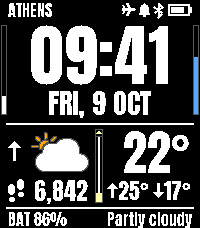
A bold, highly readable watch face for the Pebble Time 2, built around the Anton typeface. An everyday watch, a weather station, a compass, an alarm clock, a reminder board, a personal flight board and a Formula 1 companion, all on one face. Prefer less on screen? Switch to the calm SIMPLE FACE with one setting.

=====================================
THE WATCH FACE
=====================================

TIME
- Large, clear Anton digits
- 12 or 24 hours, optional AM/PM and leading zero
- Optional seconds
- Optional bottom line (battery percentage and weather text). Turn it off and the time and date get the extra room

DATE
- Several date formats, short or full day name, optional bold date
- 41 languages, including Greek, Cyrillic, Chinese, Japanese and Korean

WEATHER (no account or key needed)
- Current temperature, today's high and low, and the condition in words
- Colour weather icons, or classic monochrome icons
- Your city name, from your phone's location
- A barometric trend arrow: rising, steady, falling, storm warning
- Wind and humidity bars on the screen edges, with a marker for the strongest wind expected in the next 3 hours
- Celsius or Fahrenheit

MOON PHASE
- A moon gauge showing how full the moon is, with an arrow for waxing or waning
- A small full-moon icon next to the temperature on the day of the full moon

HEALTH AND STATUS
- Step counter
- Battery and Bluetooth icons
- A bell icon when the alarm is on, and a plane icon while you follow a flight
- Bluetooth disconnection alert: a double vibration and a "BLUETOOTH DISCONNECTED" message for a few seconds. Turn it off, or choose a quiet time (2 minutes to 2 hours) so it doesn't nag when the connection comes and goes, for example when you walk away from your phone at home
- Respects your watch's own Motion Backlight setting

SECOND TIME ZONE
- Every UTC offset in the world, plus a custom offset and label
- Summer time is handled automatically

TIMING (in the date row)
- Event countdown, with the event's own time zone. In the last 24 hours it counts down in 5-minute steps, then by the minute
- Stopwatch
- Timer: when it reaches zero you get a double vibration, and 0M 00S blinks for one minute

ALARM
- Choose the time and the days of the week
- Vibration, sound or both
- A soft chime that starts gently and reaches full volume in 40 seconds
- The backlight turns on while it rings
- Stop it with two firm shakes
- If you don't stop it, it rings for 90 seconds, pauses 3 minutes and repeats twice, then stays quiet for the rest of the day

COLOURS
- Choose the colour of every element: background, time, minutes (simple face), date, city, status icons, lines, dividers, weather, temperature, steps, bottom line, wind bar, humidity bar and moon
- One-tap reset to the defaults

=====================================
REMINDERS
=====================================

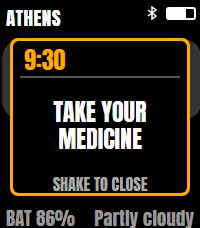
Up to 30 reminders, set up on your phone. At the right moment the watch lights up, vibrates and shows your message in a box with the time and a bell.

WHEN IT GOES OFF
- Every day
- Certain days of the week
- Certain days of the month (for example the 1st and the 15th)
- Every year on a date (with an optional warning the day before, shown as TOMORROW)
- By elapsed time: every N minutes, hours, days or months from a start date
- One time only: a single date and time in the future. It never repeats

YOUR MESSAGE
- Up to 40 characters. The watch font has capitals only. Greek and Russian letters are written in Latin letters, and the settings page shows exactly what the watch will display

HOW IT BEHAVES
- The message stays until you shake the watch, or disappears by itself after a number of seconds you choose
- Optional "vibrate again" if you haven't dismissed it
- Vibration length: short, medium, long or very long
- The next time each reminder will go off is shown in the list and when you open it. Dates follow the date format you chose
- A one-time reminder that has gone off stays in the list, greyed out, until you delete it

=====================================
SIMPLE FACE
=====================================

One switch in the Time settings gives you a calm, uncluttered face:
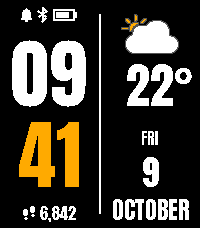
- The time in huge stacked digits: hours over minutes, with the minutes in a colour of your choice
- One column with the weather icon, the temperature, the weekday, the day number and the month written out in full (NOVEMBER, not 11)
- Your step count under the time
- A row of status icons above the time: flight, alarm, Bluetooth and battery. An icon that is off leaves no gap
- It still has the alarm, the reminders, the shake screens and the Bluetooth message
- Seconds, second time zone, countdown / stopwatch / timer, wind and humidity bars, moon gauge, pressure arrow and the bottom line belong to the full face and are hidden while the simple face is on. Switch back any time

=====================================
THE SHAKE SCREEN: YOUR CHOICE
=====================================

Shake the watch firmly to open a second screen. You choose which one in the settings:

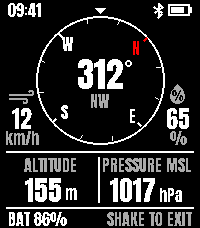
- COMPASS
- FLIGHT
- FORMULA 1

Only the chosen screen fetches data, so you never spend requests you don't need. Shake firmly again to return to the time. The compass and Formula 1 screens can also return to the time by themselves after 1 or 5 minutes.

=====================================
COMPASS
=====================================

- A large rotating dial with heading in degrees and N, NE, E ...
- Wind speed and humidity beside the dial
- Altitude from a terrain model, and sea-level (MSL) pressure
- Calibration help: a figure-8 animation shows you how to calibrate

=====================================
FLIGHT
=====================================

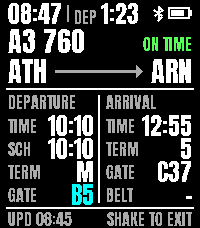
Enter your flight number, and the shake screen becomes your personal flight board.

WHAT YOU SEE
- Flight number and status: ON TIME, DELAYED +16M, IN THE AIR, LANDED, CANCELLED, colour-coded
- Route, e.g. ATH -> ARN
- Departure: time, scheduled time, terminal, gate
- Arrival: time, terminal, gate, baggage belt
- Your seat number (optional, from your boarding pass)
- A countdown next to the clock: DEP 1:23 to departure, then ARR 2:05 to landing, turning orange in the last 30 minutes
- Times later than scheduled are shown in orange

IT TELLS YOU WHAT CHANGED
- A long vibration when something important changes: a gate, terminal, belt, status, or a time shift of 5 minutes or more
- The changed value is shown in cyan for one minute, so you see at a glance what's new

IT WORKS BY ITSELF
- Your flight is checked once a day, 3, 2 and 1 days before departure. The bottom line shows CHECKED and the time, so you know the watch has captured your flight (if the service already lists it, the route and times appear too)
- On the day of the flight the screen opens by itself when the data arrives, and stays on until you shake it away
- Updates are planned around your flight: frequent near the gate and around landing, sparse in between, to save your monthly requests
- If you enter AM instead of PM (or the other way round), it notices and corrects the departure time
- Overnight flights that took off yesterday are supported
- If something is wrong, the bottom line says so: KEY ERROR, NO DATA, API LIMIT or OFFLINE
- When the flight is over (belt known, or 1 hour after landing), it clears itself

FLIGHT DATA: YOUR OWN FREE KEY
The flight screen uses a flight-data service with your own free API key:
- AirLabs (recommended): about 1,000 free requests a month, planned for around 10 flights a month
- Aviationstack: 100 free requests a month, planned for around 4 flights a month (2 return trips)
Enter the flight number as on your boarding pass, e.g. A3 912 or LH 1283. Spaces and leading zeros don't matter.

=====================================
FORMULA 1
=====================================

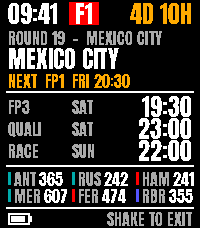
Follow the Formula 1 season on your wrist, free, with no account or key needed.

TWO WAYS TO DISPLAY IT

Follow the race weekend (default): one page, chosen by what's happening.
- Normally: the next race with its round, city and Grand Prix, a line naming the next session, the last three sessions (FP3, qualifying, race) in your local time with big times, and the championship standings: top 3 drivers and top 3 teams
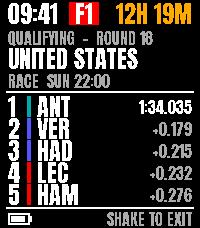
- After qualifying: the final qualifying result (Q3) with pole time and gaps, until the race starts. It appears only when the result is complete and confirmed, so a delayed session never shows Q1 or Q2 times by mistake
- After a sprint: the sprint result, for 1 hour
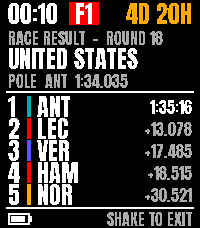
- After the race: the race result with gaps and pole, for 18 hours
- Then: the next race with its countdown and the updated standings

Pages turn by themselves: next race, qualifying, last race and standings, every 6 seconds.

ALWAYS ON SCREEN
- A big orange countdown on the top line to the next session: 3D 10H ... 25M ... NOW
- Team colour stripes for every driver
- Sprint weekends are shown with their sprint sessions

RESULTS, FAST
- After qualifying or a sprint, your phone checks every minute, so results appear as soon as the official classification is published. After the race it checks every 5 minutes at first, then every minute from 95 minutes after the start. The qualifying result is shown once two checks in a row agree
- A long vibration when new results arrive while the Formula 1 screen is open

=====================================
SETTINGS
=====================================

All settings are on your phone, in collapsible cards: Time (including the Simple face and Bottom line switches), Date, Alarm, Second time zone, Weather, Shake screen, Timing, Flight, Bluetooth, Reminders and Colours.

=====================================
GOOD TO KNOW
=====================================

- Made for the Pebble Time 2.
- Flight data comes from third-party services and can lag behind the airport's departure boards, especially for gate and belt changes. Services often list a flight only shortly before departure, so the checks 1 to 3 days ahead may only confirm that the watch looked. Always follow the official airport and airline information. For the fastest gate alerts, also turn on notifications in your airline's app.
- Formula 1: the calendar and standings come from Jolpica-F1 and the session results from OpenF1, both free community services. Results appear once the official classification is published, not live during a session. Sprint qualifying results are not shown.
- Reminders are checked by the watch itself, so they work without your phone. A reminder is missed if the watch is switched off at that minute.
- Battery friendly: the watch face only uses the accelerometer when shake-to-open is on, the alarm is ringing or a reminder is waiting to be shaken away, and only the chosen shake screen fetches data.
- Privacy: your location is used only to get weather and your city name, through Open-Meteo and BigDataCloud. Your flight API key is stored only in the app's settings on your phone, and is sent only to the flight-data service you chose. Note: Aviationstack's free plan only allows unencrypted connections, so the key travels unencrypted; AirLabs uses a secure connection. Formula 1 data is fetched from Jolpica-F1 and OpenF1 without any personal data (like any web request, they see your phone's internet address).
- Developergeochrist
- CategoryFaces
- PlatformsTime 2
- Permissions
- Updated2026-11-10
- Version1.34
- Battery ImpactSmall (5-15% shorter battery life)Measured across all versions; latest version v1.34 not measured separately yet