 6
6Departures
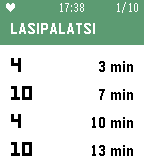
Tools & UtilitiesThis Pebble app answers the question: when does my tram or bus leave? Departures displays the next four tram and bus departures for up to 10 stops. It works in all of Finland and Estonia, including Helsinki, Tampere, Turku, and Tallinn. By default, Departures will show the ten nearest stops based on your location. Add stops to your Favorites list to always display them first, and to see their departures even when you aren't nearby. See the stop code (e.g. H1234, visible in the HSL/HRT route planner and on tram and bus stop signs) to make sure you're adding the right stop. Favorite stops are saved in the Pebble app on your phone, so your favorites will always be syncronized no matter which Pebble you decide to wear. On color Pebble watches, bus stops are colored blue, and tram stops are colored green. On Pebble Classic and Pebble Steel watches, route numbers (e.g. "1T" and "21N") are simplified to just numbers, due to font limitations on those watches. Using Departures for Finland and Estonia? Do you have feedback, or have you noticed a bug? Email me at joel@potatofi.com.
 47
47Hubble
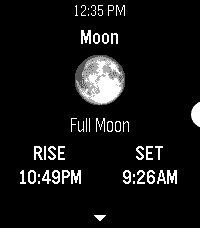
Tools & UtilitiesAn astronomy app for Pebble. It uses the time and your location to obtain the azimuth & altitude of the sun, moon, planets, and various constellations. Eligible bodies will also display their phase, rise & set times, and relative illumination levels. No internet access required. Locate these objects around you using only your Pebble’s accelerometer and compass, simply by holding your watch right in front of where you are looking. The ‘😊’ emoji in the locator reading indicates your compass heading has been corrected for magnetic declination. Keep track of the things in the sky outside of the app too, right on your Timeline: Pin rise/set times, twilight (civil, nautical, and astronomical), solar noon, solstices, equinoxes, eclipses, and more! Visit the app settings to decide what to include.
 17
174-7-8 Breathing
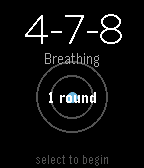
Health & Fitness4-7-8 Breathing Find calm in minutes with the proven 4-7-8 breathing technique. A simple breathing app for your Pebble watch. Practice 4-7-8 breathing to reduce stress, ease anxiety, and improve sleep. Features: Guided 4-7-8 breathing: Inhale for 4, hold for 7, exhale for 8 Visual breathing circle that expands and contracts with your breath Customizable rounds: Choose 1-10 rounds (default: 4) Progress tracking shows which round you're on Haptic feedback at phase transitions Clean, minimal design Why 4-7-8? Developed by Dr. Andrew Weil, this technique activates your body's relaxation response. Use it to calm down when stressed, fall asleep faster, manage anxiety, or reset during the day. How to Use: Open the app Adjust rounds with UP/DOWN buttons Press SELECT to begin Follow the visual guide and breathe Perfect for quick sessions at your desk, before bed, or whenever you need a moment of calm. Take a breath. Find your center.
 8
8Wrist & Biases
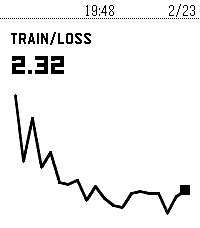
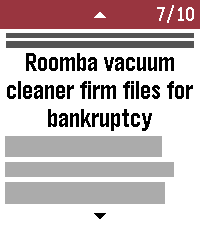
Tools & UtilitiesMonitor your Weights & Biases ML training runs from your Pebble smartwatch.
 607
607News Headlines
DailyRead the top 10 - 20 BBC News stories on your wrist. Categories available: Headlines, World, UK, Politics, Science & Environment, Technology, Health, Education, Entertainment & Arts. Also includes regions around the world! Category, region, and number of stories is configurable from within the app. Note: This app is not an official BBC News app, but a novel use of its public feeds.
 7
7Blue Card Jokes
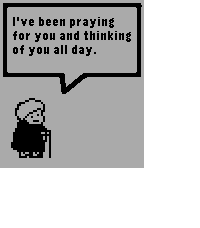
DailyThis is a collection of the blue card jokes from Norm Macdonald Live and Norm Has A Show.
 21
21Instant Gram
DailyInstant Gram provides you with a small dose of heartwarming encouragement every time you open it!
 2
2Button Masher
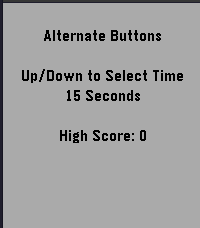
GamesButton Masher is a speed test to see how fast you can press your watch buttons. Can you beat your high score? Select 15s, 30s, 45s, or 60s and start pressing the up and down buttons to crank up your score!
- 2
xDrip+ Snooze
NotificationsxDrip Snooze shortcut
 11
11Disc Golf Counter
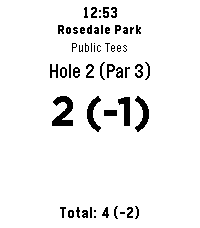
Health & FitnessLeave your phone in the bag and focus on your throw! Disc Golf Counter is the ultimate wrist-based caddie for your Pebble, powered by real-time course data. Unlike simple tally counters, this app uses your phone’s GPS to automatically find the nearest disc golf courses and download the actual scorecard layouts. KEY FEATURES: GPS Course Finder: Automatically detects nearby courses. Smart Layouts: Select the specific layout you are playing (e.g., "Main", "Advanced", "Shorts"). Supports dynamic hole counts (9, 18, 27, etc.). Live Scorecard: Tracks your strokes, current hole Par, and your total score relative to Par (e.g., +2, -1, E). Persistent Storage: Your game is saved automatically. If you exit the app, your score is waiting for you when you return. Readable Interface: Large, high-contrast numbers for easy reading in bright sunlight. CONTROLS: SELECT (Click): Add Stroke SELECT (Long Press): Subtract Stroke (Undo) UP (Click): Next Hole DOWN (Click): Previous Hole UP (Long Press): Refresh GPS / Find Course DOWN (Long Press): Reset Round (Clear Score) COMPATIBILITY: Works on all Pebble models (Original, Steel, Time, Time Steel, Round, 2). Note: This app requires a connection to your phone to fetch course data.
 8
8igitimer
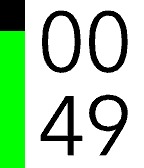
Tools & UtilitiesA simple and functional timer for Pebble smartwatches, featuring a high-contrast interface and quick controls. Button Functions UP Button Single Press: Adds 1 minute to the timer. Long Press: Adds 5 minutes to the timer. Note: Incrementing resets seconds to zero. SELECT Button (Center) Single Press: PAUSES or RESUMES the countdown. Long Press: RESTARTS the timer using the last set total duration. DOWN Button Single Press: Subtracts 1 minute from the timer. Long Press: Subtracts 5 minutes from the timer. Note: If the time reaches zero, the timer stops. User Interface Display: Minutes in the top half, Seconds in the bottom half. Progress Bar: A vertical bar on the left (green on black background) empties as time passes. Status: When paused, a pause icon appears in the center. When time expires, the watch vibrates.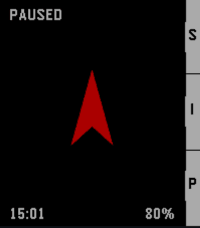 50
50PureNavi
Tools & UtilitiesPureNavi is a minimalist, highly efficient straight-line navi. Instead of distracting you with complex maps, PureNavi delivers navigation in its purest form. A single arrow and the exact distance to your destination. Nothing more. Nothing less. The v2 update introduces a refined hybrid engine that intelligently combines GPS and compass data. This ensures a smooth, stable needle that stays on course whether you are moving at pace or standing still. You can also pin your current position instantly with a single button press. This is perfect for finding your car again or marking any spot you want to return to later. PureNavi navigates exactly as the crow flies. Direct. Clear. Focused.
 416
416Weather Graph
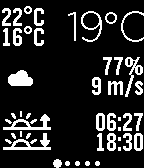
DailyDisplay a graph for the upcoming 24 hours, showing details on temperature, rain precipitation, and wind speed. The interface consists of 7 screens, starting from current conditions, progressing through the next 24 hours, and extending to a 6-day forecast. Rain is displayed as vertical blue bars, with each row representing 1mm of expected precipitation. The temperature line is color-coded: red or blue, depending on whether the temperature is above or below freezing. Additional features include: Wind speed and direction Moon phase Current humidity Daily forecast: Rain precipitation and probability Sunrise and sunset times Weather data can be based on GPS, a fixed location, or voice input. Languages supported for automatic day settings: English French Spanish German Options available: GPS On/Off Fixed Position Metric/Imperial units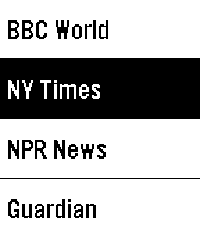 18
18FlashRead News
DailyFlashRead News brings RSS feeds to your Pebble using RSVP (Rapid Serial Visual Presentation), a proven speed-reading technique that displays words one at a time, centered on the optimal recognition point. Features: 6 pre-configured news sources (BBC, NY Times, NPR, Guardian, Le Monde, Reuters) Add unlimited custom RSS feeds via phone configuration Adjustable reading speed from 100 to 600 WPM Read headlines, then dive into full article descriptions Optional backlight during reading Navigate between articles with physical buttons Perfect for the small Pebble screen. Free and open source.
 32
32Memos
Tools & UtilitiesA very simple app to connect with your self-hosted Memos server and quickly send thoughts or ideas straight over! Requires dictation. https://github.com/usememos/memos Use keywords such as: check box -> - [ ] title (big/medium/small) -> (#/##/###) new line -> \n hashtag "word" -> add a tag --------------------------------- These take advantage of Memos use of markdown (.md) to 'fancify' your notes. May add the ability to pull your memos from the server to view on your watch at some point. We shall see. I have only tested on the old iOS pebble app, and a pebble time.