 31
31PebbleBus
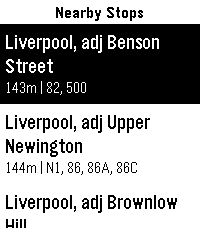
Inspired by the great PebbleRail, PebbleBus is an equivalent app for UK and Ireland buses:

- Find nearby stops
- Check a list of services from a stop, including expected and actual (live) arrival times
- Check stops along the route for a given service to see when you should arrive at your destination
- Save your favourite stops so you can check times for them even when you're not nearby (long press a stop to add/remove it as a favourite)

Data provided by the excellent bustimes.org, thank you!
 1
1Nextcloud Deck
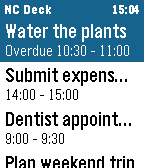
Pebble watchapp for Nextcloud Deck: browse cards, mark them done or archive them from your wrist, and get timeline pins with actions.
 4
4TheEconFeed
A section menu of all 17 Economist sections leads to scrollable headline-and-dek feeds you can flick through story by story. Everything is cached on the watch, so once a section has loaded it keeps working offline from that cache. Reads The Economist's public RSS feeds. Not affiliated with or endorsed by The Economist. Collects anonymous usage statistics, including approximate country.
 29
29Rain Map
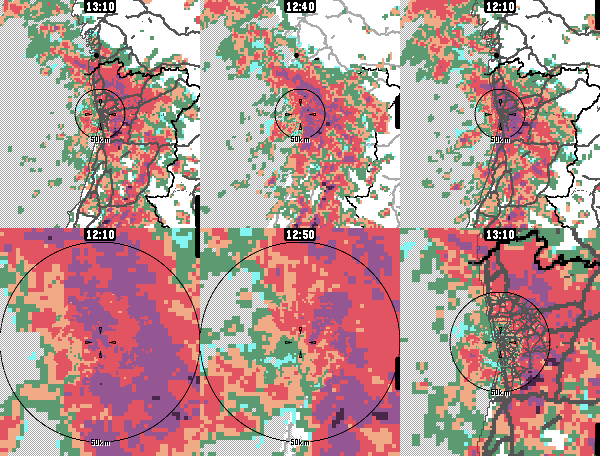
App for viewing recent rain radar data. For the most accurate near-future rain forecast.

The app features proximity-based resolution, to give you the most detailed data closest to your location.

Radar data sources:
- Rainviewer, https://www.rainviewer.com/
- Finnish Meteorological Institute, https://en.ilmatieteenlaitos.fi/open-data-manual-radar-data
- Maybe others in the future

Map data sources:
- Geoapify for live raster tiles
- OpenStreetMap & Natural Earth for static vector maps

App controls:
- Select timestep: Press up/down or touch the screen
- Switch zoom level: Press select/back
- Highlight map features: Long-press select
- Show legend: Zoom too much

Configure units, (free) Geoapify API keys etc. from the app's phone-side settings page.
 12
12WristList (Index 01 for your watch!)
Pebble Index for your watch.

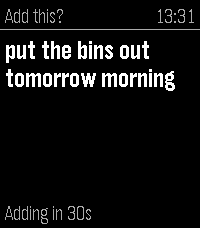
This app allows you to dictate a message on your watch and publish the dictation to a CalDav server (Nextcloud/Ownecloud etc.) as a Task.

Just add the CalDav address into settings along with the user and password to send messages to the server.

Map the app to a physical Quick Launch button and adjust the "Quick Launch Action" settings in WristLists watch app to 'Dictate'.

This will open the dictation function when the app is launched from a watch button. Speak the Task and either confirm with the select or wait a specified period and it will save automatically.

No intermediate processing, uses the Pebble dictation capability and your task is sent direct to your server.

Features include:
-View your Task Lists
-Dictate Task Notes
-Edit Tasks (including Task properties)
-Mark as Done / Delete Task
-Open Dictate on Quick Launch setting option

If you like this app please heart it, and if you find it useful feel free to buy me a coffee on Ko-Fi, can say thanks here https://ko-fi.com/ben839721
 12
12Werkbank
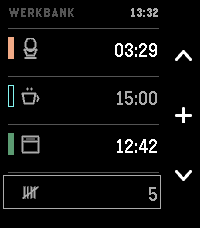
Three timers and a tally counter, for when your hands are already busy.

In a kitchen or a workshop you often can't look at a screen or type a label: your hands are covered in dough, or holding something.

Three tracks, side by side. The question this screen answers is not "how long has this one got" but "which of these finishes first" — a comparison, so all three are shown at the same size and scale at once. A carousel hides two of them; a ring of arcs distorts them. This is a list.

Each track has its own colour — the label you never have to set.

USING IT

Up / Down — choose a track.

Select — set a time; or start, pause, resume, acknowledge. The middle icon always shows what the button will do next.

While setting: Up and Down change the time, and holding a button runs through it. The step grows with the value — ten seconds under a minute, half a minute up to ten, then whole minutes. Select starts it. Back keeps the time without starting it.

Select, held — give the track a pictogram. Eleven, each one a thing that takes time: an egg, a pot, an oven, a bowl for dough to rise, a cup to steep, a brush for paint to dry, a clamp for glue to set, laundry, a tablet, an hourglass for anything else, and a blank to remove one. Naming stays optional; a timer starts without a label, always.

Down, held — reset. On a track that empties it, even mid-run; on the counter it returns to zero. Never a short press; the pictogram survives.

No text entry — the watch has no keyboard. No configuration page either: roughly half of those in the Pebble catalogue no longer load.

A running track has a filled bar, a set one a hollow bar. That difference is a shape, not a shade: in sunlight two bright tones stop being two tones, a shape survives.

When a timer ends, the watch tells you which one, with its colour and its pictogram, and at what time it actually ended — not "now". If it was in a drawer when it happened, "now" would be a lie. This works with the app closed.

It vibrates. It does not beep. The Pebble Time 2 is the first Pebble with a speaker, and a timer that sounds off in a shared kitchen is an intrusion into a room, not just a wrist. Silence is the default, not a setting to find.

The counter at the bottom counts to 9999, one press each — rows, reps, batches, laps.

No phone required, ever. No companion app, no network access, no account, no adverts, no tracking. Everything runs on the watch — which is also why nothing here can be switched off by a server in five years' time.
 3
3Stibble
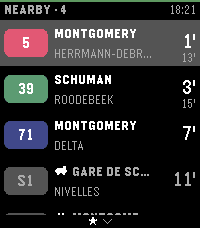
Stibble shows live STIB-MIVB departures on your Pebble Time 2. It covers the bus, tram, and metro network of Brussels.

The app finds the stops nearest to you. Each stop shows its lines. Each line shows a badge in its official color and the wait in minutes. The board refreshes every 30 seconds.

You can pin favorite stops. Favorite stops always stay on the board. Hold the select button to open the favorites list.

Configure the app from your phone. Search for stops, pin favorites, and turn the arrival vibration on or off. The interface speaks English, French, and Dutch. Stop names show in French or Dutch.

The status bar color shows the app state at a glance. Green means live data. Other colors show a lost phone, a lost network, or old data.

Stibble continues the work of Aurélien Ooms, who made the original pebble-stib-mivb app.

Data source: STIB-MIVB – Open Data (CC BY 4.0)
 16
16Tarot Reader
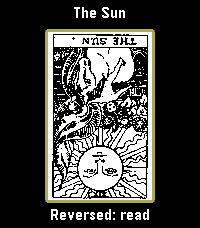
I've been stuck on tarot art lately, so now there's an entire deck on your wrist. All 78 cards. This seemed reasonable at the time.

Draw one card, lay out a Celtic Cross, or try a three-card reading or a scattered table of five to seven cards. Turn them over one at a time. The last reading stays where you left it.

Select reveals a card, then opens its meaning. Hold Select to enlarge the artwork; Up and Down move through it. Back takes you out one step. You can turn reversals off in the menu.

Pamela Colman Smith's original black-and-white illustrations, with A. E. Waite's upright and reversed meanings from 1910. The language is very much from 1910. Everything lives on the watch and works offline.

Adapted by Luke Steuber for Ambient Time.
 9
9Daily Poem
Enjoy a daily poem from poetrydb.org!

Query random poems, save poems and favorite poets, dictation-search for a poet, and find a random poem by your favorite poet!
 3
3Pest Stop
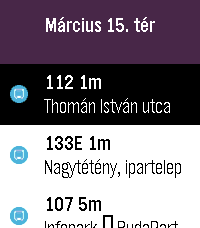
Your wrist-sized companion for the Budapest Transit system

Data source: BKK Zrt., CC BY 4.0
The full license text is available here: https://creativecommons.org/licenses/by/4.0/deed.en
 7
7SG LightningMon
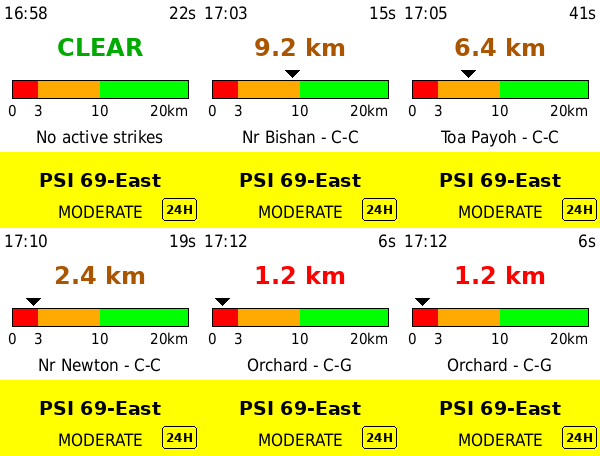
SG LightningMon 2.2 — Real-time lightning proximity and air quality on your
wrist. Powered directly by NEA's live data (data.gov.sg) for your exact GPS
location — no app server, no middleman.

NEW IN 2.2
- 1-hour PM2.5 — press DOWN to switch the lower panel between the 24-hour PSI
  and NEA's hourly PM2.5 reading in µg/m³
- Why both? PSI is a six-pollutant composite averaged over a day, so it lags.
  The 1-hour PM2.5 is the first number to move when haze arrives. During an
  episode the two disagree, and that gap is the point
- Band colours — Normal, Elevated, High, Very High, on the same colour logic
  as the PSI panel
- Source badge — a 24H or 1H marker sits in the corner of the panel, so a
  glance never leaves you guessing which reading you are looking at
- Your panel choice is remembered across restarts, alongside your theme

FEATURES
- GPS-based distance to the nearest active lightning strike
- Distance ruler — the nearest strike plotted on a 0–20km scale, so you can
  see a storm closing in or moving off
- Colour-coded zones — RED (<3km) / ORANGE (<10km) / GREEN (>10km), marked on
  the ruler itself
- Air quality for your region, picked automatically from GPS — 24-hour PSI or
  1-hour PM2.5, your choice
- Strike type — cloud-to-ground (C-G) or cloud-to-cloud (C-C)
- Neighbourhood lookup — names the nearest estate to each strike
- Adaptive rolling window — tightens from 10 to 5 minutes during active storms
- Light and dark themes — press SELECT to switch, your choice is remembered
- Data age indicator — turns red if the phone link drops
- Live clock, refreshing every minute
- Auto-refresh every 2.5 minutes

REQUIREMENTS
- No account or API key — uses NEA's public API directly
- Location Services enabled on your phone

SUPPORTED WATCHES
Pebble Time 2 (Emery) — optimised

HOW TO USE
1. Open the app on your watch
2. Grant location permission when prompted on your phone
3. Press SELECT to switch between light and dark
4. Press DOWN to switch between 24-hour PSI and 1-hour PM2.5
5. RED means seek shelter — read the distance, don't just glance at the colour

Approximate distances only. Not a certified life-safety device — always follow
official NEA/SCDF advisories during severe weather. The 1-hour PM2.5 bands are
NEA's descriptors for short-term concentration, not health categories — for
decisions like school closures, NEA's own 24-hour PSI forecast is the number
to follow. Tested with Pebble Time 2 only.

Built with ❤️ in Singapore.
 8
8Virta
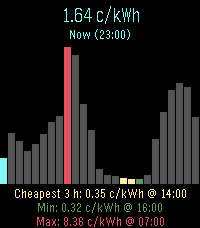
Energy prices for nordic and baltic countries
 1
1PebbleMetro
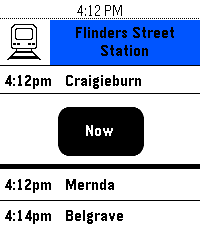
PebbleMetro is a simple watch-app that allows you to display upcoming departures from your favourite stops using the Melbourne PTV API. Support’s all stops supported by the API including metro stations, rural stations, tram stops and bus stops. Configure your favourite stops using the built-in app configuration page.

If you run into any issues, feel free to contact me.
 17
17WindSock
WindSock is a basic location based wind Forecast app that I made mainly for my drone flying. But I'd imagine it being useful for many outdoor activities 🚁⛵😎

Watch:
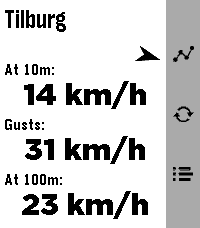
🔶 Main screen shows current wind speeds at your current location (shown on top) at 10m , gusts and at 100/120m, and a small arrow for bearing
🔶 Forecast screen (down button) gives you a (touch-)scrollable 24hr hourly forecast of all these values (also bearing!). Where a line turns red when either Gusts or 100/120m Winds exceed your set warning threshold
🔶 12hr forecast Graph screen (up button) for all three values (Gusts in red in colour screens). Adapts to km/h, mph, m/s or kts choice.

Phone side settings:
🔷 Choose wind speed unit between kilometers per hour (the default), miles per hour, meters per second or knots.
🔷 Choose between wind models 'Global' (the default) and 'Benelux'.
🔷 Choose your own 'Strong wind warnings' speed limts

The Benelux KNMI model is slightly more accurate for NL, BE and LX (the model I used as main up to v1.2) but reports the high winds at 100m instead of 120m. The 100m/120m label on main will switch accordingly with your model choice.

👉 Just select Refresh on the watch main screen to apply any changes (or just refetch the data).
☑️ Chosen wind model or wind speed unit are persistent over launches.

Data comes from Open-Meteo so should give you a worldwide coverage. Resolving phone's location into location-name done by a call to BigDataCloud.
App uses phone location and loads all data fresh every time you start the app.

Like what me and Claude made? Then give it some love in the store 😘🩷
And do check out my other stuff here:
 17
17Train 2 Time
Inspired by "TrainTime" by otoone_dev:
https://apps.rebble.io/en_US/application/5904a0c90dfc329df8000706
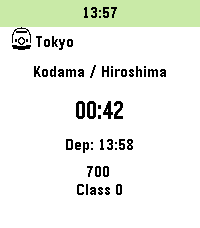
I created this app to improve its usability for my own needs. It is a simple app that counts down the minutes until your train departs. Timetable data is fetched from user-created Markdown (.md) or Text (.txt) files hosted online (intended for use with GitHub Gist "Raw" URLs).
Sample data is also available on GitHub.

Note: Since this was designed for the Japanese railway system, some behaviors may differ from your local transit rules.

Controls:
- [UP / DOWN]: Change train
- [Hold UP / DOWN]: Add to timeline
- [SELECT]: Change station
- [Hold SELECT]: Change current data slot

Features:
- Fetches timetable data only at app launch.
- Customizable limits for the number of trains and the time range to fetch (within stable memory limits).
- Stores up to 5 timetable URLs.
- Supports 3 schedule types per station: Weekdays, Sundays/Holidays, and Saturdays.
- Fallback logic: Sunday/Holiday and Saturday schedules can be omitted; the app will default to the Weekday schedule.
- Uses a 24-hour format from 04:00 to 27:59 (considering 4:00 AM as the start of the day).
- Supports "\n" in the remarks section for up to 2 lines of text (approx. 9 full-width characters per line).
- Optimized for approximately 5-10 stations.
- For color-enabled Pebbles: Background color for the current time and highlight color for post-departure count-ups can be customized.
- Text and background colors for train types are now customizable on Pebble Time 2 and later (Defaults: Text #000000, BG #FFFFFF).
- Japan-specific: Can automatically fetch Japanese public holidays via:
https://holidays-jp.github.io/api/v1/date.json
(Disabled by default). Special thanks to Hiroshi Matsuo.


otoone_dev氏作の「TrainTime」を愛用していたのですが、自分なりに使い勝手を良くしようと思い立ちこのアプリを作りました。
列車の発車時刻まであと何分?をカウントダウンするアプリです。
時刻表データはユーザー自身がweb上にmarkdown(.md)またはtext(.txt)ファイルを作成し、それを参照する方法をとっています
(Github Gistの非公開URL、Rawを想定しています)。
GitHubにサンプルデータを用意しました。

特徴:
- アプリ起動時のみ時刻表データを参照します
- 参照する列車の本数や、向こう何時間まで参照するかは設定で変更できます(クラッシュしない程度の制限をかけています)
- 時刻表データのURLは5つまで記憶できます
- 駅ごとに時刻表は平日、日曜祝日、土曜の3種類
- 時刻表は[平日>日曜祝日>土曜]の順に参照するため、日曜祝日と土曜は省略可
- 時刻表は午前4時を一日の基準とした04:00から27:59の24時間を使います
- 備考部分は改行「\n」が使えるので2行までなら表示できます(全角9文字x2行を想定)
- 5-10駅くらいのデータを想定して作っています
- カラー対応端末は現在時刻の背景色と列車出発後カウントアップのハイライト色を変更できます
- Pebble Time 2以降では列車種別の文字色と背景色を指定できるようになりました(デフォルトで文字色000000、背景色FFFFFF)。
- 日本向けの設定として、自動で日本の祝日を参照できます(デフォルトではdisable)。Hiroshi Matsuo様ありがとうございます。


Data Example:
// Force specific dates as Holidays or Saturdays (Optional)
// 特定の日付を強制的に祝日や土曜として扱えます(省略可)
@HOLIDAYDAY:2026-12-31
@SATURDAY:2027-01-01

// Station Name
// 駅名
# Tokyo

// Icon to the left of the station name (Optional)
// 1:Shinkansen 2:Retro Train 3:Modern Train 4:Bus 5:Clock 6:Monorail 7:Cable car 8:JR Central Shinkansen 9:JR East Shinkansen...
// 駅名の左隣に表示するアイコン(省略可)
// 1:新幹線 2:国鉄風電車 3:現代風電車 4:バス 5:時計 6:モノレール 7:ロープウェイ 8:東海道新幹線 9:東北新幹線 10:国鉄風特急 11:京急風電車 12:L特急 13:寝台特急 14:SL 15:アプリアイコン
## 1

// Schedule Type: weekday, holiday, or saturday
### weekday

// Format: Departure Time, Destination, Type (Optional), Remarks Line 1 \n Line 2(Optional) \n Remarks Line 3 (PT2 or later), Text Color (PT2 or later, Optional), Background Color (PT2 or later, Optional)
// 発車時刻,行先,列車種別(省略可),備考1行目\n備考2行目(省略可),種別文字色(PT2以降のみ),種別背景色(PT2以降のみ)
- 04:00,Kyoto,exp,Dir.\nFirst,000000,FFFFFF
- 27:59,Osaka