 23
23Israel Bus
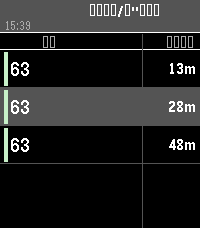
Showing incoming buses to your nearby station (using Israeli API)
This app comes from my long time need to keep my phone in my pocket while I wait for the bus.


* Now requires APK app that refresh the token and able to change the location of the selected station using a map
https://gofile.io/d/4SWxwU

CONTROLS:
UP: previous nearby stop
DOWN: next nearby stop
MIDDLE (short press): refresh arrivals for current stop
MIDDLE (short hold): force GPS re-locate
 0
0MHD HK
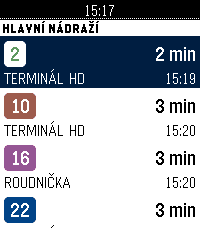
Odjezdy hradecké MHD (DPMHK) přímo na hodinkách. Zvednete ruku, vidíte,
za kolik minut vám to jede.

CO UMÍ

Odjezdy — nejbližší spoje ze zastávky: linka, směr a čas odjezdu.
Odpočet do odjezdu se přepočítává průběžně.

Oblíbené — až šest zastávek, které používáte denně. Nastavíte je
v telefonu (našeptávač všech hradeckých zastávek) nebo přímo na
hodinkách: dlouhým stiskem přidáte zastávku z okolí, dalším ji zase
odeberete.

Nejbližší — zastávky kolem vás podle GPS v telefonu, seřazené podle
vzdálenosti.

Trasa spoje — u vybraného odjezdu si zobrazíte zastávky, kterými
pojede dál.

Offline — poslední zobrazený odjezdový panel zůstává v hodinkách.
Když je telefon mimo dosah nebo server neodpovídá, appka ukáže
uložená data s poznámkou, kdy byla stažena, místo prázdné chybové
hlášky.

Celé rozhraní je česky, včetně diakritiky. Funguje na všech modelech
Pebble včetně kulatých displejů.

DATA

Data pocházejí z api.dpmhk.cz, tedy ze stejného zdroje, který pohání
vyhledávání spojení na dpmhk.cz. Aplikace není oficiálním produktem
DPMHK a není s dopravcem nijak spojena.

Otevřený zdrojový kód (MIT):
https://github.com/ArzykDev/pebble-dpmhk

---

Departures for Hradec Králové public transport, Czechia (DPMHK).
Favourite stops, nearest stops by GPS, downstream route preview, and
an offline fallback board. Czech UI.
 84
84XKCD Reader
XKCD Reader — the entire archive on your wrist.

Over 3,000 XKCDs, pulled on demand. The app streams today's comic when you launch it. Press SELECT to roll a random strip from the full archive. UP / DOWN scroll the comic panel-by-panel — hold either button for smooth scrolling through tall strips (Climate Timeline, Timeghost…) or wide multi-panel ones (Regex Golf, Life Goals). Long-press SELECT or shake your wrist to reveal the alt-text — the hover-text joke Randall hides behind every comic. BACK exits.

Your phone handles the heavy lifting: it fetches the XKCD JSON metadata and PNG, bilinear-resizes to match your Pebble's resolution, Floyd-Steinberg dithers into crisp monochrome line art, then streams the bitmap over AppMessage. Wide comics auto-scroll horizontally, tall ones vertically, so text stays legible instead of getting squished into 200 pixels.
 1
1Abfahrzeiten Linz
Echtzeit-Abfahrten für die nächste Haltestelle in Linz – automatisch per GPS.
 27
27Steep Me
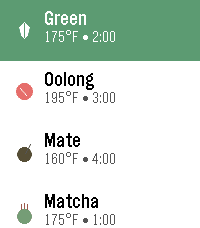
This app allows you to quickly find the temp of common tea types and set a steep timer for each type of tea, with customization allowed on your phone.
 1
1Basketball Clock
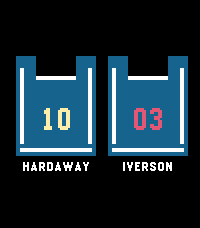
Display the time using your favorite basketball players' jerseys.
 12
12Blue Card Jokes
This is a collection of the blue card jokes from Norm Macdonald Live and Norm Has A Show.
 27
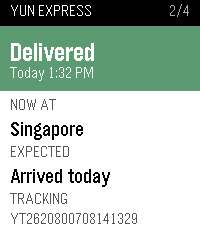
27Parcel Tracking
Wondering if any parcel is arriving today? This app answers that question in an instant.

Open any shipment to check its current status, location, estimated delivery time, and complete past tracking history. Want an instant update? Just long-press to force a refresh.

Setup Note: This app requires your own free Ship24 API key (grab one for free at https://www.ship24.com/tracking-api). Enter your key in the app settings on your phone to get started

Compatible with all Pebble smartwatches
 60
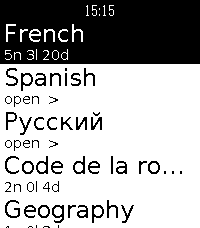
60Anki-pebble
Run your AnkiDroid review sessions straight from your Pebble. Pick a deck, read
the question, reveal the answer, and grade it, eyes up, phone in your pocket.

⚠️ REQUIRES A FREE COMPANION APP
This watchapp reads your collection through a small open-source Android companion
you install separately:
→ https://github.com/Wyoc/anki-pebble-companion/releases
Install the APK, open it once, and grant the AnkiDroid database permission. You
also need AnkiDroid installed with your collection.

FEATURES
• Hierarchical deck menu with due counts (folders and sub-decks)
• Scrollable question and answer screens for long cards
• Grade with the buttons: hold Up / Select / Down for Easy / OK / Hard, Back for Again
• Uses AnkiDroid's modern v3 scheduler (grades sync back to your collection)
• On-watch font size (Small / Medium / Large)
• Latin and Cyrillic text support

CONTROLS
Question: Up/Down scroll · Select reveal · Back exit
Answer: Up/Down scroll · hold Up/Select/Down = Easy/OK/Hard · Back = Again · hold Back = abandon
Deck menu: Select open · Back up a level · hold Select = font settings

For any issue or request, please open en issue: https://github.com/Wyoc/anki-pebble-watch/issues

Free and open source (GPL-3.0)

Not affiliated with Anki or AnkiDroid.
Requires AnkiDroid + the Anki-Pebble companion app.
 3
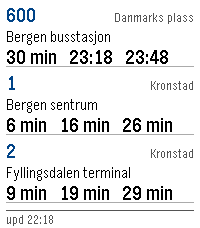
3Bussruter
Real time bus routes in Norway. Show up to three different bus routes and get real time updates of when a bus is at a given stop.

Data made available by Entur (https://entur.no)
 1
1Treinreisplanner
Let op: pure vibecode. Heb de meeste bugs er proberen uit te halen, maar dit is vooral een persoonlijk project wat toch nog wel handig is geworden. Als je vragen hebt, kun je me vinden op Discord: Matthijs3545

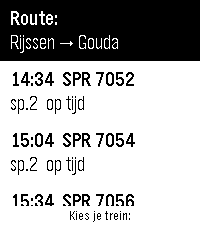
Volg je treinreis live op je pols. Kies een trein in het vertrekoverzicht en Treinreisplanner begeleidt je hele reis: een compacte tijdlijn met elk traject, overstappen met wachttijd, sporen rechts uitgelijnd, kleurbalken met de drukteverwachting en oranje markering bij vertraging of spoorswijziging. Rode waarschuwingen verschijnen als een trein (deels) is geannuleerd of je overstap niet meer haalbaar is. De watch trilt 5 minuten voordat je bij je overstapstation aankomt. Ben je bezig met een reis, maar moet je een andere app openen? Sla je voortgang op door de middelste knop in te houden. Bij het heropenen van de app ga je verder met je actieve reis, ook uren later. Meerdere routes instelbaar via de ingebouwde webconfig; wisselen kan met de middelste knop.

Let op: op Android kunnen achtergrondupdates stoppen als je telefoon vergrendeld is - houd de Pebble-app actief tijdens je reis. Alleen
treinverbindingen (bus, tram en metro worden niet ondersteund). Mogelijk in de toekomst nieuwe versie met online backend.
Vereist een gratis NS-app API-sleutel (apiportal.ns.nl).
 24
24YarraTrak
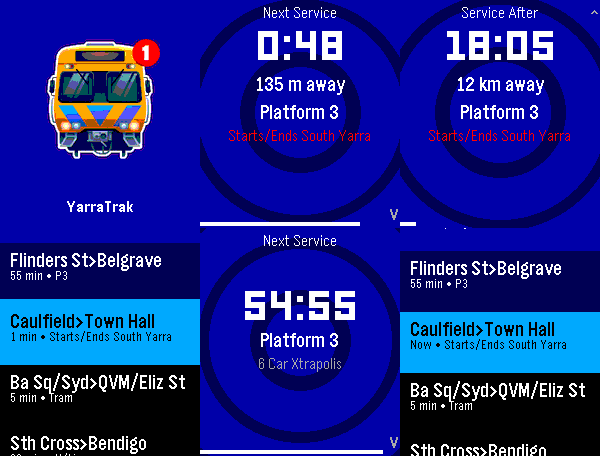
Real-time Melbourne public transport departures on your Pebble smartwatch. YarraTrak shows live train, tram, and V/Line departure times directly on your wrist. Configure your favourite stations and get instant, glanceable info, with vibration patterns that encode the wait time, so you know when to leave without looking at the screen. It also keeps you aware of upcoming and current disruptions to services on your favourite lines. It also includes an AI assistant where you can natural language questions ("next train from Richmond to the city"), to obtain information of services that are outside of your favourites list, via the dictation feature. The app comes pre-loaded with 4 demo entries. Open it and you'll see live departures immediately Open Settings on your phone to customise your favourite stations. The server collects anonymous metrics about query and request volumes so performance and scalability can be monitored over time. (I don't want to flood PTV's API too much). The endpoint server uses Department of Transport and Planning (DTP) data but is not affiliated with DTP or PTV / Transport Victoria. 0
0Activity Tracker Pro
test
 6
6Pebble Buy
BESCHREIBUNG DEUTSCH
----------------------------------------------------------------
Pebble Buy – die Einkaufsliste am Handgelenk.

Leg dir eine Liste je Laden an – Aldi, Edeka, Baumarkt, Drogerie – und ruf im Laden
einfach die passende auf. Abhaken geht mit einem Druck oder Tipp; der nächste Artikel
rutscht direkt unter die Markierung. Erledigtes wandert durchgestrichen nach unten.

Neue Artikel auf der Uhr:
• Diktieren: „Milch, Eier und zwei Kilo Äpfel“ wird zu drei Artikeln – mit Menge
• Anfangsbuchstaben wählen, dann aus Vorschlägen tippen (rund 300 Begriffe + deine eigenen)
• „Häufig“: deine üblichen Artikel, was bald wieder fällig ist, steht oben
Kategorien werden automatisch erkannt und farbig markiert.

Funktioniert auch ohne Netz im Laden – Änderungen werden nachgeschickt.
Bequem am Computer pflegen: pebble.ni3d.de/buy (Web-App mit Hell/Dunkel-Modus) – drei Tage gratis testen, mit Pro unbegrenzt.

Gratis: 2 Listen, Web-App 3 Tage zum Testen.
Pebble Buy Pro (einmalig 2.99 USD zzgl. MwSt.): Web-App unbegrenzt, bis zu 20 Listen, Listen mit dem Haushalt
teilen (live abgeglichen – wer eingeladen wird, braucht kein Pro) und Statistik mit
Kaufrhythmus und „bald wieder fällig“. Freischalten direkt auf der Uhr.

Datenschutz: Konto mit E-Mail, gespeichert auf ni3d.de in Deutschland. Keine Werbung,
keine Weitergabe; eine anonyme Artikel-Statistik gibt es nur, wenn du sie einschaltest.

BESCHREIBUNG ENGLISCH
----------------------------------------------------------------
Pebble Buy – your shopping list on your wrist.

Create one list per store and open the right one when you get there. Tick items off with
one press or tap; the next item slides right under the cursor. Done items move to the bottom.

Add items on the watch:
• Dictate: "milk, eggs and two kilos of apples" becomes three items – with quantities
• Pick the first letters, then choose from suggestions (built-in + your own items)
• "Frequent": your usual items, the ones due soon on top
Categories are detected automatically and color-coded.

Works offline in the store – changes sync when you're back online.
Edit on your computer at pebble.ni3d.de/buy (web app with light/dark mode) – free for three days, unlimited with Pro.
Note: the built-in word list and dictation splitting are German-first.

Free: 2 lists, web app for 3 days.
Pebble Buy Pro (one-time 2.99 USD + VAT): unlimited web app, up to 20 lists, share lists with your household
(live sync – invited people don't need Pro) and statistics with buying rhythm and
"due soon". Unlock right on the watch.

Privacy: account with e-mail, stored at ni3d.de in Germany. No ads, no data sharing;
anonymous item statistics only if you opt in.
 13
13HeadeRSS
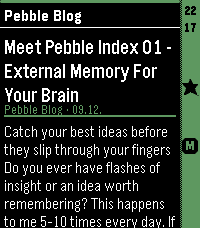
Pull feed headings and summaries from any Google Reader-compatible API, such as FreshRSS, and enjoy a lightweight reading experience on your Pebble.

- Show all articles either at folder level or per feed.
- Mark articles as read or unread as you open them.
- Mark articles as favorites.
- Minimalistic settings.

Designed as a companion reader for quickly browsing your feeds on Pebble, this app lets you discover and triage articles on the go, then read the full content later in your upstream RSS reader. Because it connects to a full-featured RSS backend, there is no built-in limit on the number of feeds you can use—the feed management stays where it belongs: in your RSS service.