 4
4Storyline
Shows what news outlets are reporting, grouped by event rather than by
publisher.

When several papers cover the same story you get one card, not eight
near-identical headlines. When a story runs for days the watch keeps the
thread: press SELECT on a card marked "N updates" to walk back through how it
developed, one day at a time.

- Eleven publishers, refreshed daily
- Stories grouped by event, not repeated per outlet
- Multi-day timelines for stories that keep running
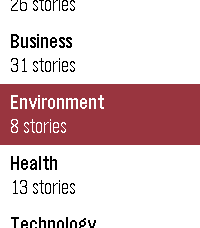
- Browse by category: world, politics, sport, culture, business, technology,
  science, health, education, environment and UK
- Works on every Pebble, from the original through to Pebble Time 2

Where sources disagree on the facts or the framing, cards are marked so you
know the story is contested. A fuller explanation of how they differ is coming
to the web.

Coverage is currently UK publishers, with other regions planned.

Collects anonymous usage statistics: how often the app is opened, which
categories are read, how far down the feed you scroll, and whether story
timelines are opened. This includes your country and a random per-watch
identifier so repeat use can be counted. It does not include your name, your
location beyond country, your IP address, or which individual stories you
read.

Not affiliated with, endorsed by, or a publication of any news organisation.
Headlines and summaries are generated from publicly available RSS feeds.
 3
3benzaiflow
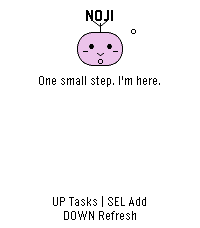
benzaiflow brings Noji, your quiet companion, to your wrist. See your tasks, catch a new thought, and put the phone away.

• Browse active tasks, with pinned tasks first, and open a task for its details and estimated minutes.
• Add a task by dictation on supported watches, write with the watch buttons, or choose a small essential. Review before saving.
• Capture while your phone is out of reach: once paired, the app keeps up to three unsent tasks on the watch for retry when you reconnect.
• Bring your Noji’s shape, color and expression with you.

SETUP
A benzaiflow account is required. After installing, open the app’s settings in the Pebble phone app, sign in, and choose “Connect my Pebble.” The Pebble phone app provides the internet connection for syncing. Learn more: https://benzaiflow.com

LANGUAGES & LIMITS
The watch interface is English; pairing is available in English and French. Task text supports UTF-8; button entry uses a Latin ASCII alphabet. Dictation requires a compatible watch and an available phone transcription service. This first release supports browsing and adding tasks; completion, deletion and reminders are not available on the watch.

Support: support@benzaiflow.com
Privacy: https://benzaiflow.com/privacy
 80
80Small Places
Small Places

Discover the independent businesses and hidden gems around you — no chains, no noise.

Small Places uses OpenStreetMap to surface nearby cafes, bookstores, vintage shops, bakeries, parks, and more, filtered by walking distance and updated as you move. Built to help you slow down and appreciate the small things in life.

! Developer Notice (June 22nd 2026) - This app is currently powered by the free Overpass API. Overpass has been experiencing increased traffic as of late and is working on developing strategies to best manage the quantity of requests they receive. While this app does everything it can to be a good user of the Overpass API and minimize requests, the landscape for interacting with the Overpass API is currently very volatile. For the Small Places app, this means sometimes requests may sometimes be dropped and businesses will fail to populate. As the situation develops, alternative solutions to provide you information about local small businesses are being considered !

Features:
- Live nearby list with walk-time estimates and closing-soon warnings
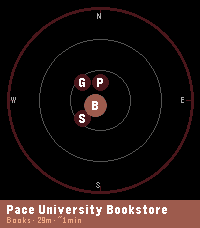
- Compass radar view showing places by direction and distance
- Smart time-of-day priority sorting (coffee shops in the morning, bars in the evening)
- Mood presets to instantly switch your search focus — Morning Fuel, Lunch Break, Evening Out, Weekend Wander
- Save spots you want to visit later to "My Places" for quick reference
- Chain filtering keeps results locally-owned and independent
- Background wake-ups so results are ready when you raise your wrist
- Configurable radius, poll interval, hours filter, and measurement units
- Manual latitude/longitude input mode lets you explore local businesses anywhere in the world from the comfort of your current location (or simply get a better idea of the app's abilities without downloading to a physical watch)

Supported Business Categories: Art & craft, bakeries, bars & pubs, bike shops, bookstores, cafes, clothing, florists, game stores, gift shops, grocery, hardware, libraries, music stores, parks, pet stores, restaurants, specialty food, toy stores, vintage & second-hand shops.

Platform notes:
- Full experience (color, radar view) on Pebble Time 2, and Pebble Time Round 2
- Pebble 2 Duo: all features supported, radar view not available to save you some space for a more lightweight small places experience
- Original Pebble: supported with a reduced nearby list (5 places) and bookmark limit (10); radar view not available. Just the core functionality without modern space expectations weighing you down.

Powered by OpenStreetMap contributors — this app wouldn't exist without their effort.

---

If you would like to give back and make sure your favorite local businesses in the area are on the map and well documented for everyone to enjoy, please check out OpenStreetMap: https://www.openstreetmap.org. This app is not directly affiliated with OpenStreetMap but does draw its data from there. The OpenStreetMap editor interface is fairly easy to use for making quick updates in your local community. Please ensure proper contributor standards are maintained and contribute responsibly!
 6
6Slow
Slow - 24-Hour Single Hand Watchapp

Experience time at a calm, natural pace with Slow, a minimal 24-hour single-hand watch application for Pebble inspired by classic 24-hour timepieces. Engineered with a custom finite state-machine architecture, Slow completely eliminates redundant screen redraws to deliver ultra-low battery consumption.
KEY FEATURES
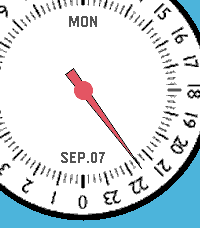
• 24-Hour Single Hand Dial: Follow the full daily cycle with a single continuous hour hand across 4 distinct color styles.
• 3D Angle-Aware Second Hand: Toggle a high-precision second hand on demand (Double UP). It tracks smoothly while you look directly at the watch and instantly disappears to freeze screen rendering the moment you turn your wrist away or rest it flat.
• Blank (Deep Sleep) Mode: Enter a zero-power standby state with a single UP click, shutting down all timers and sensors for 100% MCU deep sleep while keeping a clean static dial.
• Quick Pomodoro & Smart Alarm: Instantly launch a preset countdown timer with a long press on DOWN, or set customized alarms with auto-accelerating buttons and native system wakeup integration.
• Auto-Respawn Keep-Alive: Exiting with a single BACK click automatically relaunches Slow via the Wakeup API, giving you full watchapp power with watchface-like accessibility.
• Protection Alerts: Visual battery limit rings, Bluetooth disconnect vibration warnings, and flip-to-mute gesture support.
BUTTON CONTROLS
• UP (Long Press): Open full Settings Menu (Preferences)
• UP (Double Click): Toggle angle-aware Second Hand mode
• UP (Single Click): Enter Blank (Deep Sleep) Mode
• SELECT (Single Click): Open interactive Alarm Setting
• SELECT (Double Click): Toggle visual Battery Warning rings
• SELECT (Long Press): Cancel all scheduled alarms
• DOWN (Single Click): Toggle Day and Date display
• DOWN (Double Click): Change dial face style (4 themes)
• DOWN (Long Press): Start Quick Alarm (Pomodoro timer)
• BACK (Single Click): Exit with Auto-Respawn (auto-relaunch)
• BACK (Double Click): Quit application completely
• Any Button (in Sleep): Wake up with smooth hand-winding animation
For detailed guides, release notes, and configuration options, please visit:
https://andrwj.com/pebble-slow-watchapp

---

Slow watch for pebble, inspired by slow-watches.com
Permission granted by Slow Watch to use design & the name 'Slow'
 6
6Tasks
Your lists on your wrist. Tasks is the Pebble companion of the Tasks for Pebble iPhone app (Android coming soon): the same lists on both, in sync within seconds. The watch app requires the mobile app to work.

This watch app includes automatic list generation and item addition from your watch which means server costs are there and will require a PRO subscription. If you want to enjoy the app and can't pay for the fees, write an email at hello@ovvio.studio and I will send you a yearly code.

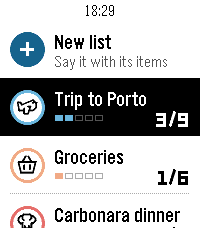
• Say a list: choose "+ New list" and say something like "packing list for a weekend in Lisbon". Tasks writes the list with its items.
• Add to any list by voice from "+ Add items".
• Check items off with SELECT; the iPhone sees it right away.
• Each list shows its icon, colour and a progress row, with animations in the watch's own style.
• Hold SELECT on a list to change its icon or colour, clear checked items or delete it. Hold SELECT on your lists to re-sync.
• Works offline: your lists stay on the watch, and checks you make offline sync when the phone is back.

How to start: install Tasks for Pebble on your iPhone, open Tasks on the watch, press SELECT for a 6-character code and type it in the iPhone app under Settings › Pebble.

The watch app needs Tasks Pro, a subscription in the iPhone app with a free trial. Lists on the iPhone are free.

Works on Pebble Time 2, Pebble 2 Duo and Pebble Round 2.
 88
88Transit, that's it
This it Transit, that's it. It's a simple app for navigating public transit across the globe.

with it you can quickly:
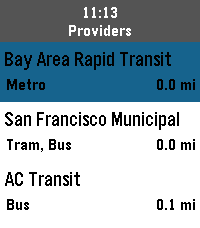
- find the nearest train, light rail, subway, or bus stations
- view an up-to-date departure schedule for those stations
- schedule a trip and pin your departure and arrival to your timeline (simple reminders on pebble classic)

And thanks to the folks @ Core Devices, it's completely free to use, no API key required.
 20
20MLB Scores
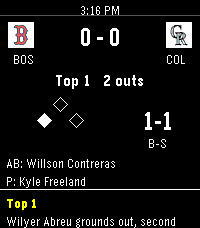
MLB Gameday on your wrist. See all games, their current inning, and their scores. Drill into any game to see the pitcher, active hitter, and their count down to the current balls and strikes. See all scoring plays so you can keep track of the game at a glance. Set a favorite team so they are always top of mind. Uses the latest MLB API in 2026 so you can always feel the rush of "In play, run(s)!".
 5
5Orationes
Make time for prayer. On your wrist. Available offline.

Orationes is a Catholic prayer book for Pebble Time 2. Large text and clear contrast help you focus on the words. Your prayers stay on your watch, ready without a phone or internet connection.

PRAY THROUGHOUT YOUR DAY
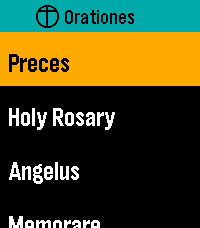
Start with Latin Preces, Holy Rosary, Regina Caeli, Angelus, and Memorare. Explore Come, Holy Spirit, the Litany of Humility, Adoro Te Devote, blessing and grace at meals, 92 Aspirations, 14 Prayer Cards, the Litany of Loreto, psalms, prayers before work, preparation for Confession, and more. The Rosary mystery reference previews today's set and weekday before opening it. All Mysteries separates each set's name from its weekday details.

KEEP YOUR PRAYERS CLOSE
Choose and arrange up to seven shortcuts to individual prayers or collections. Personalize them on the watch or through Settings in the Pebble mobile app. Browse All Prayers and press Select to open a prayer directly; hold Select and release for Open/Pin options. A readable first-use hint explains where the gesture works. Settings → Help offers eight selectable topics covering navigation, reading, resuming, pinning, layout, phone settings, Rosary, and reminders. Scroll through each topic with Up/Down; Select or Back returns to topics.

PICK UP WHERE YOU LEFT OFF
With Remember Place On, opening a prayer from any menu resumes its saved position, or starts at the beginning if none exists. With it Off, prayers always start at the beginning and saved places are cleared. Continue displays your last saved prayer name prominently and opens it directly. Recent Prayers keeps separate places for up to eight prayers. Enable Continue First at the top of watch Settings or in phone Settings to put Continue above your shortcuts; the setting stays synchronized between both. Both Settings pages show their bundled app version at the bottom.

READ YOUR WAY
New installations start with Dark appearance, Ocean title accent, and Lime navigation highlight. Choose Large or Extra Large text, Light or Dark appearance, and independent title and navigation colors. Existing preferences are preserved on upgrade. Prayer text retains strong black-and-white contrast, with clearer response blocks and stanza spacing. The Litany of Humility attribution stays in small print. Compact headers, submenu chevrons, and a narrow list-position indicator make menus easier to browse. Compact Menus fits short rows into 36 pixels instead of the spacious 54-pixel default, keeping full-size text and expanding longer names. Short Settings labels and values share a line when they fit. Compact Menus is available on the watch and in Clay and syncs in both directions. Opening phone Settings requests current watch values; if the watch does not reply, cached values are clearly labelled. Open Orationes on the watch and reopen phone Settings to refresh. The Preces blessing cross is supported in both text sizes.

RESTORE YOUR DEFAULTS
One Restore Defaults action resets shortcuts and shared preferences: Dark/Ocean/Lime colors, Large text, Remember Place On, Continue First Off, Compact Menus Off, and the noon reminder Off with a 10-second duration. Saved prayer positions are kept. On the phone, tap Save Settings to apply the reset.

MOVE AT YOUR PACE
Swipe to scroll, tap Up or Down, or hold either button to move faster. Press Select while reading for Start again or Jump to section where available. Aspirations offers ten jump groups covering all 92 entries. Double-press Select while reading to return to your watchface.

PAUSE AT NOON
Enable an optional vibration reminder for Angelus or Regina Caeli, selected automatically for the season.

EXPLORE THE PRAYER DIRECTORY
https://github.com/ewijaya/pebble-orationes/blob/main/docs/prayer-list.md
 2
2Bit Spender Fork
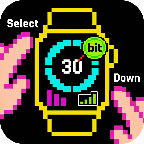
Fork of Tonda's Bit Spender App. Recreated using Gemini to add some new QoL features. Now used for MY thesis!

Select a focus which starts a 30 minute timer. After 30 minutes, you earn a bit. You can hold Select to add a bit without the timer. Hold Down to see stats.

New QoL features include:
- Combined the Bit Display with the Bit Selection Display so that you can select a timer as soon as the app opens
- Persistent Timer which runs even when you exit out of the app. Also vibrates and brings you back to the app when the timer goes off
- Made Daily Bits have colors corresponding to your focus so you can visually see what you've been focusing on during the day
- made a smoother way to add specific bits without a timer (holding select now works consistently)
- Made the histograms stacked with color so you can visually see what you've been focusing on the last few days
- When using app with Quick Start, exits you out of app 3 seconds after starting timer
- Can cancel timer
 36
36After Credits
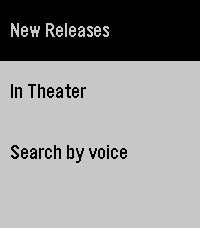
After Credits helps you decide whether to stay after a movie ends.

Search by title and instantly see if there are post-credit scenes, how many there are, and whether they appear during or after the credits. Get spoiler-light guidance so you can choose to wait (or leave) without ruining surprises. Fast, simple, and made for movie nights.

It saves locally the last search if you lose internet/phone connection.

Note: I don't own the movie database, it comes from https://aftercreditsapp.com
 9
9Caltrain.app
Catch the right Caltrain from your wrist.

Features:
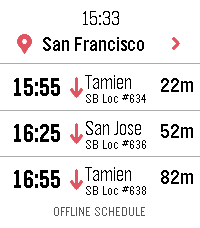
• Upcoming departures in a fast, glanceable list
• Live estimates and delay information
• Train details and a scrollable route timeline
• Touch gestures and equivalent hardware-button controls
• Tailored layouts for Pebble Round 2 and Time 2

ONLINE
With a phone connection, Caltrain.app can use a one-time location lookup to select the nearest station. You can also choose and remember a preferred station.

OFFLINE
When your phone or internet is unavailable, the app retains useful live results and falls back to a compact schedule stored directly on the watch. Scheduled information is clearly distinguished from real-time data.

PRIVACY
No accounts, ads, analytics, or background location tracking.

Unofficial community app. Not affiliated with or endorsed by Caltrain.
 43
43Hacker News Reader
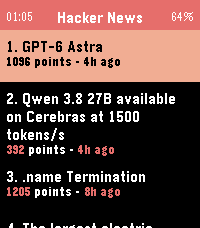
Browse Hacker News and read full articles directly on your wrist.

The app fetches the top stories from Hacker News, with more available at the tap of a button, and lets you read the full article content by scrolling with the Up/Down buttons or your finger on the touchscreen. Press Select to switch between light and dark themes, and Back to return to the story list. Requires a phone connection to fetch content.
 2
2Scalemates
Scalemates profile viewer for having your Stash and Wishlist lists at hand when out and about ✈️on scalemodelling events 🛩️ or fairs. #ModelAircraft #ScaleModelling
I know, pretty niche; you gotta be a double nerd for this... 😜

Just fill in your Scalemates user ID in the settings in the phone to find your Scalemates profile (see settings screen how to find that).
Also select your feeds and cycle through activated feeds on the watch by long-pressing Select. Available feeds:

🛩️ Stash
🛩️ Wislist
🛩️ Started
🛩️ Completed
🛩️ For sale
🛩️ On order

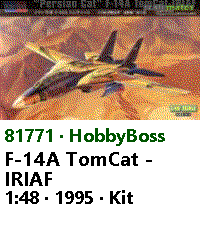
Detail page for each item showing the box art and some more info. Supports touch for scroll and select.

Time 2 (Emery) only.

Check out my other stuff here:
 5
5Verse
Simple app to get a verse of the day

Powered by ourmanna.com API
 20
20Mindful Practices
An app to remind you to slow down and smell the flowers. This app comes will many prompts that can help you be a little more mindful each day and even set reminders if you'd like to get in the habit of enjoying this odd life we're in.