 0
0Should I Run?
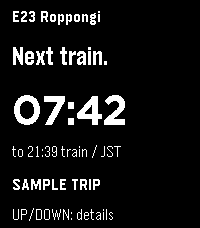
Your next Tokyo Oedo Line train, at a glance. Should I Run mirrors your selected station, direction, departure countdown, estimated outdoor distance and pace from the Should I Run phone app to Pebble Time 2.

Select refreshes the trip; Up or Down shows details. Live reports and scheduled estimates are clearly labeled.

Development preview: requires the companion Expo app and a reachable local relay. Keep the phone app open while syncing. Advice expires within 30 seconds without fresh data. This version is not a standalone transit service. Walk inside stations; distance and pace are estimates. Screenshots show fictional sample trips.
 11
11Ukraine Alerts
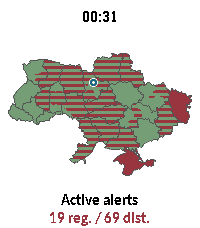
Ukraine Alerts brings real-time air raid alert monitoring and situational awareness directly to your Pebble smartwatch. Featuring an interactive vector map of Ukraine, the app tracks sirens across all regions and districts with live updates every 15 seconds.

Key Features:

🗺️ On-Device Vector Map: Renders full vector boundaries for all regions and districts with instant color-coded status.
📍 "My Safety" & GPS Pin: Uses your phone's location to place a marker on the map and prioritizes alert status for your immediate area.
⏱️ Active Sirens & Durations: Browse a dedicated list of currently alarmed regions with elapsed time counters (minutes, hours, days).
🔍 Smooth Navigation & Zoom: Zoom in (1.0x to 4.0x) to inspect specific raions or tap any region for instant details. Full touchscreen drag & tap support on compatible hardware (emery, gabbro).
🌐 Multilingual & Cyrillic Support: Bundles clean Cyrillic typography (Carlito font) and in-app language switching (Ukrainian, English, etc.).
🔄 Resilient Data: Automatically polls every 15 seconds with built-in API failover to ensure dependable uptime.

Controls:

UP / DOWN: Zoom in & out (1.0x – 4.0x)
SELECT: Open Active Alerts & Safety menu
BACK: Clear selection / Reset view / Exit
Touch / Tap: Drag to pan across the map, tap to inspect any oblast or district

Privacy & Data:

Geolocation is only used to compute your relative position within Ukraine and is never stored or transmitted externally.
Data sources: vadimklimenko.com & ubilling.net.ua.
 143
143Pebbles on the Street
The Pebble version of a popular on-the-go editor for OpenStreetMap — StreetComplete! Not affiliated with StreetComplete itself (yet 😛).

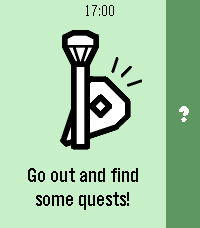
This app lets you improve public maps by completing quick and simple quests right from your Pebble. For example:
- How many levels does this building have?
- Does this pedestrian crossing have audible signals for accessibility?
- What road surface does this road have?

How it works:
1. Start the app on your Pebble and go for a walk!
2. When you come across a quest nearby, your Pebble will vibrate and point you towards it.
3. When you're at the quest location, you can answer the question from your watch.
4. If you don't feel like answering, you can back out of the quest and search for another one.
5. If something isn't clear in the quest situation, you can dictate a note for other mappers to review later.

This app has been developed for the Pebble Spring app contest with no access to actual hardware. Once I get ahold of my Pebble, I will probably significantly revamp the application and polish the experience further.
 5
5BKK Departures
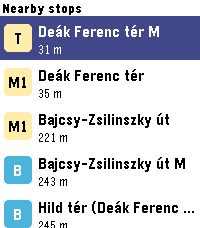
Live Budapest public transport departures on your wrist - nearby BKK stops, real-time countdowns, and favourites.
 45
45Marquee
Marquee
Got something you need to glance at quickly? Marquee shows any text you want right on your wrist. Always visible, no fumbling with your phone.
Perfect for:

🔑 Door and gate PIN codes
📶 WiFi passwords for guests
🅿️ Parking spot or floor number
🔢 Locker combinations at the gym
🗺️ A hotel room number while travelling

Different font sizes let you dial in exactly how much text fits comfortably on your screen. Set it once via the Pebble app, and your text stays on your wrist until you change it. Even after a restart. Scroll using up and down, center button jumps to the top. Use this sign ^ for line Feed.
Simple. Fast. Always there.
 22
22tg
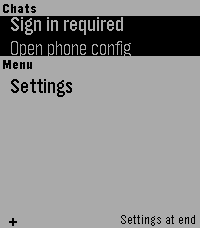
Telegram interface for Pebble (unofficial). Read your messages and send with dictation. Message your friends -- or your OpenClaw -- all from your Pebble!
 3
3BCN Bus - live Barcelona bus times
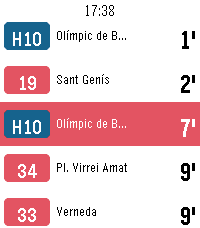
Real-time bus arrivals for Barcelona on your Pebble. See how long until the next bus at any TMB stop without taking your phone out. Favourites— keep the stops you use every day and open them in one press. Nearby — find bus stops near you by GPS, nearest first, with the distance in metres. Search by code — type the stop code printed on the bus stop sign. Open a stop for every line calling there, soonest first, each in its own line colour. Pick a line for its next two buses and where they are headed. Live times from TMB's iBus service, refreshed every half minute, with the clock on screen throughout. Metropolitan AMB lines and Nitbus night buses included. In Catalan, Spanish and English. Works on Pebble Time, Time 2, Time Round, Pebble 2 and Core Devices watches. Unofficial: not affiliated with, endorsed by, or connected to Transports Metropolitans de Barcelona. It reads TMB's public developer API. Bus times are predictions and can be wrong — check the stop sign for the last bus of the night. Keywords: Barcelona, bus, TMB, AMB, iBus, bus times, arrival times, next bus, bus stop, nearby stops, public transport, Nitbus, night bus, Catalonia, transit, real-time.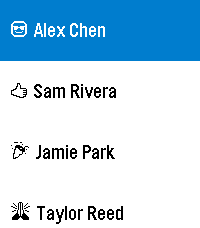 41
41Patch
Harness the power of iOS Automations to send text messages (including iMessages) from your Pebble! No server required.

Patch uses Outlook (yes, Outlook!) to send an email to yourself, which triggers an Apple Shortcuts automation to intercept the notification and send the text message.

The whole process takes less than ten seconds and requires no intervention after you hit send on the Pebble.

You can also assign emojis to contacts, and program up to 10 canned messages.

This app only works if you properly configure the automation on your phone. Be sure to carefully follow the setup guide in the app settings.

Official text response functionality on iOS should be coming soon to the EU as a result of Article 6(7) of the Digital Markets Act.
 1
1Bahá'í Prayers
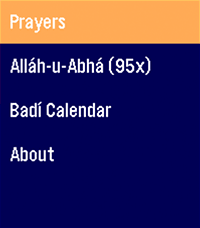
An application for Bahá'ís to access a quick prayer book, act as a digital replacement for prayer beads in a pinch, and show you the current date on the Badí / Bahá'í calendar!

COMING SOON:

* Pre-populate holy days and feasts on your timeline
* Qiblih finder (I have to figure out the heading / compass API... my brain hurts)
 40
40Moon Phase
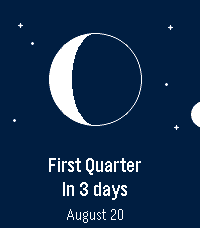
See the Moon exactly as it looks in the sky tonight — right on your wrist.

Moon Phase draws the Moon the way you'd actually see it — the real illuminated shape, oriented for your hemisphere — then tells you what's next and when. No phone required: everything is computed on the watch.

🌒 The real Moon — the current phase drawn as a crisp disc, lit exactly like the sky above you.
⏳ Next phase, at a glance — “In 4 days” and the date, front and center.
📜 What's coming — press SELECT for the upcoming new, first‑quarter, full and last‑quarter dates.
🧭 Hemisphere aware — the crescent flips for the Southern hemisphere, set automatically from your location.
🌍 Speaks your language — English, French, German, Spanish, Italian, Portuguese and Chinese, with local date formats.
🗓️ In your Timeline — upcoming phases show up as pins.
🎯 Accurate & offline — a proper astronomical model, good to the minute.
 1
1Baby Watch Reborn XL
Adds extra features to Baby Watch Reborn
 23
231 More Episode
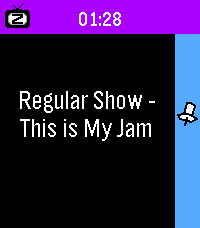
"#^%$! I fell asleep and woke up watching a different season! What was the last episode I saw?!" - You, probably

Well now your Pebble smartwatch can tell you! This app uses your Pebble Health data to match the time you fell asleep with your Jellyfin/Plex watch history. You can even track what you fell asleep to each night on your past timeline!

Simply provide your Jellyfin/Plex (Tautulli) API key+URL in settings and let your Pebble keep track! The app changes themes automatically to match your streaming platform of choice.

Due to limitations of Pebble sleep data retention, it can only show data for your most recent sleep session, and it has to be within the last day, so be sure to launch the app the day you wake up from your binge!

WARNING:
Jellyfin is strongly encouraged! Plex support requires installing Tautulli since the official API doesn't seem to want to return watch history (unless you have Plex Pass?).
 3
3KRL Watch
KRL Watch.

Check your next KRL train in Indonesia without touching your phone.

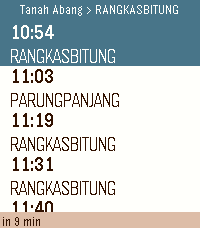
Open the app and your nearest stations appear automatically, sorted by distance. Tap a station, pick a direction, and see upcoming departures in seconds. Schedules refresh every minute so the times stay current.

Features:

- GPS finds your nearest stations automatically.
- Manual browse by line: Bogor, Cikarang Loop, Rangkasbitung, Tangerang, Tanjung Priok, Yogyakarta-Solo.
- Countdown to departure for the highlighted train.
- Save up to 5 favourite stations for one-tap access
- Covers all active KRL stations including Jatake (opened 2026)
- Auto-refreshes every minute in the background.

How to save a favourite:
Hold the middle button while viewing any schedule. The station is saved instantly and appears at the top of every station list. Hold again to remove it.

Supports: Pebble Time 2

Schedule data provided by PT Kereta Commuter Indonesia via kci.id.
 3
3Lightdash
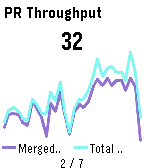
A Pebble watchapp that rotates through your Lightdash saved charts. Glance at your BI numbers from your wrist. No phone needed once the tiles load.
 62
627day ICS Calendar
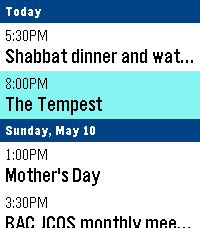
Leave your phone in your pocket. 7-Day ICS Calendar brings your Google Calendar(any ICS should work) directly to your wrist, beautifully organized and always available—even when you're offline.

Built from the ground up for speed, reliability, and a native Pebble feel, this app securely bridges your private Google Calendar directly to your watch, ensuring you never miss a meeting.

Key Features:
AppGlance Support: See your next upcoming meeting directly on your Pebble’s system launcher menu without even opening the app! (Pebble OS 4.0+)

Extreme Customization: Long-press the Select button on the main menu to open the Settings. Instantly toggle between Dark/Light Mode, switch to Large Fonts for better readability, or choose to show/hide past events.

True Offline Support: Going for a run without your phone? Your events are permanently saved to the watch's internal memory. Close the app, open it later, and your schedule is instantly there.

Battery-Conscious Sync: The app uses a smart background caching system to prevent battery drain, waking your phone’s Bluetooth only when you need fresh data. Need an instant update? Just hit "Force Sync" in the settings menu.

Scrollable Detail View: Click any event to open a dedicated detail view. Read massive event descriptions and long titles using the physical buttons to scroll, complete with a native top status bar so you never lose track of time.

Universal Compatibility: Designed to support all Pebble hardware, including dynamic layout adjustments for the Pebble Time Round and high-contrast mapping for monochrome screens like the Pebble 2.

Global Formatting: Fully respects your preference for 12-hour (AM/PM) or 24-hour time formats.

How to Setup:
1. Go to your Google Calendar settings on a computer.
2. Find your calendar and scroll down to "Secret address in iCal format."
3. Copy that link and paste it into the App Settings page on the Pebble phone app.
4. Hit Save, and your watch will securely sync your next 7 days!

If you enjoy what I am making don't forget to heart the app. If you want to support continued development, consider a donation: https://ko-fi.com/ericmccormick