 19
19Price Charts
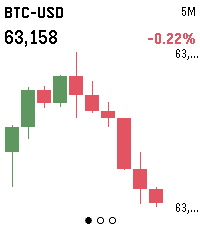
Live candlestick charts for stocks, futures, crypto and FX, right on your wrist. Three screens — 5-minute, 1-hour and 1-day intervals — each showing the last 10 candles, auto-scaled to fit the display.

Build a watchlist of any Yahoo Finance symbols (AAPL, ES=F, BTC-USD, EURUSD=X) in Settings, then press SELECT to flip between them and UP/DOWN to change the timeframe. Hold SELECT to refresh.

Crypto data comes from Binance; stocks, futures and FX from Yahoo Finance. No account or API key required.
 86
86Cobble
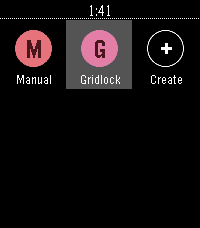
Cobble is a Pebble app that writes Pebble apps. Talk to your watch, get a bespoke app — stopwatch, dice, compass, whatever. Generated on demand, lives in your launcher, disappears when you're done with it.
 3
3Huckleberry
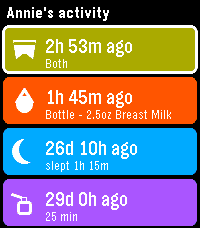
See your children's latest logs from Huckleberry so you can always stay on top of diaper changes and upcoming bottle feedings.

In order to use this app on your watch, you will need to generate an access token to authenticate with Huckleberry. I have created a simple dashboard for using Huckleberry on the web, as well as generating tokens here: https://huckleberry-dashboard.bfmw-dev.workers.dev/

* This project is an independent, unofficial integration. It is not affiliated with, endorsed by, or connected to Huckleberry Labs, Inc.
 5
5SG Bus
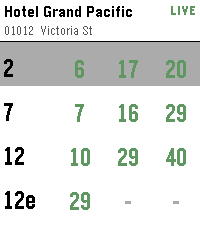
Singapore bus arrival times on your wrist.

Find bus stops near you using your phone's location, or open a favourite stop to see live arrival times. Tap a bus service for the next few buses, including crowding and vehicle type.

Long-press any stop to add or remove it from your favourites.
 8
8Bildschirmli - Swiss Transit
Displays Departures
 14
14AstroCast
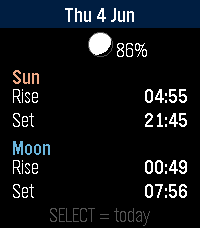
AstroCast = Astronomical Forecast
AstroCast turns your Pebble into a precise sun and moon almanac for your exact location. Open it for a clean overview of today, then step backward or forward through any day to plan ahead or look back.
Features:

* Overview page with sunrise, sunset, moonrise, and moonset at a glance, plus a small location-aware moon showing the current phase and illumination.
* Detailed sun page: sunrise, sunset, solar noon, maximum altitude, day length, rise and set azimuth, and civil, nautical, and astronomical twilight.
* Detailed moon page: moonrise, moonset, illumination, phase name, moon age, transit, maximum altitude, and rise and set azimuth.
* A moon drawn and shaded exactly as it appears in your sky, rotated for your latitude rather than the flat calendar view.
* Automatic positioning, or fixed coordinates you set yourself, with the nearest place name shown for confirmation.

Navigation is simple: up and down move between days, select jumps back to today or switches between the sun and moon detail pages.
Built for all Pebbles
 172
172Calendar for Pebble
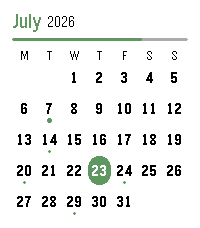
A touch calendar watchapp for Pebble Time 2 and Pebble Round 2.
Shows the month with a dot on every day that has events; tap a day for an agenda you can scroll through. Syncs from iCloud and Google Calendar.

iCloud calendar link:
1. iPhone: Calendar app → Calendars → tap the ⓘ next to a calendar → enable Public Calendar → Share Link → Copy.
2. Paste the `webcal://…` link into a calendar row in Settings.(Public sharing is read-only and needs no password.)

Google calendar link:
On a computer at calendar.google.com:
1. Hover the calendar → ⋮ → Settings and sharing.
2. Easiest (public): under "Access permissions", tick "Make available to public", then copy the share link (the `…?cid=…` URL) — the app converts it automatically.
3. Private (keep it unlisted): scroll to "Integrate calendar" → copy "Secret address in iCal format (ends in `.ics`).
4. Paste the link into a calendar row in Settings.

Credits
App menu icon adapted from [pebble-dev/iconography
(https://github.com/pebble-dev/iconography)
Watch screenshots for banner created using (https://pebble-render.aru.dev/)
 0
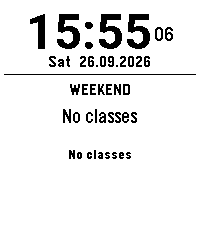
0Schoolwatch-Schooltimer-Schultimer-Schul
update
 3
3Når går bussen
For eget bruk. Viser avganger fra et stopp i Bergen
 48
48Sidecar by flwkt
Sidecar by flwkt

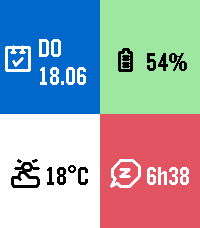
Your watchface looks great — but it probably does not show everything you care about. Sidecar is a quick-launch companion watchapp that fills the gaps: a configurable grid of complications you can open in one press and dismiss just as fast.

Love a minimal face with no clutter? Keep it. When you need steps, sleep, weather, or battery at a glance, Sidecar is there.

Complications

Assign any of these to up to six grid slots:

- Current weather — Live temperature with a weather icon for current conditions
- Weather forecast — High and low temperatures for today with a forecast icon
- Steps — Today's step count
- Distance — Distance walked or run today
- Heart rate — Current heart rate in BPM
- Battery — Watch battery level as a percentage
- Date — Day of week and calendar date
- Sleep total — Total sleep duration for today
- Deep sleep — Restful (deep) sleep duration for today
- None — Leave a slot empty; only active slots are shown

The grid layout adapts automatically based on how many slots you use, from a single full-screen cell up to a 2x3 grid.

Features

Built for Quick Launch — Assign Sidecar to a Quick Launch button on your Pebble Time 2 for instant access. Press Back, Up, or Down to exit and return to your watchface.

Weather from your phone — Current conditions and today's forecast use your phone's location via Open-Meteo. Pick Celsius or Fahrenheit in settings.

Health data — Steps, distance, heart rate, and sleep metrics read from Pebble health services when those complications are enabled.

Make it yours — Set global background and foreground colors, or turn on per-cell colors for a bolder look. Pick a system font (Gothic, Roboto Condensed, Droid Serif, Bitham, and more) or leave it on Auto to scale with your grid size.
 45
45All Sports Scores
Updated for Core Devices, and existing platforms starting in 2026!
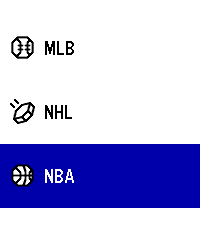
A native sports app for Pebble - Get your favorite NFL, MLB, NHL, NBA, MLS, Tennis, MMA / UFC, AFL, Cricket, Rugby  scores live on your wrist!

- Baseball, Soccer, Football, Cricket, Tennis, Boxing, Fighting, Hockey, Rugby, Basketball, etc
- More cups and divisions than any other app.

All on your wrist. Stay up to date.

New Features:

*More sports than any other app, all in one place!

*Added timeline support with favorites. Your team on your timeline.
It will also inform you where to watch the game.

*Find out where to watch the game under where to watch in the action menu!  - Or the timeline pin
(You can view the action menu by hitting select on the scoreboard.)

Planned Features down the line:
1.) I plan on adding even more sports when I can figure out how to make the scoring system work for sports that don't traditionally do scoring.
2.) I would like to improve navigation, potentially adding teams as a menu vs listing all games the way it does now per division.

Note for Original Pebble & Pebble Steel (Aplite) Users:
Due to an extremely limited 32KB RAM constraints, the action menu popups may occasionally crash the app on 1st-gen devices. This app is provided as-is for legacy hardware, but works best on Pebble Time and up.

Acknowledgements:
This is a fix it project from Andy's original sports app.
All credit goes to them for building it. I just fixed it, added some more sports, and ported it to newer platforms.

Here is the original source:
https://github.com/andyburris/pebble-sports
https://apps.repebble.com/sports_637af4ebc6c24a000a815ecb
 0
0Bus/Tram Strasbourg
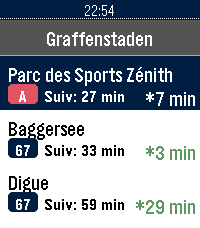
Application non officielle pour le réseau de transport de Strasbourg (CTS).

Fonctionnalités :

Horaires en temps réel (SIRI) avec rafraîchissement automatique et décompte à la minute
Secours 100% hors-ligne avec horaires théoriques complets (GTFS) : Tram A–F, Bus G, H, C1–C9, 10–76
Recherche rapide d'arrêt avec clavier tactile T9
Arrêts à proximité par localisation GPS et favoris enregistrés sur la montre
Info Trafic en direct (perturbations et alertes du réseau)
Disponibilité en temps réel des Parkings Relais (P+R) et guide des tarifs
Mentions légales : Données fournies par la CTS et l'Eurométropole de Strasbourg sous Licence Ouverte 2.0 (Etalab).
Projet indépendant, non affilié ni approuvé par la Compagnie des Transports Strasbourgeois (CTS).
 10
10STOXX Stock Tracker
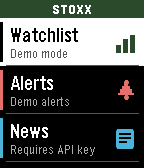
STOXX Stock Tracker lets you track prices, set alerts, as well as track entries and P/L. You can even set a target price to monitor. Instructions in the app and watch.
Requires a free API key from finnhub.io, paste your API key in the Settings page to use the app.
 18
18BigWeather
My eyesight isn't as great as it used to be when I bought the first Pebble watch many moons ago (pesky ageing.......)

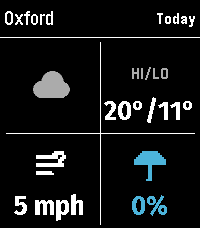
Anyway it seems like all the weather apps are trying to cram loads of information onto one small screen using tiny icons and small text, so Ive created this app with bigger text which is more suitable for a watch.

BigWeather shows current conditions for your location and also any town or city via search, with today, tomorrow, hourly, now/next (+2 hours) and 5-day forecasts with rain, temperature, wind data screens using Open-Meteo (no sign-up, no API key).

Features (as of Version 2.0 - August 2026)
  - Current location, stored and auto-refreshed on open
  - Improved search with ability to filter preferred location (Phone Settings),
  - Search any town/city worldwide
  - Add locations to Favourites
  - Customisable Today/Tomorrow screens, select which information you want to see (in Phone settings)
  - Hourly screens (Rain, Temperature, Wind - viewable by pressing Hourly and select to cycle through screens)
  - 5-day forecasts, per-day detail
  - Rain forecast (Now/Next) shows next rain, amount and intensity over the daytime, not just the peak %
  - No API key needed (Open-Meteo); optional OpenWeather with your own key
  - Units your way: °C/°F, mph/km/h, mm/in, 12/24-hour; large-text mode
  - Built for the Pebble Time 2 and classic Pebble models

If you like this app please heart it, and if you want to buy me a coffee on Ko-Fi you can say thanks here https://ko-fi.com/ben839721
 21
21NHL Scores
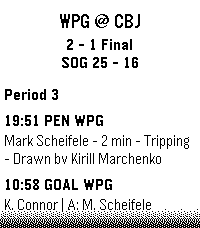
Keep updated with your favorite teams with NHL Scores, the ultimate daily companion for hockey fans on the Pebble watch! Whether you're tracking a live matchup or checking the final results from earlier in the evening, NHL Scores focuses exclusively on the current day's action, bringing the scoreboard right to your wrist.

Get a quick glance at today's game scores, or dive into detailed views to see team records, division standings, and play-by-play events including goals, assists, and penalties.

Configuration Settings
Customize your experience right from the Pebble app on your phone:
 -   Favorite Teams: Select up to 5 of your favorite NHL teams to always pin their games to the top of your daily list.
 -   Show Penalties: Choose whether to display or hide penalty events in the play-by-play view.
 -   Event Sort Order: Read through today's game events sequentially (from puck drop in Period 1 to the final horn), or set it to "Latest Event First" to see the most recent goals and action at a glance.

Credits
Score data is made possible thanks to the excellent open-source nhl-score-api project and official NHL web APIs. The configuration menu is powered by the @rebble/clay library.

About the Developer
- Comet Designs creates fun content for the Pebble platform.
- Please send any feedback to cometdesignspebble@gmail.com !
- Buy me a coffee https://ko-fi.com/cometdesigns