 1
Bahá'í Prayers
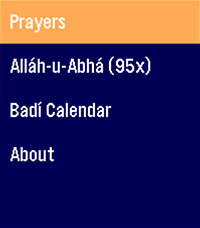
An application for Bahá'ís to access a quick prayer book, act as a digital replacement for prayer beads in a pinch, and show you the current date on the Badí / Bahá'í calendar!

COMING SOON:

* Pre-populate holy days and feasts on your timeline
* Qiblih finder (I have to figure out the heading / compass API... my brain hurts)
 54
Moon Phase
See the Moon exactly as it looks in the sky tonight, right on your wrist.

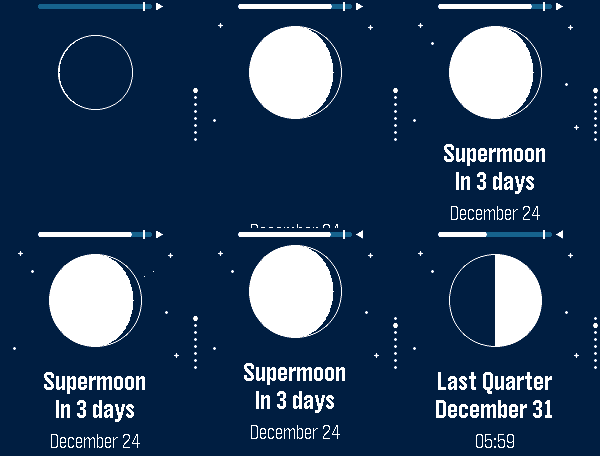
Moon Phase draws the Moon the way you'd actually see it: the real illuminated shape, oriented for your hemisphere. Then it tells you what's next and when. Everything on screen is computed on the watch; the phone only tells it the hemisphere and fills your timeline.

🌒 The real Moon: the current phase drawn as a crisp disc, lit exactly like the sky above you.
⏳ Next phase, at a glance: “In 4 days” and the date, front and center.
📜 What's coming: press DOWN (or swipe up on a touch screen) to slide through the upcoming new, first‑quarter, full and last‑quarter phases, one card each, with their date and time.
📏 How far away: a gauge across the top fills as the Moon comes closer, an arrow tells whether it is approaching, and a full moon within 360,000 km (the tick on the gauge) is called out as a supermoon.
🧭 Hemisphere aware: the crescent flips for the Southern hemisphere, set automatically from your location.
🌍 Speaks your language: English, French, German, Spanish, Italian, Portuguese and Chinese, with local date formats.
🗓️ In your Timeline: upcoming phases, perigees and apogees show up as pins; perigees, apogees and supermoons give their distance.
🎯 Accurate & offline: a proper astronomical model, good to the second.
 1
Baby Watch Reborn XL
Adds extra features to Baby Watch Reborn
 23
1 More Episode
"#^%$! I fell asleep and woke up watching a different season! What was the last episode I saw?!" - You, probably

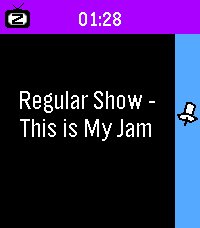
Well now your Pebble smartwatch can tell you! This app uses your Pebble Health data to match the time you fell asleep with your Jellyfin/Plex watch history. You can even track what you fell asleep to each night on your past timeline!

Simply provide your Jellyfin/Plex (Tautulli) API key+URL in settings and let your Pebble keep track! The app changes themes automatically to match your streaming platform of choice.

Due to limitations of Pebble sleep data retention, it can only show data for your most recent sleep session, and it has to be within the last day, so be sure to launch the app the day you wake up from your binge!

WARNING:
Jellyfin is strongly encouraged! Plex support requires installing Tautulli since the official API doesn't seem to want to return watch history (unless you have Plex Pass?).
 3
KRL Watch
KRL Watch.

Check your next KRL train in Indonesia without touching your phone.

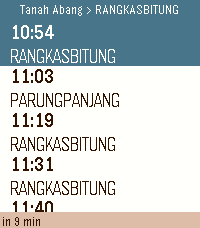
Open the app and your nearest stations appear automatically, sorted by distance. Tap a station, pick a direction, and see upcoming departures in seconds. Schedules refresh every minute so the times stay current.

Features:

- GPS finds your nearest stations automatically.
- Manual browse by line: Bogor, Cikarang Loop, Rangkasbitung, Tangerang, Tanjung Priok, Yogyakarta-Solo.
- Countdown to departure for the highlighted train.
- Save up to 5 favourite stations for one-tap access
- Covers all active KRL stations including Jatake (opened 2026)
- Auto-refreshes every minute in the background.

How to save a favourite:
Hold the middle button while viewing any schedule. The station is saved instantly and appears at the top of every station list. Hold again to remove it.

Supports: Pebble Time 2

Schedule data provided by PT Kereta Commuter Indonesia via kci.id.
 3
Lightdash
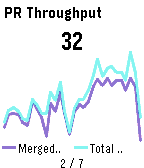
A Pebble watchapp that rotates through your Lightdash saved charts. Glance at your BI numbers from your wrist. No phone needed once the tiles load.
 73
7day ICS Calendar
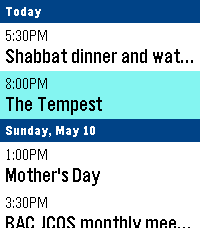
Leave your phone in your pocket. 7-Day ICS Calendar brings your Google Calendar(any ICS should work) directly to your wrist, beautifully organized and always available—even when you're offline.

Built from the ground up for speed, reliability, and a native Pebble feel, this app securely bridges your private Google Calendar directly to your watch, ensuring you never miss a meeting.

Key Features:
AppGlance Support: See your next upcoming meeting directly on your Pebble’s system launcher menu without even opening the app! (Pebble OS 4.0+)

Extreme Customization: Long-press the Select button on the main menu to open the Settings. Instantly toggle between Dark/Light Mode, switch to Large Fonts for better readability, or choose to show/hide past events.

True Offline Support: Going for a run without your phone? Your events are permanently saved to the watch's internal memory. Close the app, open it later, and your schedule is instantly there.

Battery-Conscious Sync: The app uses a smart background caching system to prevent battery drain, waking your phone’s Bluetooth only when you need fresh data. Need an instant update? Just hit "Force Sync" in the settings menu.

Scrollable Detail View: Click any event to open a dedicated detail view. Read massive event descriptions and long titles using the physical buttons to scroll, complete with a native top status bar so you never lose track of time.

Universal Compatibility: Designed to support all Pebble hardware, including dynamic layout adjustments for the Pebble Time Round and high-contrast mapping for monochrome screens like the Pebble 2.

Global Formatting: Fully respects your preference for 12-hour (AM/PM) or 24-hour time formats.

How to Setup:
1. Go to your Google Calendar settings on a computer.
2. Find your calendar and scroll down to "Secret address in iCal format."
3. Copy that link and paste it into the App Settings page on the Pebble phone app.
4. Hit Save, and your watch will securely sync your next 7 days!

If you enjoy what I am making don't forget to heart the app. If you want to support continued development, consider a donation: https://ko-fi.com/ericmccormick
 0
Monzo
Plugin and app for Monzo bank accounts
 20
Price Charts
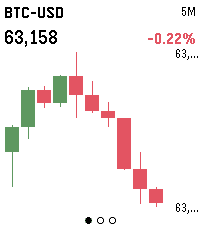
Live candlestick charts for stocks, futures, crypto and FX, right on your wrist. Three screens — 5-minute, 1-hour and 1-day intervals — each showing the last 10 candles, auto-scaled to fit the display.

Build a watchlist of any Yahoo Finance symbols (AAPL, ES=F, BTC-USD, EURUSD=X) in Settings, then press SELECT to flip between them and UP/DOWN to change the timeframe. Hold SELECT to refresh.

Crypto data comes from Binance; stocks, futures and FX from Yahoo Finance. No account or API key required.
 87
Cobble
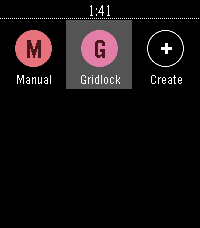
Cobble is a Pebble app that writes Pebble apps. Talk to your watch, get a bespoke app — stopwatch, dice, compass, whatever. Generated on demand, lives in your launcher, disappears when you're done with it.
 3
Huckleberry
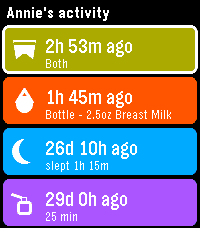
See your children's latest logs from Huckleberry so you can always stay on top of diaper changes and upcoming bottle feedings.

In order to use this app on your watch, you will need to generate an access token to authenticate with Huckleberry. I have created a simple dashboard for using Huckleberry on the web, as well as generating tokens here: https://huckleberry-dashboard.bfmw-dev.workers.dev/

* This project is an independent, unofficial integration. It is not affiliated with, endorsed by, or connected to Huckleberry Labs, Inc.
 7
SG Bus
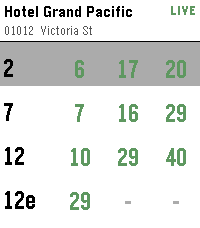
Singapore bus arrival times on your wrist.

Find bus stops near you using your phone's location, or open a favourite stop to see live arrival times. Tap a bus service for the next few buses, including crowding and vehicle type.

Long-press any stop to add or remove it from your favourites.
 8
Bildschirmli - Swiss Transit
Displays Departures
 15
AstroCast
AstroCast = Astronomical Forecast
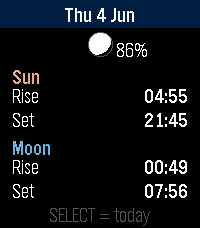
AstroCast turns your Pebble into a precise sun and moon almanac for your exact location. Open it for a clean overview of today, then step backward or forward through any day to plan ahead or look back.
Features:

* Overview page with sunrise, sunset, moonrise, and moonset at a glance, plus a small location-aware moon showing the current phase and illumination.
* Detailed sun page: sunrise, sunset, solar noon, maximum altitude, day length, rise and set azimuth, and civil, nautical, and astronomical twilight.
* Detailed moon page: moonrise, moonset, illumination, phase name, moon age, transit, maximum altitude, and rise and set azimuth.
* A moon drawn and shaded exactly as it appears in your sky, rotated for your latitude rather than the flat calendar view.
* Automatic positioning, or fixed coordinates you set yourself, with the nearest place name shown for confirmation.

Navigation is simple: up and down move between days, select jumps back to today or switches between the sun and moon detail pages.
Built for all Pebbles
 5
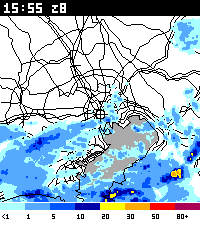
高解像度ナウキャスト表示
日本の降雨レーダーである「高解像度ナウキャスト」の画像を表示します。

現在地周辺の雨雲を、Pebble Time 2で確認できます。地図上には現在地のマーカーと雨の強さの凡例を表示します。

中央ボタンを押すと、現在 → 15分後の予報 → 60分前の実況 → 30分前の実況の順に切り替わります(最低限の非同期読み込みによるロード時間短縮は実装済み)。

上ボタンで拡大、下ボタンで縮小します。中央ボタンを長押しすると設定メニューが開き、現在地の再取得、デフォルト倍率の変更、地名表示の切り替えができます。地名は初期状態では非表示です。

アプリ起動中は約5分ごとに画像を更新します。画像の取得には、Android版Pebbleアプリとの接続と位置情報の許可が必要です。表示対象は日本周辺です。

対応機種:Pebble Time 2
データ出典:気象庁・国土地理院