 192
Calendar for Pebble
A touch calendar watchapp for Pebble Time 2 and Pebble Round 2.
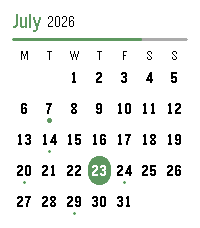
Shows the month with a dot on every day that has events; tap a day for an agenda you can scroll through. Syncs from iCloud and Google Calendar.

iCloud calendar link:
1. iPhone: Calendar app → Calendars → tap the ⓘ next to a calendar → enable Public Calendar → Share Link → Copy.
2. Paste the `webcal://…` link into a calendar row in Settings.(Public sharing is read-only and needs no password.)

Google calendar link:
On a computer at calendar.google.com:
1. Hover the calendar → ⋮ → Settings and sharing.
2. Easiest (public): under "Access permissions", tick "Make available to public", then copy the share link (the `…?cid=…` URL) — the app converts it automatically.
3. Private (keep it unlisted): scroll to "Integrate calendar" → copy "Secret address in iCal format (ends in `.ics`).
4. Paste the link into a calendar row in Settings.

Credits
App menu icon adapted from [pebble-dev/iconography
(https://github.com/pebble-dev/iconography)
Watch screenshots for banner created using (https://pebble-render.aru.dev/)
 58
GoodSleep
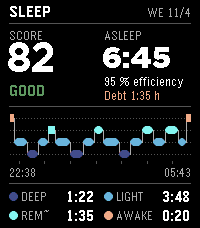
GoodSleep turns your Pebble into a sleep tracker with a smart alarm - and everything stays on your wrist. Wake up, glance at your watch: a sleep score from 0 to 100, how long you slept, and a hypnogram of your night with deep, light, REM and awake phases. On the Pebble Time 2 you also get your heart rate curve through the night with your resting pulse. SMART ALARM Set your alarm for 6:30 and GoodSleep may wake you a little earlier - as soon as it notices you are sleeping lightly in your wake window. First a gentle vibration, then a classic digital-watch beep and strong vibration at your target time at the latest. Snooze gets shorter each time (9, 5, 3 minutes). The alarm survives app switches and reboots. FEATURES - Sleep score, hypnogram and phase split every morning, plus a good-morning summary when you stop the alarm - 7-night score trend and short insights ("Deep sleep 12 min above average") - Heart rate curve through the night (Pebble Time 2) - Smart alarm with wake window, gentle first stage, weekdays and snooze - Power nap button: wakes you after 10 to 45 minutes, before you sink into deep sleep - Naps detected by your watch are listed automatically - Set the alarm right on the watch (hold the middle button) or on your phone - English and German - No ads, no account, no tracking HONEST NOTES Sleep and deep sleep come from your watch's own sleep detection, so the numbers match the Pebble app. REM is an estimate from calm light-sleep phases and is marked with "~". GoodSleep is not a medical device. During Quiet Time the watch mutes its speaker - GoodSleep then wakes you with stronger vibration. The Pebble Round 2 has no speaker and no heart rate sensor, so it wakes you by vibration and shows no heart rate curve. Your sleep data never leaves the watch. Free - if GoodSleep helps you sleep better, you can buy me a coffee from the settings page. Made by Ni3D. BESCHREIBUNG DEUTSCH ---------------------------------------------------------------- GoodSleep macht deine Pebble zum Schlaf-Tracker mit Smart-Wecker - und alles bleibt an deinem Handgelenk. Aufwachen, auf die Uhr schauen: ein Schlaf-Score von 0 bis 100, wie lange du geschlafen hast und ein Hypnogramm deiner Nacht mit Tief-, Leicht-, REM- und Wachphasen. Auf der Pebble Time 2 siehst du außerdem deine Pulskurve über die Nacht mit Ruhepuls. SMART-WECKER Stell den Wecker auf 6:30, und GoodSleep weckt dich vielleicht etwas früher - sobald er merkt, dass du im Weckfenster leicht schläfst. Erst eine sanfte Vibration, spätestens zur Zielzeit das klassische Digitaluhr-Piepsen und kräftige Vibration. Snooze wird jedes Mal kürzer (9, 5, 3 Minuten). Der Wecker übersteht App-Wechsel und Neustarts. FUNKTIONEN - Schlaf-Score, Hypnogramm und Phasenanteile jeden Morgen, dazu ein Guten-Morgen-Fazit beim Stoppen des Weckers - Score-Verlauf über 7 Nächte und kurze Erkenntnisse („Tiefschlaf 12 Min über Ø") - Pulskurve über die Nacht (Pebble Time 2) - Smart-Wecker mit Weckfenster, sanfter erster Stufe, Wochentagen und Snooze - Power-Nap-Knopf: weckt dich nach 10 bis 45 Minuten, bevor du in den Tiefschlaf rutschst - Nickerchen, die deine Uhr erkennt, erscheinen automatisch - Weckzeit direkt an der Uhr stellen (Mitte lang drücken) oder auf dem Handy - Deutsch und Englisch - Keine Werbung, kein Konto, kein Tracking EHRLICHE HINWEISE Schlaf und Tiefschlaf kommen aus der Schlaferkennung deiner Uhr, die Zahlen passen also zur Pebble-App. REM ist aus ruhigen Leichtschlaf-Phasen geschätzt und mit „~" markiert. GoodSleep ist kein Medizinprodukt. In der Ruhezeit schaltet die Uhr ihren Lautsprecher stumm - dann weckt GoodSleep mit kräftigerer Vibration. Die Pebble Round 2 hat keinen Lautsprecher und keinen Pulssensor; sie weckt per Vibration und zeigt keine Pulskurve. Deine Schlafdaten verlassen die Uhr nie. Kostenlos - wenn GoodSleep dir zu besserem Schlaf verhilft, kannst du mir über die Einstellungsseite einen Kaffee spendieren. Gemacht von Ni3D.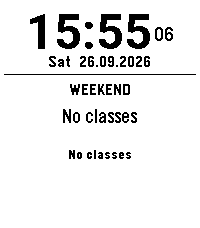 0
Schoolwatch-Schooltimer-Schultimer-Schul
update
 3
Når går bussen
For eget bruk. Viser avganger fra et stopp i Bergen
 53
Sidecar by flwkt
Sidecar by flwkt

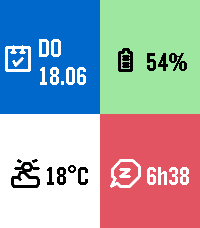
Your watchface looks great — but it probably does not show everything you care about. Sidecar is a quick-launch companion watchapp that fills the gaps: a configurable grid of complications you can open in one press and dismiss just as fast.

Love a minimal face with no clutter? Keep it. When you need steps, sleep, weather, or battery at a glance, Sidecar is there.

Complications

Assign any of these to up to six grid slots:

- Current weather — Live temperature with a weather icon for current conditions
- Weather forecast — High and low temperatures for today with a forecast icon
- Steps — Today's step count
- Distance — Distance walked or run today
- Heart rate — Current heart rate in BPM
- Battery — Watch battery level as a percentage
- Date — Day of week and calendar date
- Time (with seconds) — Current time including seconds; ticks every second only while shown
- Sleep total — Total sleep duration for today
- Deep sleep — Restful (deep) sleep duration for today
- None — Leave a slot empty; only active slots are shown

The grid layout adapts automatically based on how many slots you use, from a single full-screen cell up to a 2x3 grid.

Features

Built for Quick Launch — Assign Sidecar to a Quick Launch button on your Pebble Time 2 for instant access. Press Back, Up, or Down to exit and return to your watchface.

Weather from your phone — Current conditions and today's forecast use your phone's location via Open-Meteo. Pick Celsius or Fahrenheit in settings.

Health data — Steps, distance, heart rate, and sleep metrics read from Pebble health services when those complications are enabled.

Make it yours — Set global background and foreground colors, or turn on per-cell colors for a bolder look. Pick a system font (Gothic, Roboto Condensed, Droid Serif, Bitham, and more) or leave it on Auto to scale with your grid size.
 52
All Sports Scores
Updated for the new 2026 generation of Pebble hardware while continuing to support classic Pebble watches!

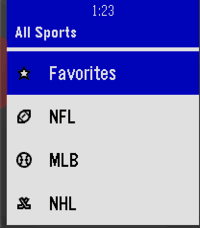
All Sports Scores is the best sports app for Pebble. Keep up with live scores, upcoming schedules, team records, and broadcast channels across 10 major sports (and growing) and over 30 leagues, cups, and tournaments all in one place.
_______________________________________________________________________
*Sports and Leagues Included:

Football: NFL, College Football, UFL, CFL
Basketball: NBA, WNBA, Mens College Basketball, Womens College Basketball, FIBA
Baseball: MLB, College Baseball, World Baseball Classic
Hockey: NHL, College Hockey
Soccer: MLS, Premier League, La Liga, Bundesliga, Serie A, Liga MX, Champions League, Mens and Womens World Cup
Cricket: International Tests, ODIs, and T20Is, IPL, Major League Cricket, with Current and Past folders
Tennis: ATP and WTA Tours, with Current and Past folders
Rugby: NRL, Six Nations, Rugby World Cup
Australian Football: AFL
MMA: UFC

>Want more sports? Send me a message request below!
_______________________________________________________________________
*APP Features:

-Favorites and Timeline Sync
Favorite your teams to see all their games in one dedicated feed. Upcoming games for your favorite teams automatically show up on your Pebble Timeline, complete with start times and where to watch.

-Game Info Screen for Pebble Time 2 and Pebble Round 2
Tap the Game Info area at the bottom of the screen or press Select on any matchup to see extra details like quarter, period, inning, or set scores, team records, live game situations, and fight results.

-Easy Controls on Newer Watches
On Pebble Time 2 and Pebble Round 2, you can tap the stars right on the scoreboard to favorite a team, tap the bottom of the screen or press Select for Game Info, and hold Select to refresh a live game.

-Classic Pebble Support
On older Pebble watches, press Select on any scoreboard to open the Action Menu. From there, you can favorite a team, refresh the score, or check Where to Watch.
_______________________________________________________________________
*Planned Features:

I plan to keep adding more sports and leagues where possible, including sports that do not use traditional team scoring systems. We will see what the future holds!
_______________________________________________________________________
*Permissions Explanation

-Internet Permission
Needed to connect to ESPNs scoreboard API to pull live game scores, schedules, and game status.

-Location Permission
This is temporarily needed while the system plugins finish rolling out. I plan to test removing this permission in a future update. Rest assured, your location info is not sent anywhere and stays on your device.

-Timeline Permission
Needed to add upcoming games and broadcast info for your favorite teams directly to your Pebble Timeline.

_______________________________________________________________________
*Acknowledgements

This project started as a continuation and repair of Andy Burriss original Pebble Sports app because people wanted an up to date way to check scores. Full credit to Andy for creating the original app and the foundation this project was built on. Since then, I have expanded it with more sports, leagues, features, support for newer Pebble watches, and ongoing fixes.

Original source links:
https://github.com/andyburris/pebble-sports
https://apps.repebble.com/sports_637af4ebc6c24a000a815ecb
 0
swiss_transport_api
app that gives you the nearest 3 stops, and then selecting one gives you the next departure times
 0
Bus/Tram Strasbourg
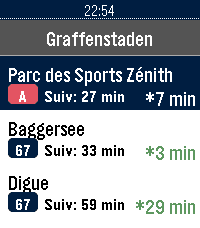
Application non officielle pour le réseau de transport de Strasbourg (CTS).

Fonctionnalités :

Horaires en temps réel (SIRI) avec rafraîchissement automatique et décompte à la minute
Secours 100% hors-ligne avec horaires théoriques complets (GTFS) : Tram A–F, Bus G, H, C1–C9, 10–76
Recherche rapide d'arrêt avec clavier tactile T9
Arrêts à proximité par localisation GPS et favoris enregistrés sur la montre
Info Trafic en direct (perturbations et alertes du réseau)
Disponibilité en temps réel des Parkings Relais (P+R) et guide des tarifs
Mentions légales : Données fournies par la CTS et l'Eurométropole de Strasbourg sous Licence Ouverte 2.0 (Etalab).
Projet indépendant, non affilié ni approuvé par la Compagnie des Transports Strasbourgeois (CTS).
 10
STOXX Stock Tracker
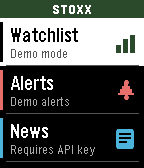
STOXX Stock Tracker lets you track prices, set alerts, as well as track entries and P/L. You can even set a target price to monitor. Instructions in the app and watch.
Requires a free API key from finnhub.io, paste your API key in the Settings page to use the app.
 23
BigWeather
My eyesight isn't as great as it used to be when I bought the first Pebble watch many moons ago (pesky ageing.......)

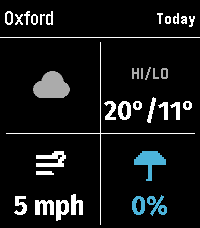
Anyway it seems like all the weather apps are trying to cram loads of information onto one small screen using tiny icons and small text, so Ive created this app with bigger text which is more suitable for a watch.

BigWeather shows current conditions for your location and also any town or city via search, with today, tomorrow, hourly, now/next (+2 hours) and 5-day forecasts with rain, temperature, wind data screens using Open-Meteo (no sign-up, no API key).

Features (as of Version 2.0 - August 2026)
  - Current location, stored and auto-refreshed on open
  - Improved search with ability to filter preferred location (Phone Settings),
  - Search any town/city worldwide
  - Add locations to Favourites
  - Customisable Today/Tomorrow screens, select which information you want to see (in Phone settings)
  - Hourly screens (Rain, Temperature, Wind - viewable by pressing Hourly and select to cycle through screens)
  - 5-day forecasts, per-day detail
  - Rain forecast (Now/Next) shows next rain, amount and intensity over the daytime, not just the peak %
  - No API key needed (Open-Meteo); optional OpenWeather with your own key
  - Units your way: °C/°F, mph/km/h, mm/in, 12/24-hour; large-text mode
  - Built for the Pebble Time 2 and classic Pebble models

If you like this app please heart it, and if you want to buy me a coffee on Ko-Fi you can say thanks here https://ko-fi.com/ben839721
 21
NHL Scores
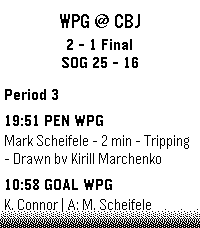
Keep updated with your favorite teams with NHL Scores, the ultimate daily companion for hockey fans on the Pebble watch! Whether you're tracking a live matchup or checking the final results from earlier in the evening, NHL Scores focuses exclusively on the current day's action, bringing the scoreboard right to your wrist.

Get a quick glance at today's game scores, or dive into detailed views to see team records, division standings, and play-by-play events including goals, assists, and penalties.

Configuration Settings
Customize your experience right from the Pebble app on your phone:
 -   Favorite Teams: Select up to 5 of your favorite NHL teams to always pin their games to the top of your daily list.
 -   Show Penalties: Choose whether to display or hide penalty events in the play-by-play view.
 -   Event Sort Order: Read through today's game events sequentially (from puck drop in Period 1 to the final horn), or set it to "Latest Event First" to see the most recent goals and action at a glance.

Credits
Score data is made possible thanks to the excellent open-source nhl-score-api project and official NHL web APIs. The configuration menu is powered by the @rebble/clay library.

About the Developer
- Comet Designs creates fun content for the Pebble platform.
- Please send any feedback to cometdesignspebble@gmail.com !
- Buy me a coffee https://ko-fi.com/cometdesigns
 18
CalDAV Calendar
This is a fork of Eric McCormick's 7day ICS Calendar (https://apps.repebble.com/7day-ics-calendar_82451ba23ca641ab82821fa6).

Your Calendar, at a Glance.

Leave your phone in your pocket. CalDAV Calendar brings your Nextcloud (or any CalDAV) Calendar directly to your wrist, beautifully organized and always available—even when you're offline.

Key Features:

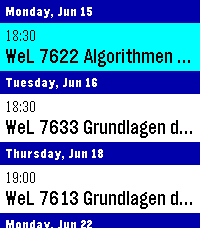
Smart Grouping: Events are elegantly categorized into "Today," "Tomorrow," and upcoming days with a clean, cyan-highlighted interface.

True Offline Support: Going for a run without your phone? Your events are permanently saved to the watch's internal memory. Close the app, open it later, and your schedule is instantly there.

Battery-Conscious Sync: The app uses a configurable 1-hour caching system to prevent battery drain. It only wakes up your phone’s Bluetooth when you actually need fresh data.

On-Demand Refresh: Did your schedule just change? Simply Long-Press the Select button on any event to force an immediate, real-time sync with CalDAV.

Full Details: Click any event to open a dedicated detail view, displaying the full event title and exact start/end times without truncating text.

Global Formatting: Fully respects your preference for 12-hour (AM/PM) or 24-hour time formats.

Multiple Feeds: Can merge up to 4 CalDAV feeds into one feed for display, if you have multiple calendars.

How to Setup:

Depends heavily on your calDAV Provider. You will find options to share the calendar publicly, often the generated link will end in .ics or ?export.

Currently supports only public (unauthenticated) calendars - in case of Nextcloud this is not much of a problem, although it means security-by-obscurity.

Copy said link and paste it into the App Settings page on the Pebble phone app.

Hit Save, and your watch will securely sync your next days!
 27
CTATrack
CTATrack gives you fast, focused transit info for Chicago right on your wrist.

Find nearby CTA train stations and bus stops, then scroll through live arrival times without pulling out your phone. The app is optimized for quick checks while commuting, with clear line colors, readable timing, and one-button mode switching between rail and bus.

Features
- Nearby CTA train arrivals with line-aware display
- Nearby CTA bus stop arrivals with route and direction hints
- Configurable search radius for train and bus results
- Metric or imperial units for both radius and distance display
- Distance shown for each selected stop/station
- Auto-refresh to keep arrival times current

Notes
- Designed for CTA service in Chicago
- Requires location access to find nearby stops
- Uses official CTA data sources for arrivals
 0
ZURICH-Railway-Datum
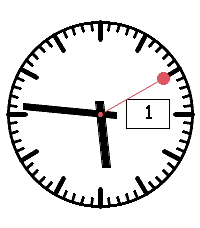
Analoges Swiss-Railway-Watchface mit größerer Datumsanzeige
 1
How Are You?
How Are You?
Mood Manager for Pebble

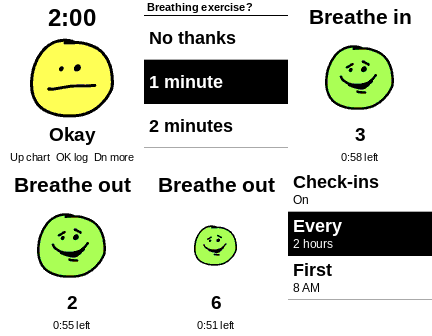
A check-in on your wrist, with hand-drawn faces that show how you're doing.

Every couple of hours, your watch gently asks how you are. Pick from five moods, from Awful to Great, and the face on your screen changes to match.

- Timed check-ins: choose how often and which hours
- Add a reason: say it out loud or pick a quick tag
- Running chart: see every answer and your average
- History: look back at your moods and reasons
- Guided breathing: 1 to 5 minutes, with your face growing and shrinking as you breathe in and out
- Send to phone: view your results, then copy or share them

Your moods stay on your watch unless you choose to send them. Spoken reasons need your phone connected and are transcribed by an online service.

This app is for personal reflection and isn't medical advice or a substitute for professional care.