 3
Football for Pebble
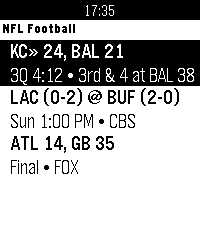
Never miss a kickoff! Football For Pebble delivers real-time NFL Football scores, AP Top 25 rankings, and live in-game situations straight to your wrist with zero clutter.

Features:
• Live NFL Scoreboard: Real-time scores, game clocks, quarters, and TV broadcast networks for matchups.
• Live Situation & Field Bar: Visual field position tracker with possession marker and real-time down & distance.
• Key Updates & Scoring Plays: Dedicated feed of scoring drives, turnovers, and critical plays with unviewed indicators.
• Quarterly Linescores & Stat Leaders: Complete quarter-by-quarter box scores, game leaders (passing, rushing, receiving), and venue/weather info.
• Anti-Spoiler Protection: Customizable delay (0–30 min) in settings so alerts and updates never spoil your broadcast or stream.
• Rebble Timeline Integration: 15-minute pregame kickoff reminders and game pins right on your watch timeline.
• High-Contrast Palette: Clean, battery-friendly layouts with custom collegiate color themes.

Controls:
• UP / DOWN: Scroll through the week's slate
• SELECT: Open Live Game Detail & situation card
• DOWN (in detail): View box score & stat leaders
• SELECT (in detail): Open Key Updates feed
• BACK: Return to scoreboard
 3
CFB for Pebble
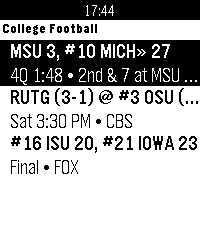
Never miss a Saturday kickoff! CFB For Pebble delivers real-time NCAA College Football scores, AP Top 25 rankings, and live in-game situations straight to your wrist with zero clutter.

Features:
• Live NCAA Scoreboard: Real-time scores, game clocks, quarters, and TV broadcast networks for Top 25 matchups and major conferences.
• AP Top 25 Badging: Nationally ranked teams clearly badged with their official poll rank.
• Live Situation & Field Bar: Visual field position tracker with possession marker and real-time down & distance.
• Key Updates & Scoring Plays: Dedicated feed of scoring drives, turnovers, and critical plays with unviewed indicators.
• Quarterly Linescores & Stat Leaders: Complete quarter-by-quarter box scores, game leaders (passing, rushing, receiving), and venue/weather info.
• Anti-Spoiler Protection: Customizable delay (0–30 min) in settings so alerts and updates never spoil your broadcast or stream.
• Rebble Timeline Integration: 15-minute pregame kickoff reminders and game pins right on your watch timeline.
• High-Contrast Palette: Clean, battery-friendly layouts with custom collegiate color themes.

Controls:
• UP / DOWN: Scroll through the week's slate
• SELECT: Open Live Game Detail & situation card
• DOWN (in detail): View box score & stat leaders
• SELECT (in detail): Open Key Updates feed
• BACK: Return to scoreboard
 1
VarnaBus
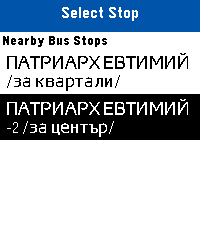
Live public transit arrivals and nearest bus stop locator for Varna, Bulgaria directly on your Pebble.
 4
tvtime
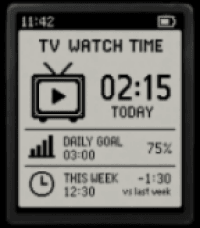
I want to make my private app that can track my plug's time on and off.
 3
Peb1090
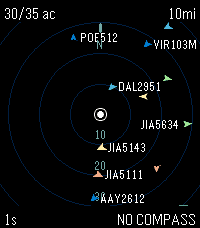
View flight data around you from a tar1090 server. This is generally useful for people who run ADS-B receivers themselves and want to plug into their own data, though it would work with a friend's or any other shared tar1090/readsb server too.
 238
Wristotle
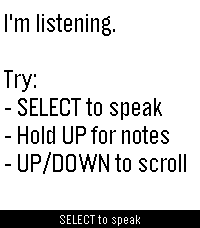
Wristotle turns your Pebble's dictation button into a voice command surface. Press the button, speak, and the Wristotle companion app on your Android phone handles it — calls, texts, reminders, alarms, music, notes, tasks, weather, sports, world clock, calculator, and an Ask-Agent path — then sends the answer back to your wrist.

Replies arrive as chat bubbles, and lookup-style answers render as full-screen cards: a colored band shows the action and an icon shows the subject, so you can read the result at a glance.

 Highlights
 - Voice commands straight from the dictation button — no extra hardware
 - Full-screen reply cards for sports, weather, and meetings
 - Browse your notes and tasks right on the watch
 - Set and view alarms on the watch (phone / watch / both)
 - Optional spoken replies on supported watches (Pebble Time 2)
 - Configurable buttons — bind SELECT and long-press Up/Down to Dictation, Menu, Notes, or Tasks
 - Optional colour theme and chat bubbles

 Requires the free Wristotle companion app on your Android phone (works with microPebble or Core Devices). Everything runs on-device by default — no account, no tracking. AGPLv3.

 Companion app + setup guide: https://wristotle.codeberg.page/

Needs a Pebble with a mic (basalt, chalk, diorite, emery, flint, gabbro — not aplite).
 82
FaceBrowser
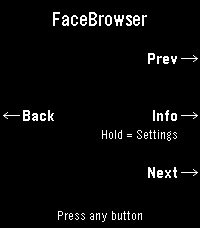
Browse watchfaces right from your wrist. FaceBrowser lets you scroll through the Rebble and Pebble app store catalog directly on your watch, showing you a live preview of each watchface so you can see exactly how it will look on your screen.

Use the up and down buttons to flip through faces one by one, or turn on random mode to discover something new. Filter by collection to browse all available faces or just the most loved ones. When you find a face you like, press select to see the app name, developer, and a QR code you can scan to quickly open it on your phone and install it.

Features:
  - Live watchface previews rendered on your watch
  - Browse sequentially or shuffle randomly
  - Filter by collection (all or most loved)
  - View app details including name and developer
  - QR code for quick install from your phone
  - Support for Rebble and Pebble app stores
  - Works on all Pebble hardware platforms
 5
Decompress Dive Log
A simple dive log on your watch.
Syncs with PADI Logbook, requires an account with PADI previous to any use.
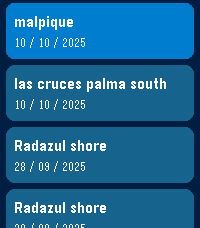
Use voice dictation and intuitive menus to record easy to forget data just as you hop on the boat or arrive at the dive center, instead of fiddling with your phone! I've found over the years of diving I kept forgetting key details (dive site, bottle size, nitrogen mix, etc...) after coming out of the water and was not recording this data anywhere. Dictate what you saw, how the dive went and anything you might want to remember later in the notes for the dive.

App shows the last 5 dives in your account, this is also useful as I never remember which weights were good for different oceans/seas, and which combination of bottle/weight was best. Click on a dive to see the details.
Last menu item to add a new dive, will prompt for key details:
- Dive Title
- Dive Site
- Type of Dive
- Max Depth
- Bottom time
- Notes: dictate using microphone
- Water Type
- Weather
- Air Temp/Surface temp/Bottom temp
- Visibility
- Weights used
- Start/end pressure

Then you can check all details later (and edit them) on the PADI Logbook app on your phone or on the PADI website.
 19
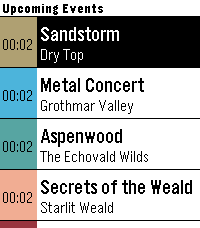
GW2 Event Timers
Pebble app that displays upcoming ingame events in Guild Wars 2.
 464
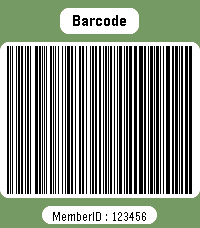
Member card
Wear your membership cards on your wrist.

Works with linear and 2D barcodes:
CODE128, CODE39, CODE93, EAN8, EAN13, UPC-A, CODABAR, ITF, Data Matrix, PDF417, Aztec and QR Code.

QR Code helpers are included for vCard contact cards and Wi-Fi network sharing.

You can also add memo cards for short notes, IDs, locker codes, or any text you want to keep on your watch.

Select cards with the up/down buttons.
Press select to enter scan mode with forced backlight and a wider display area.

Cards are stored on the watch, so no phone is needed to display them.

Storage is limited by Pebble's persistent storage: the app uses up to about 4 KB for saved cards. The exact number of cards depends on barcode type and content size.
 57
Keystone
Keystone turns your Pebble into a fully button-driven hub. It looks like a watchface, but every button is yours.

Short press opens custom menus or widgets. Long press fires a Home Assistant webhook. Select cycles through info panels. All four buttons, all yours.

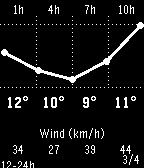
Includes a 48h weather forecast, 5-day daily view, stock tracker with sparkline charts, and built-in stopwatch, timer, and alarm that keep running in the background.

Everything is configured from a web page on your phone: button assignments, custom menus, webhook URLs, widgets, weather provider, and more.

Compatible with Pebble, Pebble Steel, Pebble Time, Pebble Time Steel, and Pebble 2. Strictly black and white by design.
 18
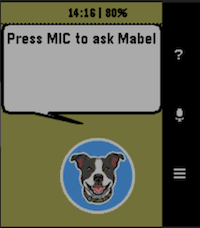
hb MabelAI
Your AI powered assistant on a Pebble Smartwatch. Speak questions to Mabel and she will fetch your answer from one of 3 configurable AI partners.

Features:
- Voice-to-text input using Pebble's built-in dictation (requires mic: Pebble Time, Time Round, Time Steel, 2/2HR)
- Choice of AI provider: Claude, Gemini, or ChatGPT (API keys from each are required)
- In-app settings UI for API keys, model, max tokens, and memory depth
- Usage statistics per AI provider with reset option
- Reminders, timers, and alarms set via AI and pinned to the Pebble timeline
- Current weather conditions and 1-hour forecast (no API key required)
- Token usage tracking per provider
- Supports all Pebble platforms: basalt, chalk, diorite, emery, flint

Note: A Rebble subscription is required for dictation. See https://help.rebble.io/subscription/

Issues, suggestions, etc, email: alan@handsbreadth.com
 61
Timer Core
"Your time. Your rules."

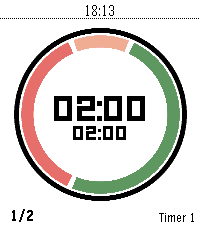
Timer Core is the personal interval timer for Pebble: clear at a glance, flexible enough for any routine, and always ready on your wrist.

A personal interval timer with four flexible segments, custom routines, and clear progress on every Pebble screen.

Build your rhythm with Timer Core, a flexible interval timer made for Pebble.

Create the routine that fits your day—from HIIT and Tabata workouts to Pomodoro focus, cooking, recovery, and everyday reminders. Configure up to four segments, choose when each one runs, set your rounds, and follow your progress through a clear circular display.

Timer Core keeps everything close to your wrist. Start, pause, reset, select, and edit timers directly on the watch. Segment transitions are announced with vibrations, while persistent settings keep your routines ready for the next session.

Highlights:

- Up to 20 named timer profiles
- Up to four configurable segments per timer
- Interval, round, and stopwatch modes
- Custom colors and backgrounds
- Per-segment control for first, repeated, and final rounds
- Vibration alerts at every transition
- Optional Pebble Health and activity information
- Optimized for round, rectangular, color, and monochrome displays

Whether you are training, focusing, cooking, or taking a break, Timer Core helps you stay in rhythm without reaching for your phone.

Made from "series timer" for core devices
 28
Multi Weather
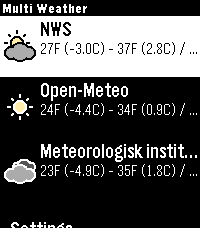
Multi Weather is a Pebble smartwatch app that lets you view weather information from multiple weather providers in one place. Quickly check current conditions, daily high and low temperatures, and detailed forecasts right from your wrist.

Unlike single-source weather apps, Multi Weather allows you to enable multiple providers and switch between them to compare data. You can reorder providers, disable ones you do not want, and customize what information is shown in the main menu.

Features:

* Support for multiple weather providers
* Enable or disable providers individually
* Reorder providers in the main menu
* Automatic GPS-based location
* Current temperature and conditions
* Daily high and low temperatures
* Automatic background refresh
* Customizable “Quick Glance” text using templates
* Menu theme that adapts to sunrise and sunset, or can be forced to light or dark

Available Weather Providers:

Free:

* National Weather Service (NWS) – USA only
* Open-Meteo
* MET Norway (Meteorologisk institutt)

Paid:

* OpenWeatherMap
  Requires an API key and a One Call API 3.0 subscription (free tier available, billing info required)

Controls are designed specifically for Pebble:

* Select a provider to view detailed weather information
* Long-press a provider to force a refresh
* Scroll down to access in-app settings
* Use buttons to switch between providers and view hourly breakdowns in graphs and lists

Settings can be configured directly on the watch or through the Pebble mobile app, including temperature units, speed units, provider order, quick glance content, custom templates, and API keys.

Multi Weather is fully open-source and designed to give Pebble users flexibility, transparency, and choice when it comes to weather data.
 31
Out
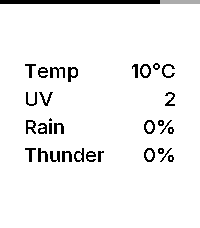
Out is an open source, minimalist weather dashboard for Pebble, giving you exactly what you need before you step out the door.

Features:

– Current Temperature: Displays real-time temperature in Celsius or Fahrenheit, matching your watch’s 24h/12h time format.
– 3-Hour Window: Shows the highest predicted risk of rain, thunder, and UV exposure for the next three hours.
– Inter Typography: Uses the Inter typeface for a modern, refined look.
– Zero Configuration: Automatically uses your phone’s geolocation. No settings or setup required.
– Battery Awareness: A subtle indicator along the edge of the screen shows your remaining charge.

Data Source:

Weather data is provided by MET Norway (The Norwegian Meteorological Institute). It provides high-quality, global forecasts used by services like Yr.

Development:

Built with assistance from Gemini.