 7
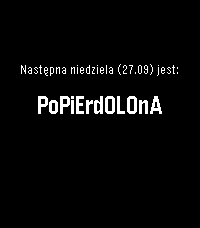
7Niedziela normalna czy popierdolona
English below.
Sprawdź, czy sklepy w najbliższą niedzielę będą otwarte bezpośrednio w apce lub na timeline Pebble.
Aplikacja wylicza niedziele bezpośrednio na zegarku, na podstawie zasad zapisanych w ustawie na dzień publikacji aplikacji.

English:
In Poland stores are closed on Sundays with some exceptions. This apps shows if what kind of sunday is next. Also adds a pin to a timeline.
 1
1Liquicity 2026
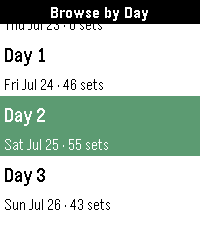
Unofficial Timetable watchapp for Liquicity 2026.

Browse shows, plan your festival, and get reminders when a show you don't want to miss is coming up.

Browse shows by day or stage, click into a show to save it to your timeline. Press down when on a Show Details page to see all shows that overlap with the selected set or are beginning within an hour of it wrapping up.

Credits go to Eric Lindholm whose Festival Schedule watchapp code I used for this one. That's why I linked his repo here.
Thanks so much for the detailed documentation!

Have fun at Liquicity everyone! 🧡
 6
6Hourly Chime
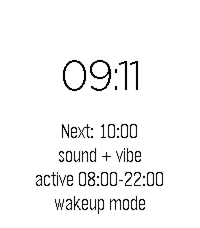
A PebbleOS watchapp that chimes on the hour with the speaker and/or the vibration motor. Runs on Pebble Time 2 (emery) and Pebble 2 Duo (flint) — the two watches with a speaker.
 10
10Beepster
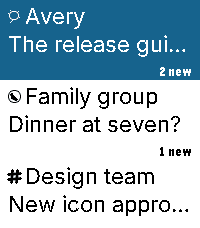
An independent, free, open-source Beeper client for Pebble Time 2. Read chats, dictate replies, use saved replies and bitmap emoji, and view full-width photos. Reactions appear beneath messages with sender indicators. Larger service icons and wider sender stripes distinguish conversations.

Supported GIFs play short, reduced-detail loops; YouTube links can show thumbnail cards. Photos preserve their proportions, with scrolling and low-memory fallbacks. Choose Natural, High contrast or Original processing without changing source attachments. GIFs may fall back to a still; one attachment per message is supported. Videos do not play.

Browse in 12-conversation batches with swipe selection and automatic boundary loading. The current list stays visible while the next batch arrives. Returning from a chat preserves your older page. Jump to newest returns to the top. Navigation briefly pauses during transfer.

Customize themes, buttons, saved replies and link visibility. Archive conversations and delete messages for yourself where supported, with confirmation. iMessage message deletion remains disabled; archiving is available.

Optional Hermes/OpenClaw Approve, Deny and supported Always controls work in explicitly linked agent chats. Decisions use physical buttons only, with Always confirmation. Check the agent result after sending a decision.

Requires macOS 14+, Beeper Desktop, Organik Apps Pebble Connector 0.8.7+, and Tailscale on Mac and phone. Keep the Mac awake. iPhone is the tested setup. Update Connector first, choose Beepster → Set up service, then reopen phone settings. Connector guides permission setup for protected Apple Messages attachments.

Final media changes passed automated and emulator checks; physical-watch media confirmation remains pending.

Install: https://geezuschrotch.github.io/beepster/INSTALL
Feedback: https://github.com/GeezusChrotch/beepster/issues
 6
6Flexible Alerts
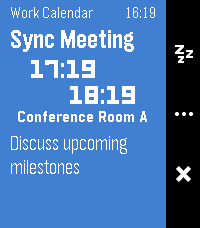
Show alerts for your Android calendars, contact birthdays, and anniversaries. Allows you to add reminders to subscribed calendars or events without built-in reminders, which is great for ICS subscriptions like holidays and private work calendars. Requires an Android companion app to function.

The Android app not yet published on Google Play or F-Droid, but you can sideload it from one of the GitHub releases or build it yourself.

Androidのカレンダーや、連絡先に登録された誕生日・記念日のアラートを表示します。リマインダー機能がないカレンダーやイベントにもアラートを追加できるため、祝日やプライベートな仕事用カレンダーなどのICSサブスクリプションに最適です。日本語にも完全対応しています。このアプリを使うにはAndroidコンパニオンアプリが必要です。

コンパニオンアプリはまだGoogle PlayやF-Droidでは公開されていませんが、リリースからサイドロードするか、自分でビルドすることができます。
 24
24Liftoff 2
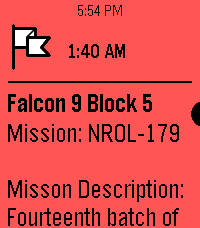
Inspired by the watch timeline app liftoff, this app shows timeline pins about upcoming launches with a small description provided thespacedevs.com. Unfortunately, due to the current pebble app being unable to retrieve info for timeline pins from servers, this app needs to trigger a wakeup call to fetch the api.

Contact me at ffkoenig@gmail.com, @awesomemeeps (on the rebble discord server), or the Liftoff 2 project discussion in the rebble discord server if you have any issues or would like something to be added!

Future updates:
-Using a server (once server side timeline pins is added to the pebble app)
-Improving UI
-Using icons for timeline pins (Not possible right now, but should be once server side timeline pins are available)
 41
41Thinking of You
Small little app for making your long distance partner feel not so far away. Send a little ping to let them know you're thinking of them. REQUIRES THE WATCHFACE FOR FULL FUNCTIONALITY! (I can integrate it on others later if wanted)

Watchfaces available:
Kickstart + Thinking of You https://apps.repebble.com/56a8c37365b34e9f90165a97
Pokétch+ Thinking of You https://apps.repebble.com/09a2026106124b0fa22a2cb2
 1
1RFD Hot Deals
Canadian deals forum comes to your wrist! The Hot deals feed of Redflagdeals.com (No affiliation) vibe coded into a feed with comments intact you can check from your pebble watch. Built for the time 2 and very much a WIP still.
 58
58MirrorMsg
MirrorMsg is the most advanced messaging client for Pebble.

Log in to your accounts and see all your live conversations in chat threads that scroll through the entire chat, with rich modern features: thumbnail previews, HQ images, animated GIFs, video playback, emoji reactions, threaded replies and more.

Works with Google Messages, WhatsApp, Telegram, Discord and Facebook Messenger natively, with no separate login beyond the app itself. Already on Beeper? Connect Signal, Instagram, Slack, iMessage and more through it too.

NEW IN 0.91
- Watch Google Messages videos right on your wrist (Pebble Time 2). Tap to pause or resume.
- Animated GIF previews play right in your chats
- Color emoji, and GIANT emoji
- Touch controls and zoom on Pebble Time 2

SWITCHING ACCOUNTS
Every account you connect has its own conversation list. To switch, scroll to the top of your chats and hold UP, then pick an account and press SELECT. On Pebble Time 2, pull down from the top of the screen from anywhere in the list and choose an account.

REPLYING
Hold SELECT in a chat and the reply menu slides in, with your conversation still visible beside it. Reply by voice, pick a color emoji, or send one of your quick replies. Open a message first to react to it or reply to it directly, where the network supports it.
On Pebble Time 2, pull the reply menu in from the right edge of a chat or message, tap to choose, and swipe right to close it.

TOUCH AND ZOOM (PEBBLE TIME 2)
- Tap a chat to open it, and tap a message to see it in full
- Swipe right to go back from any screen
- Zoom: double-tap, keep your finger down on the second tap, then drag down to make things bigger or up to make them smaller. Lift your finger to keep the size; every screen remembers its own.

EMOJI
- The 100+ most popular emoji show in full color in your messages and in the reply menu.
- Open a message that's only emoji to see them GIANT: a single emoji shows huge, and two or three show big, two per row.
- Pebble's notifications only support 64 emoji; everything else arrives as blank tofu boxes. MirrorMsg swaps unsupported emoji for the closest one Pebble can render, so the message still makes sense instead of turning into "□□".

BROWSE DISCORD LIKE A REAL CLIENT
Not just DMs: your full server list, channels, per-server notification controls, and infinite scroll through history. You won't miss a meme, because animated GIFs work!

Requires an active MirrorMap subscription (Routes or Dash) to unlock message mirroring. Enter your code right here in this watchapp's settings. Get a subscription at mirrormap.app.

Android companion app: the MirrorMsg Android app is required and is on the Google Play Store. Search for MirrorMsg or follow the companion app link below.

MirrorMsg's Android app is fully open source (AGPL-3.0): github.com/killdano/mirrormsg

Emoji art: Twemoji by Twitter/X and contributors, CC-BY 4.0
 3
3Hashcat Reactor
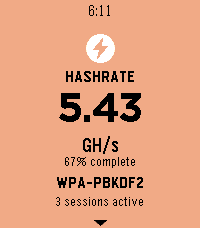
It is a client app for hashcat reactor which show real time stats like hashrate, recovered hashes, power usage and temperature, if you are the very few using hashcat and a pebble watch try hashcat reactor which is a GUI for hashcat and use this pebble client app to have the dashboard on your wrist.
Find out more at: https://github.com/jjsvs/Hashcat-Reactor
Project is open source so you can modify and fit it to your needs.
 71
71PebBeep
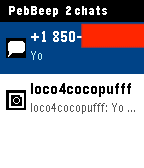
PebBeep — Messages on Your Pebble

Read and reply to your iMessage, Slack, WhatsApp, Signal, Telegram, Discord, Messenger, Instagram, Google Chat, Google Messages, Matrix, X (Twitter), and LinkedIn messages right from your wrist.

PebBeep bridges your conversations from Beeper Desktop on your Mac to your Pebble in real time, end-to-end encrypted with NaCl. Tap a chat to read recent messages, long-press to reply with a custom quick-reply or by voice (on Pebble Time and later).

Features

Unified inbox across 13+ messaging services (powered by Beeper)
Service icons so you know at a glance who's messaging
Quick replies — voice dictation + 4 custom canned responses
End-to-end encrypted between desktop and watch
Vibration + notification banners for new messages
Persistent message history on the watch
Works on all Pebble models (Aplite, Basalt, Chalk, Diorite)
Setup

PebBeep needs the companion PebBeep desktop app and Beeper Desktop running on your Mac to bridge your messages.

Install Beeper Desktop and sign in to your messaging accounts: https://www.beeper.com
Install the PebBeep desktop app: https://pebbeep.web.app
Launch PebBeep desktop, sign in / sign up with your email, and link it to Beeper Desktop
Install PebBeep on your Pebble from the app store
Open PebBeep settings in the Pebble app and sign in with the same email account
You're done — messages will start appearing on your watch
Configuration

The settings page (Pebble app → PebBeep → Settings) lets you:

Set 4 custom quick-reply phrases
Toggle vibration on new messages
Toggle notification banners
Adjust polling interval
Privacy

All messages are encrypted end-to-end between your desktop and watch using NaCl public-key cryptography. The PebBeep relay server only sees ciphertext — it cannot read your messages.

Disclaimer

PebBeep is an independent third-party app. It is not affiliated with, endorsed by, or sponsored by Pebble, Rebble, Beeper, or Automattic. "Pebble" and "Beeper" are trademarks of their respective owners and are used here for descriptive purposes only. PebBeep requires a separate Beeper account and Beeper Desktop installation, which are subject to Beeper's own terms of service.

© 2026 PebBeep. All rights reserved.
 46
46Time Eye-Opener
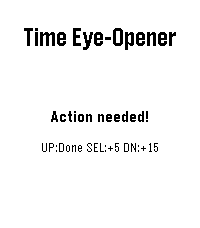
Time Eye-Opener: The notification that doesn't take "no" for an answer.
You’re in a meeting and a crucial text comes in. You can’t reply right now, but if you swipe it away, you know you’ll forget it exists. Standard smartwatches let tasks vanish into the void. Time Eye-Opener is different. With a couple of clicks, set a 5 or 15-minute persistent reminder that stays glued to your screen and escalating its vibrations until you actually mark it "Done." Stop relying on your memory; rely on your wrist.

This is also very helpful for people with busy lives, or ADHD- push away the cognitive demand for later. Deal with time blindness- open your eye to more time now, in exchange for some time later!
 19
19Qibla - Prayer Times & Compass (NEW)
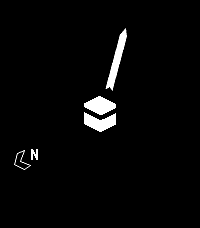
Prayer times & notifications on your Timeline, plus a Qibla compass for your Pebble. Automatically calculates prayer times based on your location - so make sure "location services" is enabled on your phone. Use the settings screen to customize the calculation method and Asr setting.

NOTE: You have to open the app every 3 day to fetch the notification and phone must be connected.

The basic calculation happens using the geo location for whole world but if you want specific you can use the below calculation using settings app.

The following calculation methods are supported:
- Diyanet (Turkey)
- Egypt
- ISNA
- Jafari
- Karachi
- London Unified Timetable
- MWL
- Makkah
- Malaysia
- Singapore (Muis)
- Tehran

Note: This is relaunch of the old app "Qibla - Prayer Times & Compass" as the old app doesn't function anymore, I am updating it and re-running the server to make it work again.
Thanks to Collin Fair (former dev) made it open source.
Let us know about the bugs, create issue on https://github.com/jibraniqbal666/pebble-qibla, thanks
 50
50TimePulse
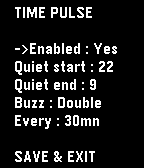
Time Pulse is a practical timekeeping app designed to assist you throughout your day.
- With Time Pulse, you can set specific intervals for notifications, helping you stay aware of the passing hours.
It's especially nice if this feature isn't supported by your watchface.

Here are some key features:
- Minimal battery usage: Time Pulse utilizes the Pebble wakeup_schedule function, ensuring it has virtually no impact on your device's battery life.
- Background efficiency: Time Pulse does not run in the background, so it does not occupy the background app slot.
-Offline customization: Customize Time Pulse directly from your watch without the need for internet connectivity or external servers.

Time Pulse is your reliable companion for staying on schedule.
(Forked from "nag for Pebble" from YGalanter)
 10
10ZWarframeAlertApp
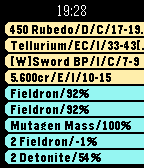
Warframe alert App. I am the warframe game fun. So I build the warning watchface for it. It support PC, Xbox One, PS4 all platfom. And it can highlight and viberation when important item come out.It is useful for me and you. And it always free for. If you love this app. Please donation Paypal acount zszen.john@gmail.com for help.

This version create for Watch App. Now you can scroll by up/down key and menu key refresh data. Very useful. But the alert don't work any more when this app be closed.