 4
Now Playing Art
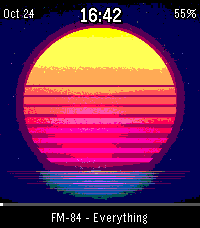
FacesAndroid only. Now Playing Art is a free, open-source Pebble Time 2 watchface with a small Android companion app. It shows full-screen album art from whatever is playing on your phone, plus time, date, battery, song progress, and artist and title at the bottom. Now Playing Art is inspired by the Apple iPod classic now playing screen—the big cover, the track info, that feeling of living inside the music. Now Playing Art brings album art back to your wrist on Pebble. The watchface alone cannot load album art. You must install the free companion app on your Android phone using the following link: https://github.com/Darachnid/music-time-free/blob/main/releases/now-playing-art-companion.apk You need an Android phone, the Core Pebble app, the Now Playing Art watchface, and the companion app linked above. Turn on notification access, pick Now Playing Art on your watch, and play music on your phone. Album art appears on the watch within a few seconds. Now Playing Art works Spotify, Apple Music, Plex and Plexamp, Jellyfin and Finamp, Amazon Music, Youtube Music, Tidal, Deezer, and even Bandcamp. This project is open source and free—no cost, no subscription.
 2
RBN Spots
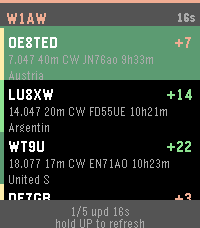
Tools & UtilitiesRBN Spots is a ham radio app for checking Reverse Beacon Network spots on your wrist—who heard your callsign, how strong the report was, and where the skimmer is—before or after CW, contesting, POTA, SOTA, Field Day, or everyday operating. The list uses a black background with a band-color stripe, white callsigns, and SNR in green, yellow, or red. Two screens. UP and DOWN move through the spot list. SELECT opens full spot details. On the first row, hold UP to request a fresh spot list from the phone. A green bar fills while you hold. Spot list shows the monitored callsign and time since the last sync, then up to several recent RBN reports. Each row has spotter call, SNR in dB, frequency, band, mode, age, and spotter location. On Pebble Time 2, location may appear on a third line. On Round 2 it is folded into the second line. The footer shows list position and a refresh hint. Spot details show spotter call and SNR, the heard callsign you are watching, frequency, band, mode, grid, spotter location, and age. BACK returns to the list. The phone loads spots from reversebeacon.net, including the usual ver_h handshake on first contact. Band and mode filters and the callsign are set in the Pebble app settings. If the phone cannot reach RBN or the link is down, the watch shows No link or keeps the last good list. A new reading needs the Rebble or Pebble app open on the phone with a network connection. The watch refreshes on a timer and when you hold UP at the top of the list. For Pebble Time 2 and Pebble Round 2.
 2
DPS Field
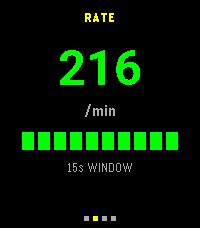
Tools & UtilitiesDPS Field is a Pebble watch companion for the DPS field controller running on the same phone. The watch uses the same dark layout as HF Bands: black background, yellow titles, and white figures. It reads a loopback feed from the phone every 5 seconds and does not scan radios itself. The Field page shows unique units found in the current capture, time since the last new one with no seconds, and the average per minute for the whole session. Below that are the unique 2.4 GHz and 5 GHz Wi-Fi counts, then unique Wi-Fi versus Bluetooth. The Rate page is a full-screen number: new uniques in the last 15 seconds, shown as a per-minute rate, with a 10-block indicator under it. Gray means idle, yellow means a slow find rate, and green means a faster one. The figure updates with each 5-second poll. The Nodes page lists each scanner, whether it is online, and its role. Holding select opens that node. Up and down then move through the nodes and show what that node has found: Wi-Fi, Bluetooth, 2.4 GHz, 5 GHz, and the last name it reported. Back leaves the detail view and returns up and down to changing pages. The Monitor page shows the latest lines from the phone app’s communication log. The phone app has to be open. The feed stays at `127.0.0.1:4774` on the phone. The companion APK fork is https://github.com/Darachnid/DPS-DIY-CLUSTER-APP. Original project by: https://github.com/Dead-Packet-Society
 8
HF Bands
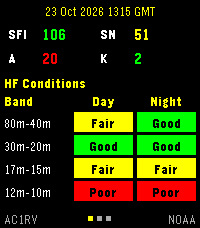
Tools & UtilitiesHF Bands is a ham radio app for checking band conditions and solar data before CW, contesting, POTA, SOTA, ARRL Field Day, or any other operating. Values sit on a black background, with yellow labels and green, yellow, or red numbers. Three pages. UP and DOWN move between them. SELECT asks the phone for a fresh reading. HF Conditions shows the update time, solar flux, sunspot number, A index, and K index, plus day and night conditions for 80–40 m, 30–20 m, 17–15 m, and 12–10 m. Cells read Good, Fair, Poor, or Closed. Solar Data adds X-ray, 304 Å, proton flux, electron flux, aurora, normalization, solar wind, Bz, auroral latitude, MUF, geomagnetic field, and signal noise. VHF Conditions shows aurora and sporadic-E for Europe, North America, Europe 6 m, and Europe 4 m. The phone loads the solar report from hamqsl.com. If that site does not answer, it uses NOAA Space Weather Prediction Center summaries instead. On that fallback, the HF and VHF colors are estimates from solar flux and the K index. The last reading stays on the watch until the next update. A new reading needs the phone nearby.
 14
Extinct Birds (1907)
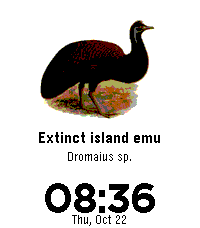
FacesA watchface featuring a different extinct bird each day, using historical illustrations from Extinct Birds (1907). Each bird is displayed with its common and scientific names. The illustration changes automatically at midnight. Original Publication Author: Walter Rothschild Illustrator: John Gerrard Keulemans and others Publisher: Hutchinson & Co., London Year: 1907 Source: https://www.biodiversitylibrary.org/bibliography/58320
 5
Morse Bird
Tools & UtilitiesMorse Bird A Free and Open Source Morse code keyer for Pebble Time 2 with an animated drinking bird. Morse Bird lets you send and decode Morse code using your Pebble Time 2's physical buttons. Features: - Paddle and straight-key modes - Adjustable paddle speed (5–50 WPM) - Automatic straight-key decoding (10–20 WPM) - Live Morse code decoding - Adjustable sidetone (200–1500 Hz) - Optional vibration - Customizable button assignments - Animated drinking bird and telegraph sounder Works independently without a phone connection. Designed for Pebble Time 2.
 14
Fresh Water Fishes of New England (1896)
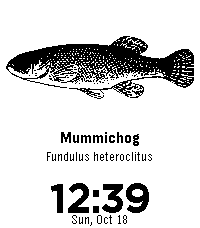
FacesFresh Water Fishes of New England (1896) A watchface featuring a different fish each day, using original public-domain illustrations from The Fresh Water Fishes of New England. Each fish is displayed with its current common and scientific names. Original Publication Author: Edward Knobel Illustrator: Edward Knobel Publisher: Bradlee Whidden, Boston Year: 1896 Source: https://en.wikisource.org/wiki/The_Fresh_Water_Fishes_of_New_England Illustrations are sourced from the original public-domain publication.
 4
SMS CW
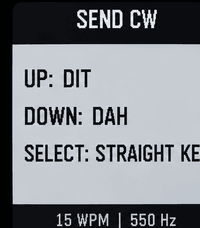
Tools & UtilitiesSMS CW provides a Morse code interface for receiving and composing SMS messages on Pebble smartwatches. The application is intended for amateur radio operators and others familiar with conventional CW operation. CW timing is central to the application. Paddle input generates timed dits and dahs, while straight-key input allows the operator to control element duration directly. Character and word spacing are determined by keying intervals rather than separate spacing commands. Features CW Reception: Incoming messages can be converted to Morse code and played through the watch. Audio and Haptic Output: Configurable audible CW tones and vibration, with independent receive and send settings. Paddle Input: The upper and lower buttons operate as dit and dah inputs. Assignments can be reversed. Straight-Key Input: The center button provides manually timed keying, with element recognition based on press duration. Automatic Spacing: Character and word boundaries are determined by standard CW timing. Adjustable Parameters: Configure operating speed, tone frequency, volume, haptic synchronization, and straight-key decoding thresholds through the Pebble phone application's settings. Operation When a message is received, the operator can initiate CW playback on the watch. Playback follows the configured speed and audio or vibration preferences. Press and hold the lower button from Receive mode to enter Send mode. The upper and lower buttons provide paddle input, and the center button operates as a straight key. The application interprets pauses between elements to establish character and word boundaries. No dedicated space key is required. Development SMS CW was developed with assistance from generative AI through an iterative process commonly called vibe coding. The software has been compiled, tested, and revised through direct interaction with the hardware. The application may contain errors or limitations. Reports concerning CW timing, input decoding, audio synchronization, and device compatibility are welcome. Source Code and Android Companion The project is open source. https://github.com/Darachnid/pebble-cw-messenger The required Android companion APK and installation instructions will be provided through the repository when the release is available. Contributions Operators and developers are encouraged to inspect the source code, report defects, contribute improvements, or fork the project for further development. Contributions concerning CW timing, alternative keying methods, accessibility, and additional device support are particularly welcome.