RBN Spots
AC1RV
Watchapp
Description
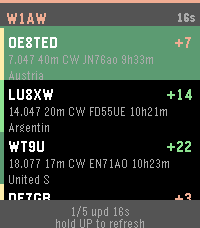
RBN Spots is a ham radio app for checking Reverse Beacon Network spots on your wrist—who heard your callsign, how strong the report was, and where the skimmer is—before or after CW, contesting, POTA, SOTA, Field Day, or everyday operating. The list uses a black background with a band-color stripe, white callsigns, and SNR in green, yellow, or red.

Two screens. UP and DOWN move through the spot list. SELECT opens full spot details. On the first row, hold UP to request a fresh spot list from the phone. A green bar fills while you hold.

Spot list shows the monitored callsign and time since the last sync, then up to several recent RBN reports. Each row has spotter call, SNR in dB, frequency, band, mode, age, and spotter location. On Pebble Time 2, location may appear on a third line. On Round 2 it is folded into the second line. The footer shows list position and a refresh hint.

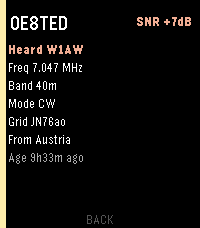
Spot details show spotter call and SNR, the heard callsign you are watching, frequency, band, mode, grid, spotter location, and age. BACK returns to the list.

The phone loads spots from reversebeacon.net, including the usual ver_h handshake on first contact. Band and mode filters and the callsign are set in the Pebble app settings. If the phone cannot reach RBN or the link is down, the watch shows No link or keeps the last good list. A new reading needs the Rebble or Pebble app open on the phone with a network connection. The watch refreshes on a timer and when you hold UP at the top of the list.

For Pebble Time 2 and Pebble Round 2.
- DeveloperAC1RV
- CategoryTools & Utilities
- PlatformsTime 2, Round 2
- Updated2026-10-24
- Version1.2.1