 9
9Find My iPhone
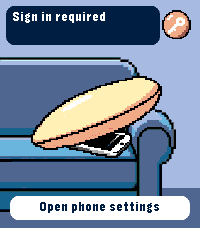
RemotesRing your iPhone directly from Pebble Time 2. Open the watch app, select an iPhone with the Up and Down buttons, then hold Select for 650 ms to send the sound command. The app runs through Pebble Core on your iPhone and talks directly to Apple over HTTPS. No separate companion app or intermediary server is required. Setup supports trusted-device two-factor authentication, multiple iPhones, automatic system language selection and clear states for offline devices, expired sessions and rate limits. Your password and two-factor code are used only during sign-in and are not stored. Apple session tokens remain in Pebble Core local storage on the paired iPhone. You can remove the saved session from the settings page at any time. Important: this is an independent, unofficial utility based on an undocumented Apple service. It is not affiliated with or endorsed by Apple. Apple may change the service without notice, which can temporarily or permanently stop sign-in or sound requests from working. Requires Pebble Time 2 (emery), Pebble Core on iPhone, an internet connection and an Apple Account with Find My enabled.
 9
9Gym Zones
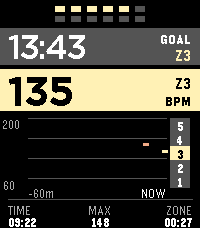
Health & FitnessGym Zones is a focused strength-training companion for Pebble Time 2. Start and finish workouts manually, see current BPM and a rolling one-hour graph, track a stable heart-rate zone, and run a configurable between-set rest timer. The app can reopen when rest ends and preserves an active workout for ten minutes after you exit. Outside a workout, take a one-minute resting PPG-RMSSD measurement and compare it with a personal seven-day baseline. HRV is an optical wellness estimate, not a medical measurement or readiness score. Gym Zones has no account, server, GPS, or network service and does not transmit workout or sensor data. Settings stay locally on the watch and in Clay on the phone; Pebble Health synchronization, if enabled, is managed by PebbleOS. Assign Gym Zones to Settings → Quick Launch → Tap Up for direct access.
 107
107Starry Digits
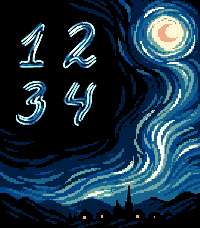
FacesHand-drawn luminous digits over a swirling 64-color pixel-art night. The large two-row layout stays readable at a glance, follows your 12/24-hour setting, and works fully offline on Pebble Time 2.
 7
7Zodiac: Gemini
FacesZodiac: Gemini pairs a vivid twin portrait with large, rounded black numerals designed for the 200×228 Pebble Time 2 display. Hours and minutes are stacked in the upper-left corner without a frame or background, leaving the illustration clear and expressive. The watchface follows the system 12/24-hour preference, updates every minute, works completely offline, and has no settings, analytics, companion app, or network permissions. autor: https://www.instagram.com/tekilla_art
 14
14Codex Weekly
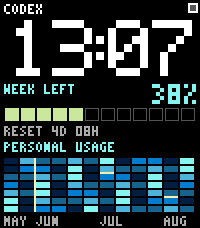
FacesCodex Weekly places an oversized pixel clock above your remaining weekly Codex quota and reset countdown. Personal Usage fills the display width with a GitHub-style 12-week heatmap, aligned month labels, and yellow month boundaries. The top status square shows whether data is not configured, syncing, synced, or unavailable. Data syncs through a private local bridge on your Mac using your existing ChatGPT sign-in in Codex; OpenAI credentials are never stored on the watch. Requires Pebble Time 2, the Pebble mobile app, and a Mac running the included bridge.
 41
41Flip Board
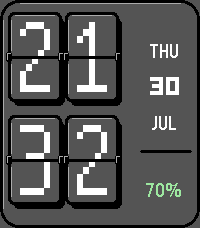
FacesA mechanical-style pixel flip clock with animated digits, date and battery.
 17
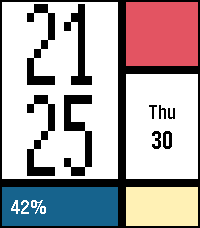
17Mosaic Grid
FacesMosaic Grid turns the Pebble Time 2 display into a compact modernist poster. A smooth launch animation builds the grid from a red canvas: the time panel slides in from the left, then the lower blocks rise and the date panel follows. Large pixel hours and minutes follow the system 12/24-hour preference. Today's steps sit on the left of the blue panel, and battery percentage is centered in yellow. Calendar, battery and steps can each be hidden in settings for a minimalist look that keeps the colored grid. Open Mosaic Grid settings in the Pebble phone app to customize visibility. Preferences are saved on the watch; normal operation works offline. Pebble Health is required for today's steps. Health data stays on the watch and is not sent to a phone or server. -- means step data is unavailable. Designed for Pebble Time 2 (Emery, 200x228).