Mosaic Grid
Analog Tick-Tocker
Watchface
Description
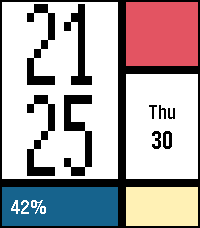
Mosaic Grid turns the Pebble Time 2 display into a compact modernist poster. A smooth launch animation builds the grid from a red canvas: the time panel slides in from the left, then the lower blocks rise and the date panel follows.

Large pixel hours and minutes follow the system 12/24-hour preference. Today's steps sit on the left of the blue panel, and battery percentage is centered in yellow. Calendar, battery and steps can each be hidden in settings for a minimalist look that keeps the colored grid.

Open Mosaic Grid settings in the Pebble phone app to customize visibility. Preferences are saved on the watch; normal operation works offline.

Pebble Health is required for today's steps. Health data stays on the watch and is not sent to a phone or server. -- means step data is unavailable.

Designed for Pebble Time 2 (Emery, 200x228).
- DeveloperAnalog Tick-Tocker
- CategoryFaces
- PlatformsTime 2
- Updated2026-09-09
- Version1.3.0