 2
Qibla Tasbih
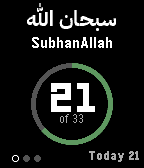
Tools & UtilitiesQibla-Tasbih is a dhikr counter for every Pebble watch. Press any button to count, and the ring around the number fills as you go. The watch vibrates at the end of each set, so you can keep your eyes closed and your attention on your dhikr. After prayer, it walks you through the tasbih of 100: SubhanAllah 33 times, Alhamdulillah 33 times and Allahu Akbar 34 times, moving on by itself after each 33 with a double vibration, and a long one when you reach 100. If you complete the 100 with La ilaha illallahu wahdahu la sharika lah instead, choose that in the settings. Features: - After-prayer tasbih: 33 + 33 + 34, or 33 + 33 + 33 and La ilaha illallah - SubhanAllah, Alhamdulillah, Allahu Akbar, La ilaha illallah, Astaghfirullah, SubhanAllahi wa bihamdihi, Salawat and La hawla wa la quwwata illa billah, each in Arabic with its transliteration and meaning - A target for each: 10, 33, 99, 100 or 1000 times, or none, counting in rounds - A free counter with no phrase and no target - Any button counts; on the Pebble Time 2 and Pebble Round 2, a tap on the screen counts too - Hold Up to undo a count, and hold Down to reset (hold Up again to bring the count back) - Today's count and your all-time total - An optional light vibration on every count Hold the middle button for the list of dhikr and the settings. Everything stays on your watch: there is nothing to set up on your phone, no account, and it works without your phone nearby. Your counts are kept when you leave the app, so you can pick up where you left off. Created by Ark-am LLC. Discover our work and custom software development services: https://ark-am.com/
 1
Alien Core App
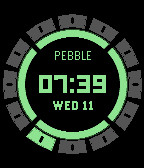
Tools & UtilitiesInspired by Ben 10's Omnitrix watch. Due to copyright and trademark infringement risks, we could not directly copy the original designs and animations. This watch face has a glowing core and inside sits a ring of twelve armoured plates, showing the time as bright digits or as hands, while the plate for the current hour lights up. Each plate holds one of twelve original avatars. Flick your wrist and a light runs round the plates like a selector dial. Flick again to scroll through them as the light steps round the hours, then let it charge up to transform: the plates flash, sparks and shock rings fly out, and your avatar springs to life, blinking, flapping and scuttling, before the time returns. The face powers up plate by plate when it appears, and a light runs round the ring on the hour. It stays still the rest of the time, so it's easy on the battery. Features: - Digital or analog time in the glowing core, with the day and date - 12-hour or 24-hour digital time, with AM or PM beside the minutes in 12-hour time - Your own name in the core, with a choice of three sizes and five font styles - Show the name, date, weather, steps, heart rate or battery above and below the time, with neat icons for each - The current hour's plate glows, with a dimmer plate for the minutes, so the ring doubles as a clock track - Twelve original animated avatars to scroll through and transform into, opened with a flick of the wrist - A transformation animation with an iris, a running light and shock rings, which can be turned off - Sound effects on the Pebble Time 2 and Pebble 2 Duo: a ratcheting dial, a note for every plate, and a call for each avatar - Eight glow colours on colour watches: alien green, lime, cyan, blue, purple, red, orange and yellow - Works on every Pebble, round and rectangular, colour and black and white - Also available as a separate Alien Core watch app, worked with the buttons, and with touch on the Pebble Time 2 and Pebble Round 2 Alien Core comes as two separate downloads: this watch face, and the Alien Core watch app. A Pebble download is either a watch face or an app, so install both to have both. Keep the face as your everyday watch face, worked with flicks of the wrist, and open the app from the watch's app menu when you want to choose avatars with the buttons: Up and Down step through them, Select transforms, and Back returns to the time and then to your watch face. On the Pebble Time 2 and Pebble Round 2 the app also responds to touch: tap the time to open the selector, swipe or drag round the plates to choose, and tap the core to transform. The face and the app each keep their own settings and chosen avatar. Settings are available via the Pebble phone app. Weather supports Celsius and Fahrenheit and needs your paired phone's location and internet access, with no weather account or API key required. Health data is unavailable on the original Pebble, and heart rate requires a supported sensor. Created by Ark-am LLC. Discover our work and custom software development services: https://ark-am.com/
 5
Minimalist
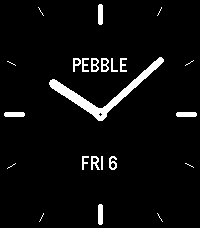
FacesMinimalist was designed for the Pebble 2 Duo and works on every Pebble watch. Heavily inspired by Pebble's Minimal Analog watch face. With this watch face, you can choose an analog dial with twelve hour marks and two slender hands, or a digital face laid out like a classic LCD watch, with the day, month and date above the time. Features: - Analog or digital style - Five hand shapes: baton, dauphine, skeleton, lollipop and leaf - Up to two widgets: weather, steps or battery, with the battery shown all the time or only when it runs low - Long marks or numbers at 12, 3, 6 and 9 on the analog dial - Four font styles for all the text: condensed, serif, rounded and mono - Dark or light background - Day and date in small capitals, or nothing but the time - Your own name on the face, PEBBLE by default, or a widget in its place - A long, strong vibration and a small sign when your phone disconnects, which you can turn off - 12-hour or 24-hour time, with or without a leading zero Set everything up through the Pebble phone app. The watch keeps your choices, so the face works without the phone nearby. The weather comes from Open-Meteo for your phone's location every 30 minutes, and the watch keeps the last reading while the phone is away. Created by Ark-am LLC. Discover our work and custom software development services: https://ark-am.com/
 2
Alien Core
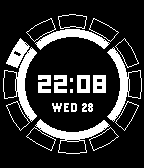
FacesInspired by Ben 10's Omnitrix watch. Due to copyright and trademark infringement risks, we could not directly copy the original designs and animations. This watch face has a glowing core and inside sits a ring of twelve armoured plates, showing the time as bright digits or as hands, while the plate for the current hour lights up. Each plate holds one of twelve original avatars. Flick your wrist and a light runs round the plates like a selector dial. Flick again to scroll through them as the light steps round the hours, then let it charge up to transform: the plates flash, sparks and shock rings fly out, and your avatar springs to life, blinking, flapping and scuttling, before the time returns. The face powers up plate by plate when it appears, and a light runs round the ring on the hour. It stays still the rest of the time, so it's easy on the battery. Features: - Digital or analog time in the glowing core, with the day and date - 12-hour or 24-hour digital time, with AM or PM beside the minutes in 12-hour time - Your own name in the core, with a choice of three sizes and five font styles - Show the name, date, weather, steps, heart rate or battery above and below the time, with neat icons for each - The current hour's plate glows, with a dimmer plate for the minutes, so the ring doubles as a clock track - Twelve original animated avatars to scroll through and transform into, opened with a flick of the wrist - A transformation animation with an iris, a running light and shock rings, which can be turned off - Sound effects on the Pebble Time 2 and Pebble 2 Duo: a ratcheting dial, a note for every plate, and a call for each avatar - Eight glow colours on colour watches: alien green, lime, cyan, blue, purple, red, orange and yellow - Works on every Pebble, round and rectangular, colour and black and white Settings are available via the Pebble phone app. Weather supports Celsius and Fahrenheit and needs your paired phone's location and internet access, with no weather account or API key required. Health data is unavailable on the original Pebble, and heart rate requires a supported sensor. Created by Ark-am LLC. Discover our work and custom software development services: https://ark-am.com/
 14
Retro F-91W
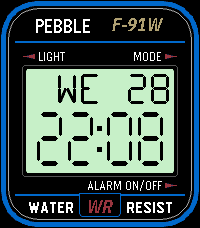
FacesRetro F-91W brings the look of the classic Casio F-91W digital wristwatch. A pale grey-green LCD sits inside a blue-framed face plate, with large segmented digits for the time, the day and date above them, and the familiar printed labels around the screen, right down to the boxed WR at the bottom. Make it your own: put your own brand and model name on the case, change or clear the printed labels, and pick the LCD and case colours, or make your own. The top row can show the day and date, the local weather, your steps or your heart rate, or switch between them with a shake of the wrist. Features: - Six LCD colours: classic pale grey-green, classic grey, backlit green, blue, amber, or dark with light segments - Black, gold or silver case on colour watches - Custom colours on colour watches: pick the case, LCD, digits, printed text, band, model name and more, or give every single part its own colour - Editable brand, model and labels - Show weather, steps, heart rate or battery in place of F-91W, WATER or RESIST - 12-hour or 24-hour time, with a PM sign in 12-hour time - Optional seconds; note, battery usage increases when the seconds are shown - An optional chime that respects Quiet Time: a short buzz, one buzz for each hour, or your own pattern; on the hour or every 30, 20, 15, 10 or 5 minutes; all day or only between the hours you choose Settings are available via the Pebble phone app. Weather supports Celsius and Fahrenheit and needs your paired phone's location and internet access, with no weather account or API key required. Health data is unavailable on the original Pebble, and heart rate requires a supported sensor. Heavily inspired by the Casio F-91W wristwatch. This watch-face is not affiliated with or endorsed by Casio. Created by Ark-am LLC. Discover our work and custom software development services: https://ark-am.com/
 13
Phone Voice Commands
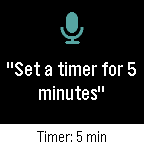
Tools & UtilitiesPhone Voice Commands lets you speak to your Pebble and have your Android phone do the work. Open the app, say what you need, check the words on the confirmation screen, and your phone carries it out. The answer appears on your watch, with one vibration when it worked and two when it did not. Things you can say: Calls and texts - "Call Mom", "Call Sam on his mobile", "Ring Dad at work" - "Call 555 1234", "Dial +1 555 123 4567" - "Text Sam I'm running late", "Send a message to Mom saying happy birthday" Directions - "Navigate to the airport", "Take me home", "Directions to 221 Baker Street" - "Walk to the park" for walking directions Timers and alarms - "Set a timer for 5 minutes", "Timer for an hour and a half" - "Set an alarm for 7:30 am", "Wake me up at 6", "Alarm at noon" - "Wake me up in 20 minutes" Music and volume - "Play", "Pause", "Next song", "Previous song" - "Volume up", "Volume down", "Volume 50 percent", "Max volume" - "Mute", "Unmute" Flashlight and apps - "Flashlight on", "Turn off the torch" - "Open Spotify", "Launch the camera" Say "Help" to see a few examples on your watch. You can speak naturally: "Hey, can you turn on the flashlight please?" works as well as "Flashlight on". Numbers can be spoken as words or digits. Contacts are matched by whole names, so the app never guesses; if two people share a name, it asks which one you meant. Texts keep your words and punctuation exactly as dictated and go out on your phone's default SIM. In Settings, choose a dark or light theme, start listening as soon as the app opens or wait for the Select button, keep or skip the confirmation screen, return to your watch-face after a command works, and switch vibrations on or off. Works on Pebble watches with a microphone: Pebble Time, Time Steel, Time Round, Pebble 2 (not the 2 SE), Pebble 2 Duo, Pebble Time 2, and Pebble Round 2. Android only. Phone Voice Commands requires its free Android companion app, located on our website: https://ark-am.com/projects/pebble-apps You can also download the companion app directly from: https://ark-am.s3.us-east-1.amazonaws.com/App_Pebble/phone-voice-commands-1.1.0-android.apk Once installed, open the companion app and allow Contacts, Phone, and SMS for calling and texting; each one is optional and only the commands that need it are affected. On Android 10 and newer, also link your Pebble once in the companion app so timers, alarms, directions, and opening apps can work in the background. Your speech is turned into text by the Pebble phone app's dictation; after that, commands are carried out on your phone and are never sent to our servers. Android 7.0 and newer. Created by Ark-am LLC. Discover our work and custom software development services: https://ark-am.com/
 38
Phone Dialer
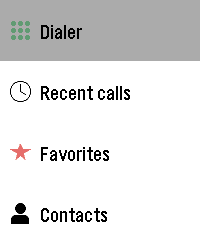
Tools & UtilitiesPhone Dialer has been the most involved app build for us at Ark-am. As the name suggest, this app lets you place calls from your Pebble watch without reaching for your phone. Call from your favourite's list, browse your contacts, call back someone from your recent calls list, or click on any number on the keypad (touchscreen supported). Favorites shows your starred contacts, and Contacts is grouped from A to Z so you can find anyone in a few presses. Recent calls lists your latest 100 calls, with missed, incoming, and outgoing calls clearly marked. The keypad covers digits, *, #, and + for international numbers. Key features during a call, your watch becomes a remote: - See who you're calling and their number, even for a number typed on the keypad that belongs to a contact - On Pebble Time 2 and Pebble Round 2, see the contact's photo, or their initials when they have no photo - Watch the call go from Calling to Connected with a running timer - Switch the sound between the phone, the speaker, and a Bluetooth device - Mute and unmute your microphone - Hang up with the Down button or by tapping End. - In Settings, choose a dark or light theme, arrange the main menu in the order you use most, and switch touch input and tap vibration on or off. On Pebble Time 2 and Pebble Round 2, tap keys, swipe through lists, and tap the call controls. Otherwise, use the buttons. Android only. Phone Dialer requires its free Android companion app, located on our website: https://ark-am.com/projects/pebble-apps Or Download the app directly from: https://ark-am.s3.us-east-1.amazonaws.com/App_Pebble/phone-dialer-1.7.0-android.apk Once installed, allow Phone access to make and end calls, Contacts for Favorites and Contacts, and Call history for Recent calls; each feature works on its own. Additionally, link your Pebble once in the companion app to switch the sound, mute, and see the call status and timer from your watch. If the companion app can't find your Pebble when linking, turn your phone's Bluetooth off and on again, then tap "Link your Pebble" within a few seconds while the watch reconnects. Your contacts and call history stay on your phone and watch and are never sent to a server. On dual-SIM phones, set a default calling SIM. For emergencies, use your phone directly. Android 12 and newer. Created by Ark-am LLC. Discover our work and custom software development services: https://ark-am.com/
 21
Gnomon 2
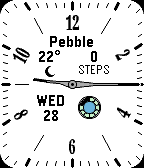
FacesGnomon 2 was originally inspired by Gnomon, developed by JR Mobley, and created to place additional features on the watch face. It pairs a classic analog dial with the everyday details at a glance. Choose from 5 styles of hour/minute hands and the color of the second hand; note, battery usage increases when the second hand is in use. Four [4] informational areas show local weather, health data, the day and date, and a battery ring with phone connection and Quiet Time status. Tap the watch to cycle through steps, distance, active calories, active minutes, sleep, and if supported, the heart rate. Hide individual information areas for a simpler look, or enable the option that moves them around the hands, spreading them evenly through the free space. Features: - A light or dark background - A custom dial name - Font choices for hour numbers and information/widgets - An optional second hand with colour choices - Show or hide the minute lines between the hour ticks - Optional phone disconnect vibrations respect Quiet Time. Settings are available via the Pebble phone app. Weather supports Celsius and Fahrenheit and needs your paired phone's location and internet access, with no weather account or API key required. Health data is unavailable on the original Pebble, and heart rate requires a supported sensor. Created by Ark-am LLC. Discover our work and custom software development services: https://ark-am.com/
 8
World Clock
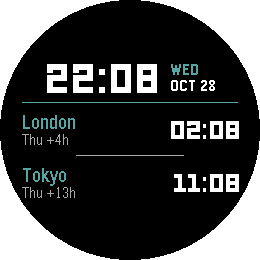
FacesKeep the important times around the world with World Clock. A clear digital watch-face for time zones around the world. Your local time takes centre stage beside the day and date, with the time of two other cities underneath. Choose from 49 cities around the world and give each one your own label. Each city shows its time difference from yours and the day when it differs, making it easier to plan a call or follow up on a loved one. Half-hour and 45-minute time zones are supported as well. Features: - 12-hour or 24-hour time displays - Personalize the time and text fonts - Choose background, time, and accent colours on colour watches, or use a light or dark background on black-and-white models Set everything up through the Pebble phone app. The paired phone refreshes time-zone offsets hourly, including daylight-saving adjustments for supported cities. When your phone is away, the watch continues using the last received offsets; reconnect to pick up any changes. Created by Ark-am LLC. Discover our work and custom software development services: https://ark-am.com/
 17
Sketchy Weather Analog
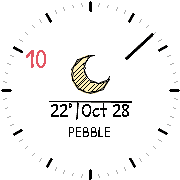
FacesSketchy Weather Analog was inspired by Sketchy Weather, developed by Igor Traskovetskyi. This watch-face adds a little pencil-and-paper character to your Pebble. Large hand-drawn weather icons and everyday information fill the centre of the face, written in a handwritten font. There is no hour hand: the current hour's number stands out, larger and in a colour of your choice, while the minutes show around the edge to keep the centre clear and easy to read. Show the minutes as a pencil, spear or arrow hand, a highlighted tick, a minute number, a pencil progress arc, a sketched bead, an edge pointer, or a combination. Choose a light Paper or dark Chalkboard background, put your own name under the information, and customize the fonts and hour numbers to finish the layout. Features: - Build up to four centre screens using weather, date, battery, steps, and heart rate - Each screen can pair a main item with a second value, and show your name or a third value on the line below - Tap the watch to switch screens, or let them change automatically every minute. - Twenty-one weather icons, from light drizzle to heavy snow, hail storms, wind, heat and cold, each with a day and a night version. - The current hour's number in a colour of your choice (colour watches), with eight ways to show the minutes - An editable name under the information, PEBBLE by default, in a small or large size - Show or hide the minute lines between the hour ticks - Show or hide the lines around the values, and choose the colour of those lines and of the information (colour watches) - Handwritten style Sketchy font by default, or Pebble, Serif, Rounded and Mono styles Phone connection and Quiet Time indicators keep you informed with optional disconnect vibrations that respect Quiet Time. Settings are available in the Pebble phone app. Weather supports Celsius and Fahrenheit and needs your paired phone's location and internet access, with no weather account or API key required. Steps require a watch with health support, and heart rate requires a supported sensor. Created by Ark-am LLC. Discover our work and custom software development services: https://ark-am.com/
 5
Baltic
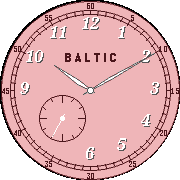
FacesMeridian is a clean analog watch-face that keeps daily essentials within a glance. Arrange weather, date, battery and connection alerts, or health data at four positions around the dial, or leave any position empty for a simpler layout. Features: - Check the temperature and conditions - See your battery percentage - Tap the watch to cycle through steps, distance, active calories, active minutes, sleep, and heart rate where supported - Optional phone disconnect vibrations respect Quiet Time. - Choose a light or dark background, accent colours on colour watches, and separate fonts for the hour numbers and information/widgets. - Show or hide hour numbers, add an optional second hand (uses more battery), and rotate the dial to suit how you wear your watch (only works correctly on Pebble Round 2). Customize Meridian through the Pebble phone app. Weather supports Celsius and Fahrenheit and needs your paired phone's location and internet access, with no weather account or API key required. Health data depends on your watch; the original Pebble shows the month and year instead. Heart rate requires a supported sensor. Created by Ark-am LLC. Discover our work and custom software development services: https://ark-am.com/
 26
Meridian
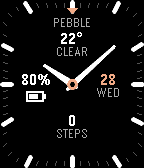
FacesMeridian is a clean analog watch-face that keeps daily essentials within a glance. Arrange weather, date, battery and connection alerts, or health data at four positions around the dial, or leave any position empty for a simpler layout. Features: - Check the temperature and conditions - See your battery percentage - Tap the watch to cycle through steps, distance, active calories, active minutes, sleep, and heart rate where supported - Optional phone disconnect vibrations respect Quiet Time. - Put your own name on the dial below 12 o'clock (PEBBLE by default) in a small or large size, or leave it empty. - Choose a light or dark background, accent colours on colour watches, and separate fonts for the hour numbers and information/widgets. - Show or hide hour numbers, add an optional second hand (uses more battery), and rotate the dial to suit how you wear your watch (only works correctly on Pebble Round 2). - Turn on Shine and light glints across the hands and the hour marks as you turn your wrist (colour watches; uses more battery while the watch is moving). - Turn on Rim glint and the edge of the screen catches the light like the rim of a watch glass as you turn your wrist (colour watches; uses more battery while the watch is moving). Customize Meridian through the Pebble phone app. Weather supports Celsius and Fahrenheit and needs your paired phone's location and internet access, with no weather account or API key required. Health data depends on your watch; the original Pebble shows the month and year instead. Heart rate requires a supported sensor. Created by Ark-am LLC. Discover our work and custom software development services: https://ark-am.com/
 11
Phone Sound Mode
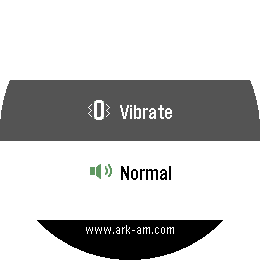
Tools & UtilitiesPhone Sound Mode puts your phone's ringer at most 2-clicks-out*. Switch your phone to Normal, Silent, or Vibrate straight from your Pebble watch. Open the app, choose a mode, and you're done; the list can be reordered from the Pebble app. A short vibration confirms that your phone has changed, and the app returns to your watch-face after the confirmation. If the change can't be made, the app stays open and tells you why, so you can try again. Clear icons for each mode make it easy to pick the right one at a glance. On colour watches each mode has its own colour (green for Normal, blue for Silent, grey for Vibrate), and the status bar turns that colour when your phone confirms the change, or red if something goes wrong. Android only. Phone Sound Mode requires its free Android companion app, located on our website: https://ark-am.com/projects/pebble-apps Or Download the app directly from: https://ark-am.s3.us-east-1.amazonaws.com/App_Pebble/phone-sound-mode-version-1.apk Once installed, open the companion app and allow Do Not Disturb access, which Android needs to reliably switch into and out of Silent mode. Nothing is sent to a server; the watch talks only to your phone. Created by Ark-am LLC. Discover our work and custom software development services: https://ark-am.com/ *Shout out to the YouTube channel, "Dave Moss Tuning".
 4
Qibla Compass
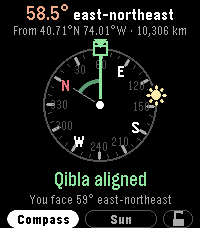
Tools & UtilitiesQibla Compass was the first Pebble application Ark-am endeavoured to build. It points you toward the Kaaba in Makkah from wherever you are. Raise your watch and swirl the watch around to calibrate the compass, and the dial turns with you to show which way to turn, with simple directions such as "Turn left 12°". This feature never worked properly and we will revisit the logic after every Pebble OS update until the app is fully functional. When you face the Qibla, the Kaaba marker turns green, the screen reads "Qibla aligned", and your watch gives a short vibration, so you can find the direction without staring at the screen. The top of the screen shows the Qibla bearing for your location and what it means, such as "58.5° east-northeast", along with your coordinates and the distance to Makkah. The dial marks the angle from north to the Kaaba, so you can see how the bearing is measured. No compass reading? Press Down, or tap "Sun", for Sun mode. The app works out where the sun is from your location and the time, then tells you how far to turn after facing the sun, or your shadow when that is the shorter turn. Sun mode needs no calibration and is not affected by metal or magnets. It works whenever the sun is up and not directly overhead. Press Up, or tap "Compass", to go back; the app remembers your choice. Prefer a dial that stays still? Tap the padlock or hold Select, and north stays at the top while an arrow shows the way you face. For accuracy, the watch corrects its compass from magnetic north to true north using the World Magnetic Model (WMM-2025) for your location and today's date. If the compass needs calibrating, the app asks you to move your watch until it is ready. If your location or compass cannot be read, tap the screen or press Select to try again. Your paired phone provides your location, so allow location access for the Pebble app; no account or internet service is needed for the calculation itself. Like any compass, readings can be affected by nearby metal, magnets, or electronics, so hold your watch flat and away from those objects. Created by Ark-am LLC. Discover our work and custom software development services: https://ark-am.com/