 6
6Step History
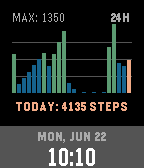
FacesStep History for Pebble A visual rolling log of your daily activity, right on your wrist. Step History is a minimalist, highly functional watchface that displays your hourly step counts over a rolling 24-hour window, making it easy to identify your active patterns throughout the day. ### Key Features: - 24-Hour Rolling Graph: A clean vertical bar chart showing steps taken during each hour of the day. - Dynamic Performance Highlighting: - High-Activity Hours (hours where steps are > 50\% of your daily peak hour) are highlighted in vibrant Jaeger Green. - Muted Inactive Hours are displayed in a clean, quiet Cobalt Blue to let your active hours stand out. - Current Hour Progress is highlighted in Chrome Yellow. - Fully Optimized B&W Layout: Custom monochrome layout for Pebble Classic and Pebble 2 using solid bars for high activity, thin lines for low activity, and a hollow bar for the current hour. - Round Screen Support: Tailored layout with dynamic scale-label padding to prevent circular screen clipping on the Pebble Time Round. - contrasting Time Banner: A clean bottom banner displaying uppercase day/date and local watch time (supporting both 12-hour and 24-hour style preferences). - Flash-Persisted Storage: Logs your hourly step history to secure flash memory, ensuring your graph persists across watch reboots or watchface switches. - Battery Friendly: Built using native Pebble Health APIs for high performance with minimal battery drain. If you like this and want to support me: https://buymeacoffee.com/joshsg
 15
15blueprints
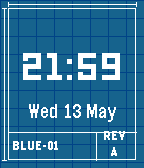
Faces# Blueprint Watchface for Pebble An architectural, engineering-inspired watchface for the Pebble smart watch ecosystem. Designed to capture the aesthetic of high-precision drafting prints. ## Description Blueprint brings a clean, technical drafting-table style to your wrist. Set against a deep cobalt blue canvas with a subtle engineering grid, it showcases the time in bold, geometric block typography that echoes industrial blueprints. Whether you're an engineer, architect, designer, or technical enthusiast, Blueprint turns your watch into a styled CAD drawing. If you like this and want to support me: https://buymeacoffee.com/joshsg
 58
58home assistant pebble
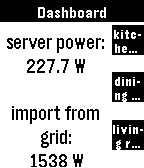
RemotesTransform your Pebble into the ultimate smart home remote Home Assistant for Pebble is a professional-grade integration designed for speed, reliability, and universal compatibility. Whether you're on a classic Pebble, a Pebble Round, or the high-res Pebble Time 2, this app provides a seamless, responsive experience. Setup Instructions: 1. Open the settings for this app in the Pebble mobile app. 2. Enter your Home Assistant URL and a Long-Lived Access Token. 3. (Optional) For the best experience, add `cors_allowed_origins: - https://joshsg3.github.io` to your Home Assistant `configuration.yaml` to enable the "Load Full List Now" button. - If you don't want to do this, save the config page, and open it again, the first 350 entities will be preloaded 4. Configure your dashboard pages and sync! Not affiliated with home assistant If you like this and want to support me: https://buymeacoffee.com/joshsg
 47
47Immich Clock
Faces# Immich Clock for Pebble **Your memories, on your wrist.** Immich Clock brings your private photo library directly to your Pebble watch. Connect to your self-hosted Immich instance and enjoy a rotating gallery of your favorite memories throughout the day. ### Key Features: - **Native Immich Integration**: Fetch photos directly from any album on your Immich server. - **High-Quality Rendering**: Advanced Floyd-Steinberg dithering ensures your photos look stunning on Pebble's unique e-paper display. - **Universal Compatibility**: Optimized for every Pebble model, including the original Pebble, Pebble Time, Pebble Time Round, and the Pebble 2. - **Smart Sizing**: Photos are automatically center-cropped and resized to fit your specific watch resolution perfectly. - **Configurable Refresh**: Choose how often you want a new memory to appear (from 1 minute to 24 hours). - **Minimalist Design**: A clean, technical digital clock that respects your system's 12h/24h settings. - **Offline Caching**: Keeps your last photo on the screen even when your phone is disconnected. ### Setup: 1. Enter your Immich Server URL (e.g., `https://immich.example.com`). 2. Provide your API Key (found in Immich Settings > API Keys). 3. Specify the Album ID you want to shuffle photos from. *Immich Clock is not officially affiliated with the Immich team.* If you like this and want to support me: https://buymeacoffee.com/joshsg
 126
126Minimalist Analog
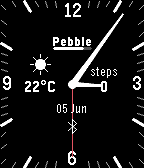
FacesA simple clean watchface, heavily inspired by the Modern series of watchfaces. Complications on the left and right are customisable along with a step goal border. If you like this and want to support me: https://buymeacoffee.com/joshsg