Step History
Joshua Galea
Watchface
Description
Step History for Pebble
A visual rolling log of your daily activity, right on your wrist.
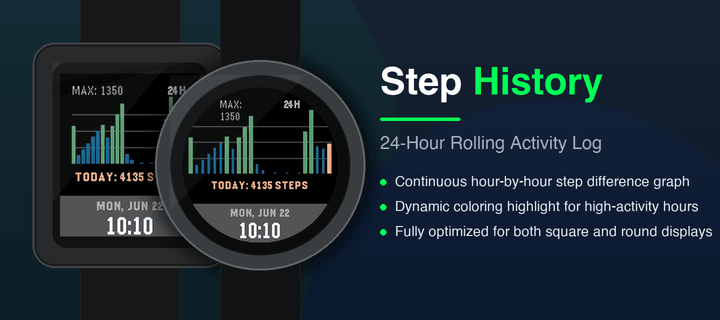
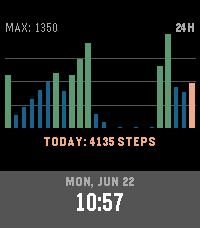
Step History is a minimalist, highly functional watchface that displays your hourly step counts over a rolling 24-hour window, making it easy to identify your active patterns throughout the day.
### Key Features:
- 24-Hour Rolling Graph: A clean vertical bar chart showing steps taken during each hour of the day.
- Dynamic Performance Highlighting:
  - High-Activity Hours (hours where steps are > 50\% of your daily peak hour) are highlighted in vibrant Jaeger Green.
  - Muted Inactive Hours are displayed in a clean, quiet Cobalt Blue to let your active hours stand out.
  - Current Hour Progress is highlighted in Chrome Yellow.
- Fully Optimized B&W Layout: Custom monochrome layout for Pebble Classic and Pebble 2 using solid bars for high activity, thin lines for low activity, and a hollow bar for the current hour.
- Round Screen Support: Tailored layout with dynamic scale-label padding to prevent circular screen clipping on the Pebble Time Round.
- contrasting Time Banner: A clean bottom banner displaying uppercase day/date and local watch time (supporting both 12-hour and 24-hour style preferences).
- Flash-Persisted Storage: Logs your hourly step history to secure flash memory, ensuring your graph persists across watch reboots or watchface switches.
- Battery Friendly: Built using native Pebble Health APIs for high performance with minimal battery drain.

If you like this and want to support me: https://buymeacoffee.com/joshsg
- DeveloperJoshua Galea
- CategoryFaces
- PlatformsOG Pebble, Steel, Time/Time Steel, Time Round, 2, 2 Duo, Time 2, Round 2
- Updated2026-06-22
- Version1.0.0