 3
Tado
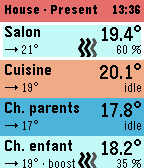
Tools & UtilitiesSee and control your Tado heating from your wrist. Tado shows the temperature and heating power of every room in your Tado home, and lets you control it from your watch. - Room list, room detail, history of the last twelve hours - Boost a temperature for a chosen time, go back to the schedule, turn a room off - Presence (Home, Away, Auto) and whole-house shortcuts - English and French, °C or °F according to your account, optional touchscreen You need a Tado account with a Tado heating system. Independent app, not affiliated with Tado. How to use 1. At first launch, enter the code shown on `login.tado.com/oauth2/device`. 2. **Up / Down**: choose. **Select**: open. **Long press on Select** from the list: menu (history, presence, shortcuts). **Back**: go back. 3. A row's color follows the temperature; the heat lines show the heating power.
 40
AI Usage
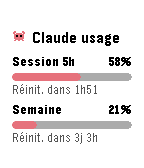
Tools & UtilitiesSee your Claude.ai usage gauges at a glance: 5-hour session and weekly limit, each with its percentage and time until reset. Configure once with a Claude Code OAuth token (claude setup-token); the token stays on your phone. Refresh interval is configurable, the interface is available in English and French, and Clawd the crab keeps an eye on your quota.
 48
DBZ Power Level Tracker
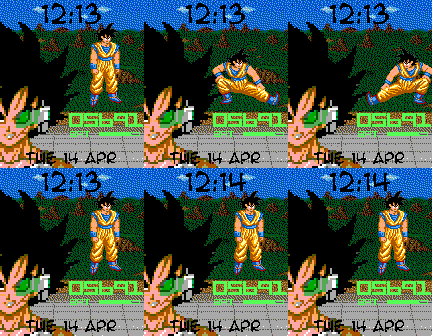
Faces# DBZ Power Level Tracker A Dragon Ball Z-themed Pebble watchface that tracks your daily step count as a power level. Reach the configured step threshold and watch your character transform into a Super Saiyan. ## Features - Step count displayed as a power level in bright green (black on B&W devices) - Choose between **Goku** and **Vegeta** as your character - Character transforms to Super Saiyan at the configured step threshold, with a multi-phase animation and vibration sequence - Goku plays a stretching animation on wrist shake; Vegeta throws punches - Configurable Super Saiyan step threshold (default: 7,000 steps) - Transformation vibration configurable; automatically suppressed when charging or in silent mode - Clock display with system time format (12h / 24h) - Date display - Battery level indicator with color-coded bar (green / yellow / red) - Vibration alert when Bluetooth disconnects (configurable) - Bardock expressions react to character state and animations - Shake wrist to stop vibrations during a transformation ## Configuration Open the Pebble app and tap the settings icon on the watchface to configure: - **Character** — Goku or Vegeta - **Super Saiyan threshold** — daily steps required to trigger the transformation - **Vibrate on transformation** — toggle transformation vibration (always off when charging or in silent mode) - **Vibrate on disconnect** — toggle vibration when Bluetooth disconnects ## Inspiration - Watchface concept: [Poke Trainer](https://apps.repebble.com/poke-trainer_579c8add1482cd051500038f) by the Rebble community ## Credits - Sprites and background images: [Sprite Database -- Dragon Ball Z](https://spritedatabase.net/game/383) - Bardock expressions: [Spriters Resource -- Dragon Ball Customs](https://www.spriters-resource.com/custom_edited/dragonballcustoms/asset/16602/) ## Contributing Contributions are welcome via pull requests.