 2
Moonlight Switchyard
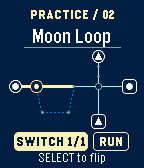
GamesSet the switches, then send every train to the station with the matching symbol. Trains move together, so two routes that work on their own can collide when you run them at the same time. Start with the one-switch tutorial, tackle a daily puzzle, or replay any of the six handcrafted yards in Practice. The game works offline and saves your switches and daily solve status on the watch.
 3
Pocket Lighthouse
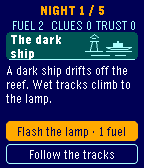
GamesA dark ship waits beyond the reef. Over five nights as the island’s lighthouse keeper, you’ll decide how to answer its signals, what to bring in from the tide, and whether to trust Mara when she knocks. You start with two units of lamp fuel. The clues you find and the trust you earn open new choices and lead to one of three endings. A second run can uncover scenes you missed the first time. Use Up and Down to highlight a choice and Select to commit. Continue starts the next night whenever you’re ready. The watch saves your place so you can leave and pick up where you left off.
 53
Quest
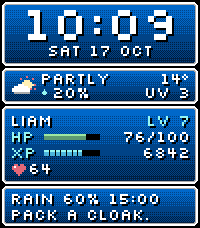
FacesTurn your day into a pixel RPG status screen. Quest pairs a bold pixel clock with dithered blue windows and weather advice. Give your wrist a firm shake to open the character sheet. Simply raising your wrist to look at the time won't activate it. Shake again to return to the clock, or wait eight seconds. On the main face, HP is battery charge out of 100, XP is today's step count, and the heart icon shows your current heart rate. LV starts at 1 each day and rises by one for every 10% of your step goal you complete. On the character sheet, LV counts how many days you reached your step goal in the last 28 days, including today if you've reached it. VIT is today's recorded low and high heart rate in beats per minute. An asterisk means the heart rate history is incomplete. AGI is today's active minutes, DIST is today's walking distance in kilometres, and REST is last night's sleep. The Quest Log shows rain and sunrise or sunset timing. The second clock shows +1 when its calendar date is ahead of yours and -1 when it's behind. For example, NZ with +1 means it's already tomorrow in New Zealand. Name your hero with up to eight characters. Choose 12/24-hour time, Celsius or Fahrenheit, a step goal and a second time zone. Weather and optional demo health fallback are configurable. Built for Pebble Time 2. Updates once a minute, with no continuous animation. Health data needs permission; weather needs the paired phone and location access. Weather data provided by Open-Meteo.
 7
Word Clock
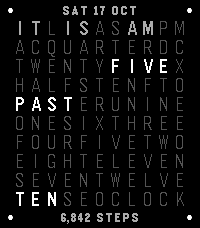
FacesTime, spelled out. A quiet letter grid with minute dots, a date and a configurable caption. Give your wrist a firm shake to open the detail page for heart rate, steps, UV, weather, upcoming sun times and a second time zone. Simply raising your wrist to look at the time won't activate it. Shake again to return to the clock, or wait eight seconds for it to return automatically. Choose a soft or fully lit preamble, dark or light ground, and steps, date or battery caption. Designed for Pebble Time 2.
 11
Meridian
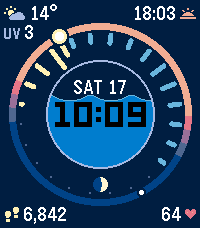
FacesFollow your day around a glowing sky ring. Meridian puts time, steps, heart rate, weather and UV around a porthole that fills as you walk. Give your wrist a firm shake to open the detail view for your pace, goal estimate, heart range, forecast temperatures and a second time zone. Simply raising your wrist to look at the time won't activate it. Shake again to return to the clock, or wait eight seconds for it to return automatically. Built for Pebble Time 2, with minute-only updates and configurable units.
 24
Underground
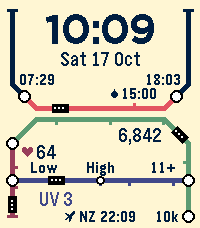
FacesYour day as a transit map. Follow daylight, steps, heart rate and UV along colourful routes on cream paper. Give your wrist a firm shake to open the seven-line Service status board. Simply raising your wrist to look at the time won't activate it. Shake again to return to the clock, or wait eight seconds for it to return automatically. Includes rolling rain forecasts, a second time zone, configurable units and step goal. Weather data by Open-Meteo. Location is used on the phone to retrieve forecasts.
 29
Mondrian
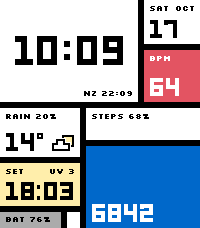
FacesAn abstract composition for Pebble Time 2. Bold time, heart rate, steps and weather inhabit red, blue, yellow and white planes that change with your day. Give your wrist a firm shake to open the detail view for a week of steps, heart range, temperature highs/lows and rain ahead. Simply raising your wrist to look at the time won't activate it. Shake again to return to the clock, or wait eight seconds for it to return automatically. Includes a second time zone and optional larger labels. Weather data by Open-Meteo. Location is used on the phone to retrieve forecasts.
 21
Pacelet
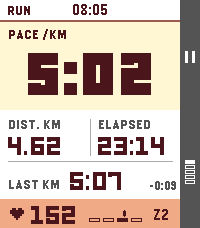
Health & FitnessA simple activity tracker, using phone GPS
 43
Signal Deck
FacesA configurable light/dark flight-deck watchface with weather, health gauges, world clock, and crisp pixel typography.