Quest
Liam Cordelle
Watchface
Description
Turn your day into a pixel RPG status screen.

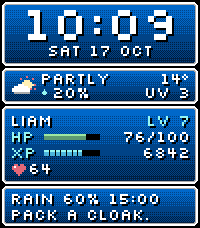
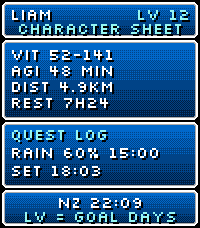
Quest pairs a bold pixel clock with dithered blue windows and weather advice. Give your wrist a firm shake to open the character sheet. Simply raising your wrist to look at the time won't activate it. Shake again to return to the clock, or wait eight seconds.

On the main face, HP is battery charge out of 100, XP is today's step count, and the heart icon shows your current heart rate. LV starts at 1 each day and rises by one for every 10% of your step goal you complete.

On the character sheet, LV counts how many days you reached your step goal in the last 28 days, including today if you've reached it. VIT is today's recorded low and high heart rate in beats per minute. An asterisk means the heart rate history is incomplete. AGI is today's active minutes, DIST is today's walking distance in kilometres, and REST is last night's sleep. The Quest Log shows rain and sunrise or sunset timing.

The second clock shows +1 when its calendar date is ahead of yours and -1 when it's behind. For example, NZ with +1 means it's already tomorrow in New Zealand.

Name your hero with up to eight characters. Choose 12/24-hour time, Celsius or Fahrenheit, a step goal and a second time zone. Weather and optional demo health fallback are configurable.

Built for Pebble Time 2. Updates once a minute, with no continuous animation. Health data needs permission; weather needs the paired phone and location access. Weather data provided by Open-Meteo.
- DeveloperLiam Cordelle
- CategoryFaces
- PlatformsTime 2
- Updated2026-11-05
- Version1.1.1
- Battery ImpactNegligible (<5% shorter battery life)Measured across all versions; latest version v1.1.1 not measured separately yet