 106
106Paper & Ink
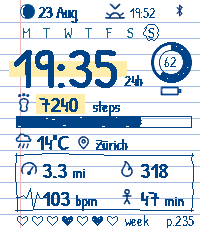
FacesA page torn out of a notebook, with your day written on it in ballpoint. The paper is ruled, the margin is pink, and everything on top of it is drawn by hand: the time in a slightly wobbly script, a highlighter swipe behind the numbers, a box ruled around the day's figures, a ring inked in for the battery. None of it is a bitmap, so it stays crisp. What's on the page: the date and tonight's moon, the next sunrise or sunset, the week with today circled, the time, battery, steps with a goal bar underneath, the weather and where you are, then distance, calories, heart rate and active minutes. Along the bottom there's a heart for every day this week you hit your step goal, and the day of the year sits in the corner as a page number. If that's too much, turn things off until the page is as empty as you like. You can also choose the highlighter colour, swap in a red pen for the hearts, pick Celsius or Fahrenheit, miles or kilometres, start your week on Monday or Sunday, set your step goal, and have the watch buzz if your phone wanders off. Made for the Pebble Time 2.
 28
28SunMoon
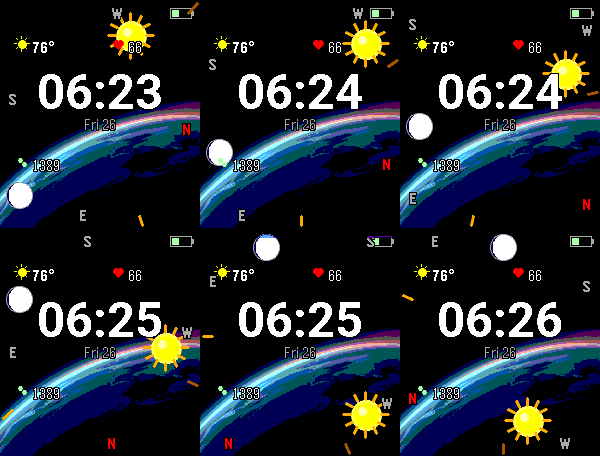
FacesSun & Moon Compass turns your Pebble Time 2 into a live sky-finder. The sun and moon icons ride a horizon frame around the screen edge and stay locked onto their real-world bearings — turn your body and they sweep around to point exactly where the sun and moon are right now. It's also a full-featured daily dashboard, with a large clock framed by the info you care about. Features Live sky compass — sun & moon pinned to their true azimuth using the watch's magnetometer + your phone's GPS Altitude at a glance — icons climb inward from the horizon as objects rise; muted when below the horizon Real moon phase — drawn with an accurate terminator (crescent through gibbous), so it reads as a real sphere Big clock + date centered, framed by a clean 2×2 dashboard Weather — current temperature + condition icon (keyless, no setup), °F or °C Heart rate & steps from the watch's health sensors Battery + Bluetooth indicators tucked into the corners Almanac field — sunrise/sunset, moonrise/moonset, daylight length & trend, or the next golden-hour window (pick one or auto-cycle) Optional alerts — vibrate at sunrise, sunset, golden hour, or full moon Fully configurable — units, field placement, on/off toggles, accent color, and a battery-saver mode that sleeps the compass until you shake your wrist. Settings survive a reboot. A note on calibration The compass relies on your watch's magnetometer. If the sun and moon icons seem stuck or only move within a narrow arc, wave your wrist in a figure-8 to calibrate. If that doesn't fix it, restart your watch — a reboot resets the magnetometer and almost always clears a stuck compass.