SunMoon
Lifedelinquent
Watchface
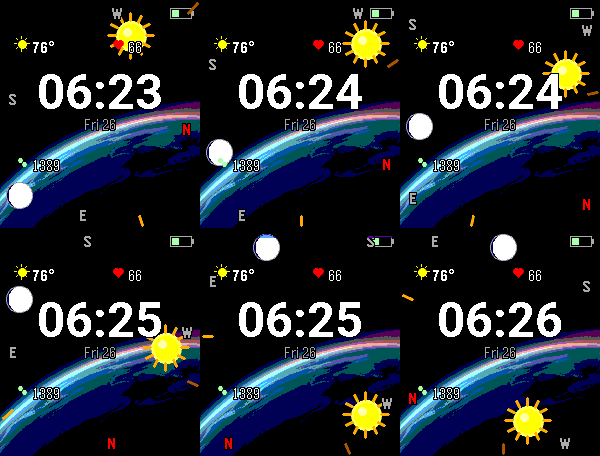
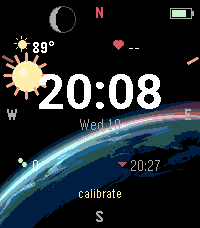
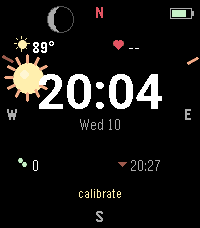
Description
Sun & Moon Compass turns your Pebble Time 2 into a live sky-finder. The sun and moon icons ride a horizon frame around the screen edge and stay locked onto their real-world bearings — turn your body and they sweep around to point exactly where the sun and moon are right now.

It's also a full-featured daily dashboard, with a large clock framed by the info you care about.

Features

Live sky compass — sun & moon pinned to their true azimuth using the watch's magnetometer + your phone's GPS
Altitude at a glance — icons climb inward from the horizon as objects rise; muted when below the horizon
Real moon phase — drawn with an accurate terminator (crescent through gibbous), so it reads as a real sphere
Big clock + date centered, framed by a clean 2×2 dashboard
Weather — current temperature + condition icon (keyless, no setup), °F or °C
Heart rate & steps from the watch's health sensors
Battery + Bluetooth indicators tucked into the corners
Almanac field — sunrise/sunset, moonrise/moonset, daylight length & trend, or the next golden-hour window (pick one or auto-cycle)
Optional alerts — vibrate at sunrise, sunset, golden hour, or full moon
Fully configurable — units, field placement, on/off toggles, accent color, and a battery-saver mode that sleeps the compass until you shake your wrist. Settings survive a reboot.

A note on calibration

The compass relies on your watch's magnetometer. If the sun and moon icons seem stuck or only move within a narrow arc, wave your wrist in a figure-8 to calibrate. If that doesn't fix it, restart your watch — a reboot resets the magnetometer and almost always clears a stuck compass.
- DeveloperLifedelinquent
- CategoryFaces
- PlatformsTime 2
- Updated2026-07-17
- Version1.2.0